live_tv
Livestream Starting Soon
00
Hours
:
00
Minutes
:
00
Seconds
Up next in 10



More Apple news: http://www.cultofmac.com
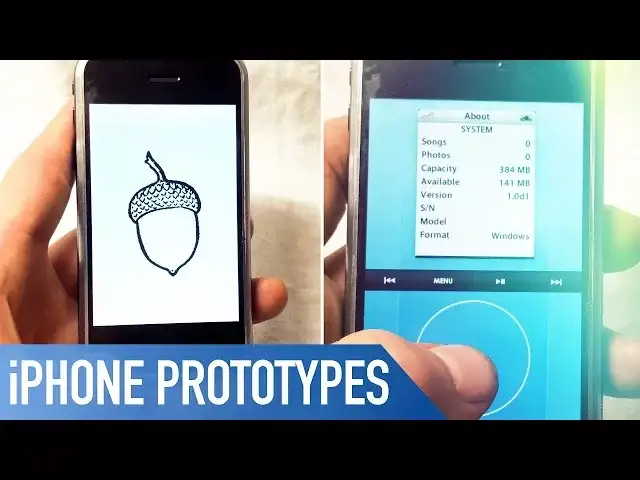
Collector Hap Plain has some 20 different prototypes associated with the first iPhone.
But the two in his hands in the video likely also passed through the hands of Tony Fadell, Scott Forstall and Apple founder Steve Jobs. Plain agreed to power up to the two rare P-series prototypes for Cult of Mac, showing how each ran very different operating systems.
Full story: https://www.cultofmac.com/488518/rare-iphone-prototypes-hap-plain/
Follow us!
Twitter: https://twitter.com/cultofmac
Facebook: https://www.facebook.com/cultofmac
Instagram: https://instagram.com/cultofmac/
Show More Show Less View Video Transcript
0:00
Hey what's up guys, Stephen from Cult of Mac here and as it's the 10th anniversary
0:07
of the iPhone, Cult of Mac is bringing you some awesome content over on the website
0:11
Here on the YouTube channel though, I wanted to share a video with you of two super rare
0:15
original prototypes. Alright so what we have here is one of the earliest known working Apple iPhone 2G prototypes
0:27
running a very early version of the operating system called Acorn. As you can see here on the back, we've got a list of components and the manufacturers
0:36
that they come from. This is unit number configuration E. Other than being all black and missing the FCC ID
0:43
and serial numbers and all of those things, the phone is slightly different from a stock iPhone
0:51
We've got the hold button labeled up here and you know, the black color
0:54
You can tell, if I can get, that the bezel here is actually just machine-draw aluminum
1:00
It's not polished or anything like that. And then the screen itself is actually made of plastic, not glass
1:09
And then the unfinished home button here. So we'll turn it on
1:13
There's two different ones running two different operating systems. Acorn OS. Unlike most prototype iPhones that I've seen, this one actually, for some reason, is fairly
1:26
resilient as far as its ability to not be able to run with much battery life
1:33
This one is running a touch-based version of what it is that we've come to know iOS
1:40
to be today. And I'll show you the other version which was kind of a more iPod-based operating system
1:48
This one takes significantly longer to load than the iPod-based OS, I'm assuming because
1:53
of the fact that it's got icons and is a much more robust operating system as far as what
1:59
it required to kind of work. So once it loads here, you'll kind of see what typically we kind of think on a very
2:08
rudimentary level what the iPhone is. So we've got other and all these tests that Apple would use
2:16
So the idea being that unlike the other iPhone, which I'll show you here in a second, you
2:22
actually click on the screen to do what it is you're attempting to do here
2:29
So call, you know, you hit call, you type in phone numbers, click dial, theoretically
2:37
so on and so forth. You know, it has other systems and tests that it has here within it
2:49
Some music, I actually don't think that one works if I recall
2:57
So this is a very, very early iPhone prototype and the engineers have a pretty decent sense
3:06
of humor. Here on the bottom as you can see, wow, isn't this ugly
3:11
Battery level zero. So pretty cool. Here is the second iPhone P-series black prototype, very similar to the other ones
3:25
EVT stage, extremely, extremely early. This one is a configuration Q, unit number
3:32
Again, the component list on the back. This one just happens to have another sticker that basically just says this is a prototype
3:39
So you know, same raw bezel, plastic screen, etc., etc. So we'll turn this one on and you'll see how much more quickly this loads relative to the
3:52
first video, which is the touch-based operating system that iOS is known to be
3:57
As you can see there, it says classic. So the idea being that this is a scroll wheel and you navigate through the menus with this
4:09
So let's say you were to want to dial somebody, you go to dial and then much like an old rotary
4:16
phone or an iPod, you would move this around and dial the phone number that you wanted
4:26
and then go down to call if you had service. But this isn't too bad for making phone calls, this one
4:33
But can you imagine having to type a text message like that? How long that would take
4:37
It would be just unbelievably ridiculous. So to show you, this is running iOS 1.0 D1 is what we have here
4:52
It doesn't even have a serial number. And it's got pretty much what you would expect to see from an iPod at the time as far as
5:01
the settings and things like that. And we don't really have any..
5:06
See if there's anything in extras. Yeah, so we've got some diagnostic and just some funky stuff here
5:16
It's obviously for testing purposes. Bluetooth is off, CPU
5:25
So the ability to adjust, assuming the speed of the CPU here
5:32
So two very early generations of iPhones, both of which show how Apple was attempting
5:40
to try to tackle this new issue, which was how is it that you take something from a physical
5:48
button like on the iPods of the day and put it onto this giant touchscreen
5:54
And then how is it that you don't cannibalize the market of your iPod, which was one of
6:01
the biggest selling Apple products at the time. People love it for its simple operating features and how it works
6:08
So why not try to build off that? But obviously once they got to that point, they realized that it wasn't really going
6:15
to make much user sense to move forward with that. So there you go
6:21
Well, that's it for this video. But if you'd like to read the full story, I'll make sure to leave a link in the description
6:26
down below. Plus we've got tons more 10 Years of iPhone pieces that are well worth a read
6:31
If you enjoyed this video, go ahead and hit that like button and make sure to hit subscribe
6:35
so you don't miss a single video from Kult of Mac. I'll catch you in the next one
#Consumer Electronics
#Software
#Operating Systems
#Mobile & Wireless Accessories
#Gadgets & Portable Electronics
#Virtual Reality Devices