live_tv
Livestream Starting Soon
00
Hours
:
00
Minutes
:
00
Seconds
Up next in 10



More Apple news: http://www.cultofmac.com
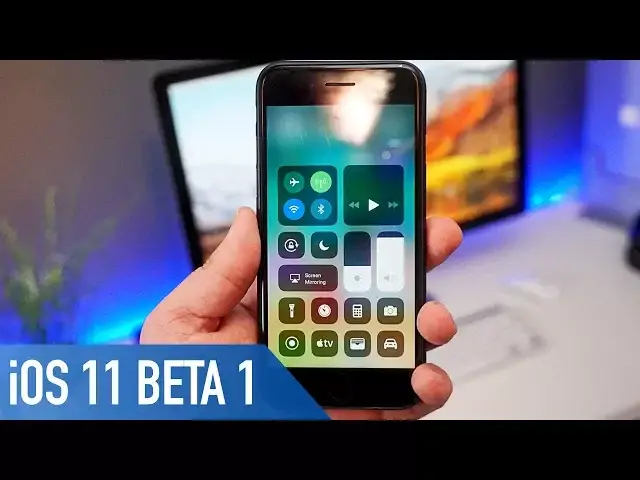
iOS 11 has been announced at this week’s annual developers conference WWDC. The first beta for the new OS has been released to developers, so in this video I’m going to give you on a hands on look at what’s new.
Public Beta: https://beta.apple.com/sp/betaprogram/
Follow us!
Twitter: https://twitter.com/cultofmac
Facebook: https://www.facebook.com/cultofmac
Instagram: https://instagram.com/cultofmac/
Show More Show Less View Video Transcript
0:00
iOS 11 was announced at this week's WWDC keynote
0:07
The first beta for the new iPhone OS has been released to developers. So in this video, I'm going to give you a hands on look at what's new
0:14
So let's get started. First up, the lock screen is now a little bit different
0:20
There's new animations for when you raise to wake, and you can swipe up to bring back previous notifications you've already dismissed
0:26
Plus you can now use slides to unlock again if you're not using a passcode if that's something
0:30
that you really missed in iOS 10. Once I unlock the phone though, you'll notice with iOS 11 there are a few subtle design
0:36
and animation tweaks. For example, there's a new circular themed calculator app, new icons for the iTunes Store
0:42
and App Store, and bolder fonts in some of Apple's own apps such as Mail and Messages
0:47
which looks more in line to Apple's Music app which was released last year
0:51
Opening and closing apps in iOS 11 also has a slight updated animation along with the
0:55
app switcher. Although it's not a big change, it's definitely a little different
1:00
When you swipe down for the notifications screen, it now brings back a clear image of your wallpaper as opposed to being overlaid to whichever screen you're currently on
1:08
Within messages there's some new updates, such as the new sticker draw design and also
1:12
some new text effects, if you're someone who actually uses them. Also all of the iMessages will now be stored in the cloud to help save room on the device
1:20
and more easily sync up across all of your Apple devices. The stock keyboard has also received a slight update with the ability to now enable a one-handed keyboard
1:30
So you can now choose to align it to either the left or right of the screen. The camera and photos apps have been updated to now allow you to choose different animation
1:37
styles for live photos. So you can now choose to bounce, long exposure or to loop to help better suit the picture
1:43
that you've taken. You can now also choose a key photo from your live photos, instead of the iPhone itself
1:49
choosing one for you. Something I can't show you at the moment is the updated portrait mode for the iPhone
1:54
7 plus, as I haven't got mine to hand, but it now allows you to take portrait pictures
1:59
in low light with the depth effects as well as HDR. One of the biggest changes within iOS 11 is the control centre, where Apple have completely
2:06
redesigned it to this remote-esque layout, with new animations for toggling on wifi or
2:11
even your cellular connection now and more importantly it's completely customisable, so you can add and remove whichever features you want from control centre
2:20
There's an updated Airplay 2, which allows HomeKit to now communicate to speakers, so
2:24
you can control multi-room playback on certain speaker brands such as Bose and of course
2:28
their own Beats. Siri now has a slightly updated look, keeping in line to their bolder and cleaner style
2:35
where you can now also type to edit your questions, similar to Google Assistant
2:39
Also the male and female voices have been updated to sound a lot more lifelike, and
2:43
less like a load of spoken words edited together. Siri will now also be able to translate to different languages to help break any barriers
2:50
you may come across, although it's only for the US at the moment
2:54
The App Store has been redesigned to look more like the Music and News applications
2:58
with a Today tab, as well as separate Games and Apps tabs
3:02
The nicest thing about this new design is the autoplay and video previews, it looks
3:06
so much slicker than before. The iCloud Drive app has been replaced with Files, which is essentially a beefed up version
3:13
bringing a more traditional file system to iOS devices. You can now view files both on iCloud Drive and on the device itself
3:20
You can move files about from folder to folder, and it just makes life easier for managing
3:24
images and documents you may have. Where the biggest differences for iOS 11 come to play though is with the iPad, which has
3:30
been radically updated to bring in many Mac-like features, giving the tablet a much stronger
3:35
argument as a PC replacement. Firstly, there's a new dock at the bottom where you can choose a number of apps to sit
3:40
there for easy access, as well as the last 3 apps you've opened, very similar to CarPlay
3:46
The dock is always visible when on the home screen, and is accessible within apps by swiping
3:50
up from the bottom of the screen. I really like this move from Apple to start moving closer to MacOS, and it'll definitely
3:56
start incentivising me to start using my iPad for more work-based tasks
4:01
On top of that you can now easily enter Split View by using the dock, or have a second window
4:05
on top of the app you've already got open. While using Split View, you can drag and drop pictures and text from one app to another
4:12
The keyboard on the iPad now also has a quick type feature to get secondary keys by dragging
4:16
up and down on the keys, which if you're typing a whole lot can be a huge time saver
4:21
Now as an extra note, a lot of people were a little frustrated that there wasn't a dark
4:25
mode added to iOS 11, but there is a little workaround to get something looking pretty similar
4:31
If you head to settings, general and accessibility, and then choose shortcuts
4:35
There's a new Smart Invert Colours option, which inverts the OS colours from white to
4:39
black just as it used to, but now it doesn't affect images or videos that you're watching
4:44
So while it's not a true dark mode as such, it's as close as you're going to get for now
4:48
Overall, there's some brilliant new additions to iOS 11, and enough design tweaks to make
4:52
it feel fresh. If you're planning to install it, keep in mind that this is the first beta, and can
4:57
be pretty unstable with a few bugs. If you can't wait till the general release this fall, your best bet is to sign up to
5:03
the public beta, which I'll leave a link to in the description
5:08
Well that is it for this video, but let me know in the comments section down below what you think of iOS 11
5:12
Has Apple done enough to get you excited? Let me know down below. Also, if you enjoyed this video or found it useful, go ahead and hit that like button
5:20
and make sure to hit subscribe so you don't miss any other hands on videos as soon as they drop
5:24
I'll catch you in the next one
#Consumer Electronics
#Software
#Operating Systems