0:00
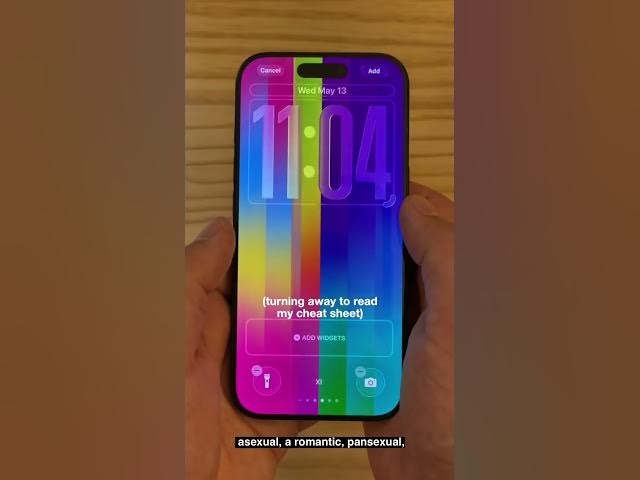
This is the new Luminance lock screen
0:02
style on the iPhone. It's really cool.
0:05
After you update your phone to iOS 26.5,
0:08
tap and hold to edit your lock screen
0:11
and tap add new. You'll scroll down and
0:14
tap to get the Pride collection. After
0:17
it downloads, you'll tap on one of the
0:19
first two options. That's the new
0:21
Luminance wallpaper. It comes with a
0:22
bunch of cool presets for the Pride
0:25
Progress flag, the transgender flag,
0:28
lesbian, bisexual, non-binary, gay,
0:32
asexual, aromantic, pansexual, and LGBTQ
0:37
rainbow flag. But if you go to the 12th
0:39
option, you can build your own custom
0:42
color collection. And you have all of
0:44
these colors available. I recommend
0:47
picking a light shade and a dark shade
0:49
of your favorite color.
0:51
Don't forget to deselect the red, and
0:53
then you've got this really cool
0:55
wallpaper. It animates when you unlock
0:57
your phone and when you turn your phone
1:00
off and on in a really cool effect.
1:02
There's also a matching watch face. You
1:05
can tap and hold to add the Pride
1:08
Luminance watch face, and you have a
1:10
bunch of options as well. You can choose
1:11
whether it's full screen or a circle in
1:14
the center with four corner
1:17
whether it's vertical stripes or a sort
1:19
of cool pinwheel shape. And you have all
1:22
of the same presets as before, including
1:25
the custom colors. As the seconds tick,
1:28
it even animates with a shimmery effect
1:30
just like on your phone. So that is the
1:33
new Pride Luminance lock screen and
1:35
watch face. I'm Digger from Jones with