Copy Any DVD To Your Mac [How To]

Copy Any DVD To Your Mac [How To]

With the announcement of Apple TV it’s never been more apparent that physical format is dying and your collection of DVDs is becoming more obsolete by the day. However, that doesn’t mean you have to purchase all your favorite movies again just so you can enjoy streaming them to your iOS devices. Here we’re going to show you how to take your encrypted DVDs and rip them onto your Mac.


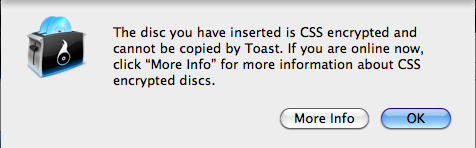
The biggest problem with ripping a DVD to your Mac is that most DVDs contain CSS encryption, thus preventing your computer from being able to copy the data. Due to the litigious nature of the MPAA and RIAA, most major software companies don’t include features in their programs that can break the CSS encryption due to fears of being liable for copyright infringement. So when you try to rip your DVD you may get a message like the following:
Copy Any DVD To Your Mac [How To]

Luckily there’s some pretty decent software out there that can be downloaded for free. I’m going to be using an application called Handbrake which can be downloaded at http://handbrake.fr/downloads.php

From here out I’m going to assume 2 things: 1) that you have your DVD in the DVD drive. 2) That you’ve already downloaded and installed Handbrake.

Handbrake is a really simple app, and as Steve would say, “it just works.”

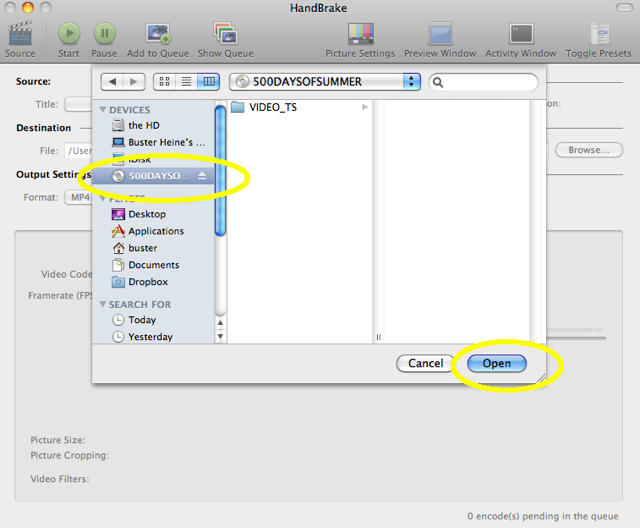
First: Choose your source. As soon as Handbrake opens up the first thing it asks you for is for the source file. On the left hand side simply click on your DVD so that it’s highlighted. You don’t have to worry about finding the right file on the DVD just click the DVD and the click open.
Copy Any DVD To Your Mac [How To]

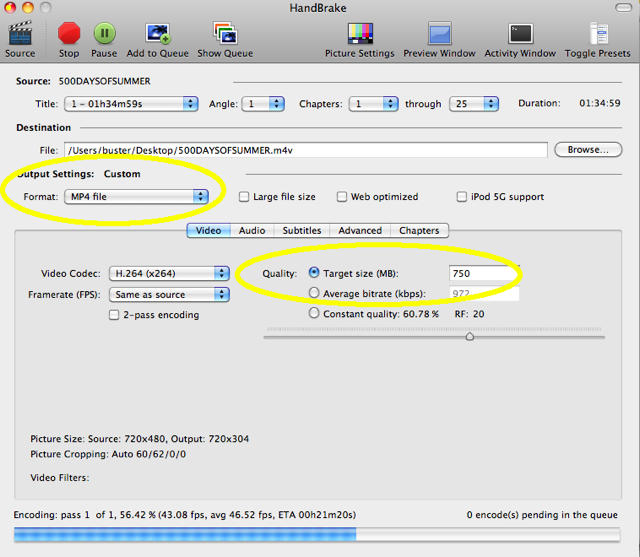
Second: Adjust your Output Settings. By default Handbrake is set up to copy your DVD using “constant quality,” meaning that the output file will be close to the same size as that on your DVD. Personally, I don’t like my movie files to be much larger than 750MB, So under “Quality” I select the radial option for “Target Size (MB)” and put in my target size. Handbrake will then average out the bitrate with the length of the film so that it’s only 750MB (you can go lower or higher). That’s usually all I change for my files because the default settings transfer nicely for playback on my iPhone. You can adjust the settings to your own desire.
Copy Any DVD To Your Mac [How To]

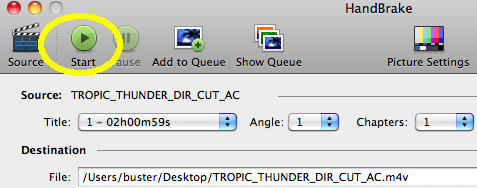
Third: Click Start.

Copy Any DVD To Your Mac [How To]

Fourth: Wait for the encoding to finish. Depending on the movie, sometimes it can take over an hour for Handbrake to encode everything. So maybe you should go grab a drink, and play some AngryBirds on your iPhone while you wait.

DON'T MISS
Use Your Mac to Copy Your Old DVD’s & Burn Them to Disc [How To]

Copy Any DVD To Your Mac [How To]

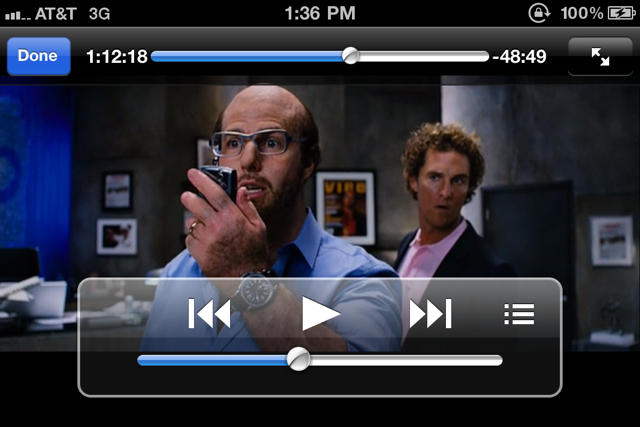
Fifth: Handbrake is done encoding (finally)! The file is saved on the desktop and is ready for viewing on your Mac. If you can now drag and drop it into iTunes and sync it to your iPhone/iPod so you can watch a movie when AT&T’s service isn’t able to stream Netflix.
Copy Any DVD To Your Mac [How To]

Sixth: Enjoy the show.

Copy Any DVD To Your Mac [How To]

For more information on using Handbrake, refer to their online manual which is available here.

About the author

busterheineBuster Heine heads Cult of Mac's Social Media presence as well as contributes posts as often as he gets around to it. Website: noolo.gy; Twitter: twitter.com/bst3r.

(sorry, you need Javascript to see this e-mail address)| Read more posts by .

Posted in How-To, Mac |

  • Danni

    I downloaded handbrake and clicked on the dvd in “choose” but when I click on it it says that I need VLC, and when I download the 64 bit version of that (which is what it specifically asks for), it says that it can’t find the 64 bit version! what should I do?

    • http://www.themacmania.com Monja Wessel

      Hi Danni, I have exactly the same problem – did you already find a solution? Buster, is there a chance to figure that out? Thanks in advance.

  • MMNW

    You should mention there are several presets for Apple devices, they have their reasons to include those. You should definitely think about the device you’re encoding for and select the appropriate preset (you can still switch to a different encoding quality afterwards).

    This is especially important for encoding for AppleTV. The older models had an incomplete Quicktime implementation, which caused some movies look horrible on AppleTV despite looking good in iTunes. Don’t know yet about the new AppleTV, but I’ll guess the HandBrake guys will update there Presets soon enough.

  • MacBeth

    Thanks – How would I go about making 1 to 1 copy that I could keep in my camper van and play on a portable dvd player ?

    • http://bust3r.com Buster Heine

      @MacBeth My write up on how to do that will be coming out next week. Stay tuned.

  • Mike P

    I had the same problem as Danni, which is why I’m still persevering with an obsolete version of MacTheRipper.

  • Ryan

    Danni, Try and download it again or download a previous version. As for VLC you’ll need to download that. VLC allows you to view different file formats.

  • JDS

    Handbrake is a great program and it just works. There are a few caveats. Download Version .093 and .094 – you are going to need both versions. If version .094 does not work or keeps on crashing use version 0.093 for that particular DVD.

    Handbrake will not copy every DVD – there are a few that are really well encrypted, especially the DVD’s from Sony. Get RipIt for those – it is a paid application but worth every penny. And it gives you 10 free rips before you pay. The file it creates can be used as input to handbrake.

    Oh and watch out – when you use Handbrake and Ripit the system temperate will shoot up crazy – so make sure your machine is well ventilated.

    Enjoy legally!

  • Danni

    Downloaded 32 bit version of both handbrake and vlc, and it worked! thanks Ryan

  • thompse2

    Another program to look into for the direct copying that I have found can break anything that I have found yet is RipIt. It costs a bit, but there is a trial version, and if you ever happen to encounter a movie that any above mentioned programs fail to crack it is definitely worth giving a try.

  • Fearless Fred

    One thing to remember when your doing this is the old issue of region coding. I’ve got a 70:30 slit in my DVD library between Region 2 (Europe) discs and Region 1 (Northern America). Partly it’s because my old company used to have regular conferences in the US, so I would always take the opportunity to buy DVDs there where they were cheaper. Also, when it comes to TV shows, the UK has a nast habit of splitting seasons in half, and charging more for each half than the complete season in the US.

    If, like me, you’ve got DVDs from more than one region, you may hit an issue if you swap back and forth between discs of different regions, locking your DVD drive after the 5th region swap, meaning you’ll not be able to watch DVDs on your mac from the other region going forward. I guess the only way to avoid this is to buy an external DVD drive and use that for your alternative region…

  • Mezzrow

    Another vote for RipIt. Developer puts out frequent updates, and I’ve never come across a DVD it cannot rip. Absolutely worth $20 for anyone wanting to just dupe their DVD’s onto their hard drive.

  • ErinsDad

    There is a big community of Handbrake users, and if you find you’re having difficulty with a particular disk, google your problem and you’ll usually find a solution. I have not yet (in 2+years) run into a disk that couldn’t be imported into iTunes. There are a variety of settings V.94 which may be tweaked, and usually it’s just a case of finding the setting for that particular disk.

  • Forest Walker

    Too bad my spanking new iMac that I shelled out a ton of dough for will no longer rip a DVD because of some terrible drive manufacturers gimp. (Riplock).

    Wish I could find a freaking workaround. I honestly would have kept my macbook and not bought this thing had I known this.

  • WAMBO

    Danni and others. make sure that vlc is in your applications folder, and is not inside another folder within the applications folder. This is what worked for me. Handbrake would not find it any other place.

    Doc

  • Mike C

    The “bits” need to match between VLC and Handbrake. For example, 64-bit Handbrake needs 64-bit VLC.

    I also seem to recall that you need to launch VLC once before Handbrake can use it.

    Another tip:

    Handbrake scans the disk and picks the longest track. Usually a good choice for a Movie, but for disks of Television shows that is usually wrong. Open the DVD using the built in DVD player and start each episode individually – then from the “Go” menu in the DVD player application look at the “Title” (on the Go menu) – the checked one is what is playing – make a note.

    Back in Handbrake, you select that title – CHANGE THE FILE NAME (Important) – then Add to Queue. Do this for each episode. Then run the queue, which will then rip each episode from the disk as a separate file (which is why you changed the file name).

    Note: You might want to disregard the article’s preference of 750 MB for single episodes of a TV show. I normally choose the preset for iPhone/iPod Touch, which for me is “good enough”

  • Thomas

    I tried Handbreak (64bit) and VLC (64bit) and does not work.
    I tried Handbreak (32bit) and VLC (32bit) and does not work.
    I tried RipIt and did not work.

  • Greg Speck

    Difficult DVD’s need to be put in a DVD Player and find out correct title to copy. Many have up to 99 titles each with chapters in differing orders to discourage handbrake from functioning. A DVD player will indicate which title is playing so you can choose this when you use Handbrake on your Mac.

  • Charles

    Hey everyone !
    Handbrake starts scanning my source, and when it gets to the 16th or 18th chapter (out of 18) it stops and apparently enters an endless loop. The only way to move on is to force it to quit. Should I download 0.093 as JDS suggested, am I having the problem he mentioned ? If yes, where can I find it ? And if not, does any of you know have any idea what’s wrong and what I can do ? Thanks in advance for the support.

  • Curtis

    RipIt stinks, avoid that piece of garbage. Those who think it is great — check your rips!! A lot of “successful” rips will have glitches – some very serious, such as menus which go in to infinite loops, chapters which are wildly out of order, etc.

    The only DVD ripper worth a darn on Mac is a program called Mac DVDRipper Pro. I have about 85% success with this; there are still a few problem discs where I am forced to rip through Windows with the venerable DVDFab.

    Handbrake is fantastic but you need a good ripper if you want a 1:1 copy of the disc.

  • Jay

    As with many other comments I’m seeing here, I downloaded Handbrake & VLC in both 32 & 64 bit versions. Handbrake (32 or 64) did not find VLC (32 or 64). Handbrake & VLC are in my Applications folder and not in a subfolder. I tried opening VLC first and tried multiple DVDs still with no success. I have a new MacBook Pro and am wondering if there is something not blocking Handbrake from finding VLC? The above article doesn’t make any reference to needing VLC.

  • MacBeth

    @ Buster Heine
    Any news on the How To cmake a 1 to 1 copy of a DVD?
    Thanks

    • http://bust3r.com Buster Heine

      it’s in the pipeline to be published on Monday. Sorry for the delay, I’ve been a bit busy lately

  • Machead

    @Buster Heine…..for 1 to 1 I recommend MacTheRipper or Ripit

  • http://None J~

    Thank you so much. I’ve had an old 2G Iphone for a year now and it hasn’t worked. I tried this the first time and it works perfect!

  • GRI BUONGIORNE

    Hi
    I am trying to rip the Seeker with Ripit and when it gets to the end of it (long movie takes about 45′) the whole application shuts down and thats it. Why? I have the latest version of Ripit.
    Thanks for yr help
    alaskamama