Will iWork for iPad Change The Way We Work?

Will iWork for iPad Change The Way We Work?

Photos courtesy of Gizmodo


iWork for iPad will be attractive to corporate users – another sly way for apple to get into the corpspace.
Will iWork for iPad Change The Way We Work?

Photos courtesy of Gizmodo

Imagine meetings where projects can begin as soon as they’re created. No more peeking over an intrusive monitor, but working directly from the table top. I could see how the iPad can make table top computers ineffective. Why leave the interface bolted to the conference room when you can take it with you?

Will iWork for iPad Change The Way We Work?

Photos courtesy of Gizmodo

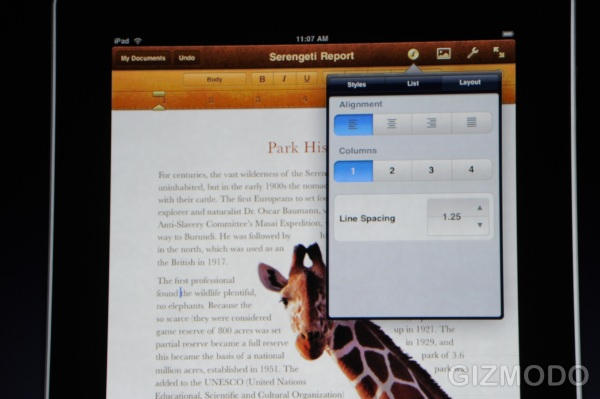
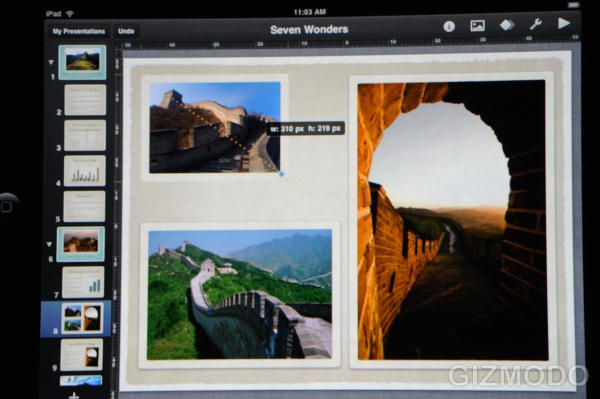
Not only is iWork for iPad attractive, it looks very easy to navigate through and create pages, spreadsheets, and presentations on the fly.
Will iWork for iPad Change The Way We Work?

Photos courtesy of Gizmodo


Could it be possible to pass files from iPad to iPad, or would we be able to access a corporate cloud? This could be the demise of the Legal Pad.

DON'T MISS
Apple Ads iPad Sharing for iWork.com

About the author

Tim CoxTim Cox is big time into coffee, craft beer, Super Street Fighter IV, and Apple products. He lives in Brooklyn with his loving wife and 5 beautiful kitties. He keeps track of the stuff he googles, gives advice on web marketing, and is pretty big on Twitter. He never updates his personal blog.


(sorry, you need Javascript to see this e-mail address)| Read more posts by .

Posted in News |

  • Loudmouth

    No.

  • Reed Richards

    With so many DRM schemes allowed in epub format it’s unlikely that Apple will allow you to move the files from iPad to anywhere else.

    Apple never plays nice with its users!

  • http://www.travismorien.com Travis

    My tablet PC does that already. Where are the amazing features I waited up half the night to read about as they came available?

  • http://settuno.com Jules Stoop

    Of course it will. In corporate space the iPad could very well become a dedicated presentation device, next to the boring Windows boxes doing the actual operational business.

  • Jeff

    The iPad will be perfect for many users. It will do what they need and be light and portable. With the just mentioned keyboard dock, input of significant amounts of data will be easier.

  • Steven Thompson

    I can’t believe no one is mentioning what this will do for students. iBooks will be amazing with textbooks, and iWork…

    when i’m on the bus, travelling home from university, pull out the iPad and write an essay. do an assignment. this is perfect for those of us who want something portable, powerful and useful when a macbook is too big, and not convenient.

  • Sean Peters

    Call me when we’ve solved the problems of exchanging files among different office suites. Note that I don’t blame Apple for this – if I had a nickel for every time I moved a presentation from my computer to the conference room computer, and the fonts shifted on me (even when using the same! freaking! version! of MS Office!), I could retire. But the fact remains: MS Office is totally dominant in the corporate world. If your presentations look different on iWork than they do on PowerPoint… it’s gonna be iWork’s fault.

  • http://www.conscienciacritica.com WetLight

    I understand that if it had a camera would be nice, but if you already have an iphone, you just need to be able to transfer that to the iPad!

  • Brian Killen

    How does one print a document? I can print photos via Wi-fi on my HP photosmart premium but it requires a special app. Are there any built in printers? iWork needs to print.

  • imajoebob

    @Sean Peters – Do you still have to load your presentations onto a “master computer?” I’ve been plugging my notebook into the projector for almost 10 years. I think you need to address your IT department, not the software publishers.

    Though I agree with your disgust that Microsoft can’t seem to make ANY version of Office compatible with another – whether between releases or platorms.

  • Dustin

    To ensure presentations look right on other computers, I simply convert a copy of my presentation to PDF if needed. I can do without fancy transitions and animations.

    I’m excited about what developers are going to do to expand the capabilities of the iPad.

  • Roy

    As a college student I can say that no one would choose to write a paper on an iPad rather than their Macbook / pro. I really can’t wait for them to start publishing textbooks for iPad, carrying around one iPad rather than three 10 pound texts sounds great and is hopefully cheaper than 150$ a pop.