0:00
What do you do when Final Cut Pro is
0:01
eating up all of the storage space on
0:03
your Mac? Well, here's what you can do.
0:06
You select your library in the column on
0:09
the left here, then you go to file,
0:12
delete generated library files, and make
0:16
sure you enable all of these settings.
0:18
Set it to all, delete your optimized,
0:21
proxy, and unused magnetic mask files.
0:25
This will delete some of the rendering
0:26
stuff that Final Cut Pro does in the
0:28
background that can build up and clutter
0:30
up your hard drives. So, select all of
0:32
that and click okay. This won't delete
0:35
any of the files or videos you have on
0:37
your Mac. It'll keep all of it in place.
0:40
It just clears out some of the caches
0:42
and duplicates that Final Cut Pro can
0:44
make. Next, to make sure this doesn't
0:45
keep happening, you're going to change a
0:47
few settings. You go to Final Cut Pro
0:50
settings, and here's what you're going
0:51
to do. In the playback tab, you make
0:54
sure background render is turned off.
0:56
You make sure create optimized media is
1:00
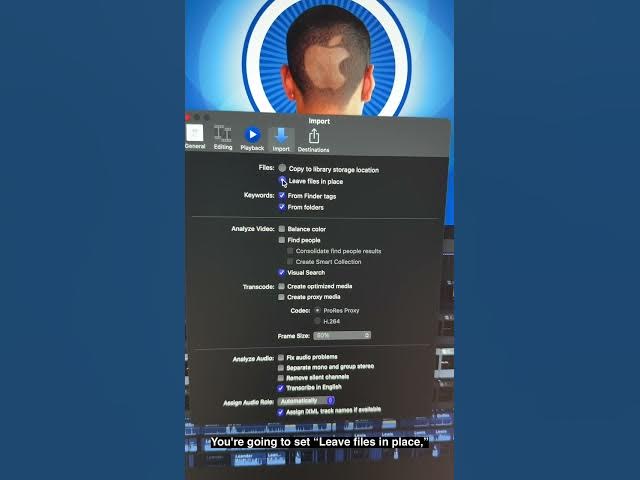
Then, in the import tab, you're going to
1:03
set leave files in place, and you're
1:06
going to turn off create optimized
1:08
media, and turn off create proxy media.
1:11
That'll stop those duplicates and cached
1:14
versions from building up going
1:16
forwards. Another option is an app like
1:18
HyperGlue Space, which can remove
1:20
duplicate files from your Mac. If you
1:23
enable it in the advanced settings, you
1:25
can make sure that if you have a video
1:27
file inside a Final Cut library that
1:30
matches one you already have in your
1:31
photos library, it'll condense them into
1:34
one. As you can see, I can reclaim 64 GB
1:38
of space. And if you take a look at the
1:41
files it found, it's all multi-gigabyte
1:44
files that are inside my Final Cut Pro
1:47
library that are also just stored in the
1:50
finder on my computer.
1:52
So, I can reclaim all that space just
1:55
like that. That is how you can make sure
1:57
a Final Cut Pro library doesn't eat up
1:59
your entire Mac hard drive. I'm Digger
2:02
from Jans with Cult of Mac.