Up next in 10



Article on Cult of Mac: @uplift-standing-desk
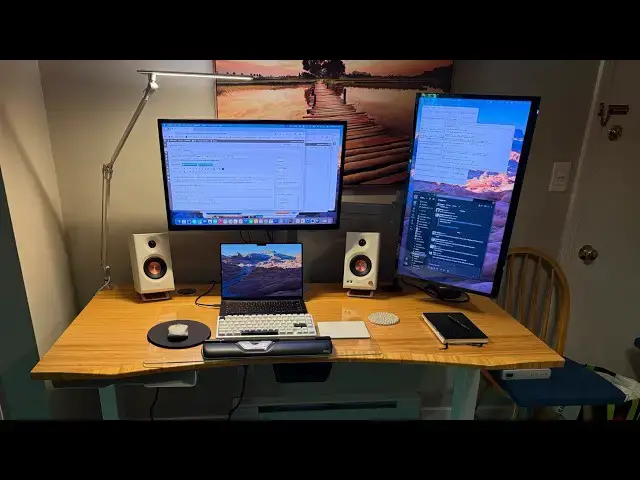
David Snow's dual-display M4 Pro #MacBook #setup gets a huge non-computer upgrade — an amazing Uplift #standingdesk.
Produced by Extra Ordinary for Cult of Mac
Follow us!
Threads: https://www.threads.net/@cultofmac
Mastodon: https://mastodon.social/@cultofmac
Instagram: https://instagram.com/cultofmac/
X: https://x.com/cultofmac
Facebook: https://www.facebook.com/cultofmac
Show More Show Less View Video Transcript
0:00
[Music]
0:01
This is our setup section where we're
0:02
going to be talking about um the desk
0:05
that is used by one of the cult writers,
0:07
Dave Snow. Uh and he just got this um
0:11
he's he's been doing a lot of tinkering
0:12
with his setup and changing things
0:14
around. He's actually I mean because
0:16
Dave writes setup posts. He actually has
0:18
setup posts going back through his
0:20
history of his setup starting when he
0:22
like just first started writing for us
0:24
and was writing on like some crummy Dell
0:27
laptop on a
0:28
just a pile of stuff on a desk. You
0:31
know, he's he's he's really turned him
0:33
his own workstation around here.
0:35
Oh wow. We should do that. We should we
0:36
should contrast with like how far he's
0:38
come. Look how far he's come. I mean
0:39
look at this thing. For those that can't
0:41
see this, we're looking at a straight
0:43
ahead picture of this um really nice
0:45
looking standing desk. It looks like it
0:47
has a bamboo top uh made out of or it's
0:51
a at least veneered with bamboo. It
0:53
looks it has a different treatment at
0:55
the front um to the rest of the desk,
0:57
but it looks a really nice big desk. And
1:00
he has got uh his MacBook Pro. I think
1:02
that's a 14inch MacBook Pro, which he
1:04
bought. I don't know. Is it an M4?
1:07
He wrote about that, too.
1:08
An M4. And that is a 14 in
1:10
and it's attached to a a very nicely.
1:12
Any idea what that monitor is? What is
1:13
the monitor? Oh, it's two. He's got two
1:15
5K a Logic clarity displays on monitor
1:18
arms that actually might be the 16 inch
1:21
because looking at zooming in and
1:22
looking at the grill, it looks like the
1:23
grill on the keyboard is a little wide.
1:26
So, I apologize. I I can't really tell.
1:30
Oh my goodness.
1:33
Well, we'll we'll we'll we'll we'll look
1:34
into that afterwards. But these Alogic
1:36
these these Alogic uh monitors are super
1:40
nice, aren't they? These are these are
1:41
definitely um alternatives to the uh
1:44
Apple Studio Display. These are 6K.
1:47
Um they're a lot cheaper, too. I think
1:48
Sorry, not 6K.
1:50
Oh, okay. Yeah, bigger one. 5K. So, um
1:53
Dave reviewed these as well and he likes
1:55
them. One of them is in in he's got one
1:57
in landscape, one in portrait up to the
1:59
side. And then of course he's got the
2:01
the uh the MacBook screen and he's got
2:02
these two nice uh bookshelf speakers or
2:05
computer speakers. At first he he he
2:08
ordered an under desk shelf. He likes
2:10
putting the open MacBook Pro up on his
2:13
desk and that was mostly so that he can
2:16
get the Touch ID or at least it's it's
2:18
useful for doing Touch ID. It's a
2:19
no-brainer there.
2:21
Um Oh, they're Edifier MR3 speakers.
2:24
Edifier makes really nice stuff. Um,
2:27
he's got this thing called Uplift's
2:28
glass desk blot. What's that?
2:30
It's just like a little glass plate.
2:33
Looks like a like a you know a rather I
2:36
don't know how big it is. Looks like
2:37
it's about 2 ft wide and like 18 inches
2:39
deep. It's just like a big glass plate
2:41
that you that he has his computer and
2:43
trackpad and mouse and everything
2:45
sitting on top of so that uh I guess the
2:48
any sweat from his palms doesn't
2:50
discolor the nicely varnished surface of
2:52
his desk or anything.
2:53
All right.
2:54
Preserves it, you know, like like a
2:56
little placemat for his uh computer.
2:58
I see. Got it. Yeah. Yeah. Yeah.
2:59
He has so I was looking at this. He has
3:01
just so many pointing devices. is I mean
3:03
now that he has the MacBook Pro sitting
3:05
open, uh he's got his MacBook Pro
3:08
keyboard and trackpad, another keyboard,
3:12
another trackpad, another mouse, and a
3:14
palm rest with a built-in pointing
3:16
device. So that's like six combined
3:19
pointing devices all open on his desk
3:22
surface.
3:23
Wow.
3:23
Yeah, it's a wobbly, which I completely
3:27
can't every time I look at that I I want
3:29
to say wobbly key. a WKY rainy 75
3:32
mechanical keyboard, a Contour roller
3:34
mouse red wireless, Logitech MX Anywhere
3:38
3 mouse for Mac, and a Magic Trackpad 2.
3:40
So, the Contour Roller Mouse Red
3:42
Wireless is a really interesting device
3:44
cuz I hadn't seen Dave reviewed this and
3:47
he is in love with this thing. It's
3:49
supposedly an anti- RSI
3:51
uh mousing device, which
3:53
it's like a big leather wrist pad except
3:56
in the center of it there's almost like
3:58
one of those think pad like track point
4:00
things in the middle. So, uh I guess
4:03
it's more like a track ball. It's got
4:04
like a little roller and like buttons
4:06
around it, but uh it it also doubles as
4:08
a wrist rest. So, you know, it's right
4:09
between where your where your thumbs
4:11
would be. Um the the 75% keyboard
4:14
mechanical keyboard is a good addition
4:16
because you know you get all the letter
4:18
and number keys and page up and page
4:20
down and the arrow keys in a normal
4:22
arrow key layout but you don't have the
4:24
you know number pad in the way so it's
4:27
you know minimal distance between your
4:29
keyboard and mouse but
4:31
right
4:31
he's he's just got way way way too many
4:34
things open. I know. Why? Why has he got
4:37
a trackpad on the right and a mouse on
4:38
the left and like you said the you know
4:40
the thing in the middle?
4:41
He's left-handed.
4:42
What's he using the trackpad for then?
4:45
For all for all the gestures. So, he
4:46
gets the best of both worlds. He has the
4:47
gestures on his trackpad and he also
4:49
gets the uh left-handed mouse. And he
4:52
doesn't have the Logitech MXM 3 because
4:54
I think that's explicitly a right-handed
4:55
mouse, but he has the uh ambidextrous
4:58
one that's, you know, symmetrical on
4:59
each side.
5:00
I see.
5:01
I I I have just a few little nitpicky
5:03
comments here. Oh, here we go.
5:06
Look, because uh he has so he has his
5:08
his center monitor on a monitor stand,
5:10
but he doesn't have it high enough for
5:11
the speakers to fit under that monitor,
5:14
which then means that uh his two
5:17
monitors, like his vertical one is like
5:19
it looks like there's a foot of distance
5:20
between his two monitors. Like, that's
5:22
just a huge gap. He's got to be like
5:24
turning his neck all the way to the
5:26
right to look at that that right
5:27
monitor. Um, so I mean if I were him, I
5:31
would I would scooch that center monitor
5:32
up, bring those speakers in and bring
5:33
the monitors a little closer together.
5:35
Uh, his desk has a little, you know,
5:37
like the the hole in the surface that
5:39
you're supposed to route the cables
5:40
through. Uh, he hasn't done that.
5:43
They're a lot of cables are just like
5:44
sort of
5:45
the cable management is awful. Dave,
5:47
he just has everything hiding behind
5:48
that MacBook Pro. Like the open MacBook
5:50
Pro lid just hides like a string cable
5:53
falling to the ground. Oh, that's You
5:55
ain't seen the rat's nest. If you think
5:58
that's a rat that it just looks like the
6:00
ultimate pristine cable management
6:02
compared to the mess I got at my place.
6:04
Yeah. And well, and plus it's in it
6:06
looks like it's in a down position. So,
6:07
is Dave Is are you really standing,
6:09
Dave? Is he?
6:11
I think there's a different image in the
6:12
post that has it in in the standing
6:14
position.
6:14
That's what's great about standing desk.
6:16
Uh the little, you know, thing on the
6:17
right there. You make it go up, you make
6:19
it go down. And it's it's you know so
6:22
you have a varied stance throughout the
6:23
day.
6:24
Well I had a standing desk and I think I
6:25
put it up once and then I put it down
6:27
again and then I sat
6:28
well I mean my my honest recommendation
6:30
is like you know I always feel a little
6:32
dangerous like raising and lowering a
6:34
desk. What I did at my my my former job
6:37
when I actually had one of those a real
6:38
job imagine that. Uh, I had them just
6:41
permanently raise my desk, just like
6:44
install like longer metal legs on it,
6:46
and then I just got a tall chair, so I
6:48
didn't have to move the desk. I could
6:50
just transition between standing and
6:52
sitting by either sitting in my chair.
6:54
How much standing? How much sitting?
6:55
Well, I I I didn't have to go through
6:57
like a fiveminute ordeal of waiting for
6:58
this mechanical thing to lower and like
7:00
mess up all my wires. I could just sit
7:02
sit down or, you know, stand up.
7:04
Clearly never used a standing desk.
7:06
Well, I I find standing it just hurt my
7:08
back and I just felt more uncomfortable
7:10
and my and then my bloody feet hurt and
7:12
so I just went back to slouching and and
7:14
you know I'm quite happy with that. So,
7:16
do you stand now or sit? What's your
7:18
Well, that was my old job. Uh since I
7:21
since I work from home and I I built
7:22
this whole studio and the tables for
7:24
these, I now sit all the time. But
7:26
yeah, right.
7:26
You know, I alternate between uh sitting
7:28
at my desk uh at my Mac and uh sitting
7:31
on my couch in the Vision Pro. So, I've
7:34
got a a combination sit sit setup.
7:39
Well, the couch. Yeah, that's um
7:41
Yeah,
7:41
at least it's comfy.
7:42
Mhm. I I
7:45
you do you still stand, Louisis?
7:47
Yeah, most most all the time. Sometimes
7:49
like if I'm sick or tired or, you know,
7:52
particularly tired or something, some
7:54
I'll sit down a little bit, but uh yeah,
7:56
mostly standing. Um
7:58
any has it helped? I I I think I feel
8:02
way better all the time in general than
8:04
when I was sitting all the time.
8:06
Well, now they say that like stationary
8:08
standing is isn't good enough. You need
8:09
to be if you're standing at a standing
8:11
desk, you need to have like one of those
8:12
little little like walking pads like,
8:14
you know, minimal track treadmills.
8:16
I don't think I'll be doing that. If you
8:18
if you look at this company that uh
8:20
uplift, this company that Dave, you
8:22
know, got this standing tester review,
8:24
uh they have one of these things. I I
8:26
remember we had one of these back in
8:27
Cult of Mac office in the old days. I
8:29
don't know if it's the same company, but
8:30
uh a bamboo motion X board. It's like
8:34
it's like a platform that you're
8:35
supposed to stand on that has like
8:38
probably circular thing on the bottom.
8:40
Yeah. Curved bottom or I can't actually
8:42
see this thing, but uh
8:44
it you stand on it so that you're not
8:46
completely like stationary, right? It's
8:48
like
8:49
you kind of wobble wiggling throughout
8:51
the day.
8:51
Wobble. I I don't know.
8:54
I remember when that was in the office,
8:55
I was just like I can't I can't get used
8:57
to this. I can't uh I I understand like
9:01
that probably uh you know works your
9:03
core makes
9:05
it was like a burpee, isn't it? Like uh
9:07
you know at the gym.
9:08
Yeah.
9:08
But a wooden version. I know. It hung
9:10
around the office for about 10 years and
9:11
no one ever used it and I finally
9:12
chucked it out.
9:13
Wow. Uh if you want to nitpick about
9:16
Dave's uh setup, look at that. He's got
9:19
that beautiful
9:20
uh center of that desk. It it goes in um
9:23
in slightly, right? But you a concave
9:27
front edge and he's got the glass the
9:30
glass thing that comes out over it
9:33
like uh you know I don't know like one
9:35
of those uh things at the Grand Canyon
9:37
where you walk out over the edge of the
9:38
Grand Canyon.
9:39
Oh god, that horrible Yeah, that viewing
9:41
platform.
9:42
Yeah.
9:42
And know he's got this beautiful station
9:44
that's beautifully lit and then like
9:45
immediately to the right of the desk is
9:47
just like a chair with stuff on it and a
9:49
pile of stuff in the corner. So uh
9:52
Well, nothing's centered. The rug, you
9:53
know,
9:54
I didn't want to mention the rug, but
9:55
yeah, the rug. Well,
9:57
he's going to hear this. He's going to
9:58
come after us.
10:00
And and I mean his even his computer
10:02
isn't centered on the the uh the desk,
10:05
is it? It's all skewed off the
10:06
wall. Centered with the the painting
10:07
next to it because that the monitors are
10:09
blocking.
10:10
Well, I I think the point is Dave didn't
10:12
spend, you know, four days getting his
10:15
uh his thing picture perfect so he could
10:17
take that one perfect Instagram shot. He
10:19
actually uses his desk. And as you
10:22
mentioned, I mean, it's been a quite a
10:23
transformation over the years. It ain't.
10:25
And I mean, let's be honest, it ain't
10:27
that easy to change things up, like
10:28
change your desk, change all these
10:30
things. I mean, you you kind of put
10:32
stuff in place and then you're like,
10:33
"Well, I really should have done this."
10:35
And everything you do, like, I don't
10:37
know. I I find it tiresome.
10:39
True enough. It's all about It's a nice
10:40
setup. It's pretty clean. It's like, you
10:42
know, he's got what he needs and nothing
10:44
more.
10:45
Um,
10:46
looks effective.
10:47
Yeah, definitely. He's very productive,
10:49
so
10:50
that's true. It definitely works.
10:53
I'm really fascinated by so he he he
10:56
just has like, you know, a presumably
10:58
like safe uh image of his work that he
11:01
does. So he's got Slack on the external
11:03
monitor, but then he has like these two
11:05
windows to the right on his right
11:07
monitor that just look like text edit
11:09
windows. One of them has like a big
11:11
table in it. One of them is like some
11:13
text document. I can just barely not
11:15
read it. And that's really frustrating
11:17
to me. I really want to know what's on
11:18
what he has on those screens. Like is
11:20
that like a planning document where he
11:22
plans articles? he's writing or I don't
11:24
know. It's fascinating.
11:25
Instructions from MI5.
11:27
Yeah. But then he has like he has
11:29
nothing on his MacBook screen on the
11:31
bottom like
11:32
and it looks like he's writing in the
11:34
CMS.
11:36
I'm sure he's just copied it into there.
11:38
Big no. No. Because I do it every time.
#Computers & Electronics