0:00
Did you know that you can create a poll
0:02
in iMessage? It's a great way to quickly
0:05
get an answer from the group of where
0:07
you want to eat or what you want to do.
0:10
You can add as many options as you want,
0:12
up to 12. Other people can add their own
0:15
options, and you can even vote for more
0:17
than one thing. It's a great way to
0:20
quickly get a consensus from the group
0:21
as to what you want to do. It's the
0:24
first of many great features and
0:26
messages in iOS 26. Another one is
0:29
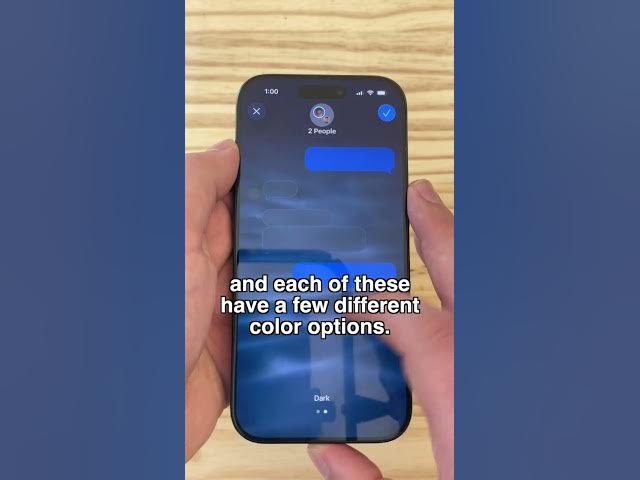
backgrounds. Just like how you can set
0:31
the name and picture of a group, you can
0:34
make a custom background. Apple includes
0:37
a few animated ones like sky and water.
0:41
And each of these have a few different
0:42
color options. You can choose from your
0:45
pictures. It has suggestions below or
0:48
you can choose from your photo library
0:50
by tapping photo. Or if you're boring,
0:53
you can tap none. Another great feature
0:56
is group Apple Cash payments. If you
0:59
need to get paid back from picking up
1:01
the tab at a bar or buying tickets, you
1:04
can request Apple Cash payments from
1:06
everyone in the group. Uh request per
1:09
person. If everybody owes you slightly
1:12
different amounts, you can do that, too.
1:14
Just swipe up and tap request without
1:17
amount, and it'll just send a general
1:20
sort of reminder. Also, in iOS 26, if
1:23
you have a multilingual group chat, it's
1:25
easy to translate the conversation. Tap
1:28
and hold, tap translate, then tap
1:31
translate conversation. You'll see an
1:33
inline translation into English, and
1:36
when you type your reply, you'll see a
1:38
translation into their language as well.
1:41
Both when you're composing the message
1:43
and after you've sent it. Finally, if
1:45
you're tired of promotions, junk texts,
1:49
transactions, cluttering up your
1:51
messages feed, you can filter them all
1:53
out. Tap the filter button in the upper
1:55
right, and you can pick from all of
1:57
these different categories. And if you
1:59
just want to get back to your messages,
2:00
you can tap messages right there at the
2:02
top. Those are the great new features in
2:05
messages in iOS 26. I'm D. Griffin Jones