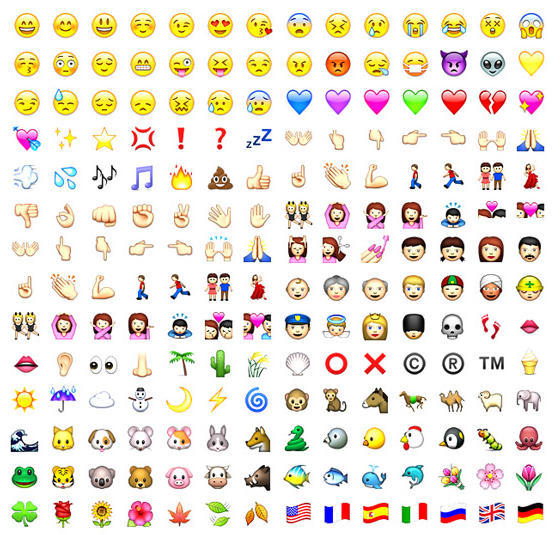
If you just can’t live without emoticon functionality on your iPhone, you may have cell phone users in Japan to thank. Perhaps with a nod to the centrality of “emoji” on all mobile devices in Japan, Apple has apparently enabled their use with iPhone 2.2 firmware, according to one report, but only through the Japanese virtual keyboard.
You must be willing to enter the brave world of jailbreaking your phone using cydia.app, but once there, you’ll be able to enable “emoji” right from the phone’s settings for International keyboard functionality: settings -> general -> international -> keyboards -> japanese -> emoji
Requires iPhone 2.2 firmware.
Via Pradt



8 responses to “Emoticons on your iPhone”
There is an iPhone app called Tweeter available at App Store now, which enables Japanese Emoji (Emoticons) keyboard w/o jailbreaking your iPhone.
The app only has minimal functionality and is, in fact , experimental to prove the emoji keyboard can be added to iPhone apps but It opens up possibilities for doing the same for other apps.
http://itunes.apple.com/WebObj…
You will need to:
Set langauage to Japanese
AND
Turn on Emoji
According to the users from iPhone4.tw, the latest FrostyPlace RSS reader will also secretly enable this feature for iPhoneOS 2.2 owners, so you won’t need to JB your iPhone or iPod touch to enable emoji:
http://itunes.apple.com/WebObj…
And these apps are all based on this trick:
http://hollowout.blogspot.com/…
There’s an app called My-mood which allows you to share your mood through some characters.
link to app:
http://itunes.apple.com/WebObj…
I’m just want to know how are emoticons from my iphone could be visualized in my MAC ; for example: I wrote reviews for my board through my iphone email and when i want to see this ones in my MAC is unable to performed.