Up next in 10



More Apple news: http://www.cultofmac.com
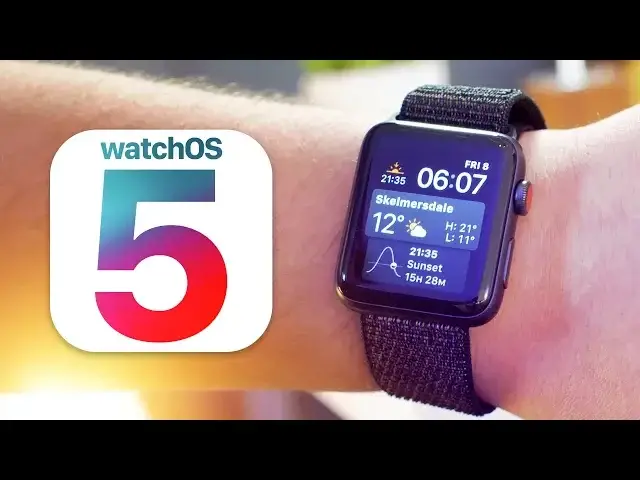
Following on from our iOS 12 coverage, in this video, we're showing you everything you need to know about watchOS 5.
Follow us!
Twitter: https://twitter.com/cultofmac
Facebook: https://www.facebook.com/cultofmac
Instagram: https://instagram.com/cultofmac/
Show More Show Less View Video Transcript
0:00
Hey guys, Stephen Cull of Mac here, back with my second video of the day, and in this one
0:04
I'm going to show you everything less new in WatchOS5. I've got it installed on my Series 3 right here, so let's not waste any more time, roll the
0:11
intro and get started. Let's kick things off with updates to the activity functions, and the first new edition
0:19
for WatchOS 5 is competitions. It makes fitness more competitive by allowing you to challenge your friends to close rings
0:25
over a seven-day period. Throughout the whole competition you receive notifications to tell you how you you're
0:29
your opponent is getting on and to help push you to keep going
0:33
The winner is whoever gains the most points and they'll receive an animated award the same
0:37
way you do when you complete a challenge. Now I love wearing my Apple Watch to track my lengths when I'm swimming, but there have
0:42
been occasions where I've forgotten to start and also stop the workout on my watch
0:47
Well in WatchOS 5 there are now workout reminders for when the watch thinks you are starting
0:50
or stopping a workout. You can toggle these on or off with the Apple Watch app on your iPhone, where you will also
0:56
find a toggle for an auto pause feature for running workouts. If you take a short break to catch a breath, the running workout will automatically pause
1:04
Apple also added to new workouts for watchOS 5, bringing options for yoga and hiking
1:09
Now the yoga workout mainly works from your heartbeat and of course Apple attests to their accuracy Unfortunately I not the yoga type or the hiking type for that matter so you guys have left to let me know in the comments down below how well these workouts work Whilst we talking about activities I should be doing more of
1:24
Apple has added a new cadence metric, which is how many steps per minute for indoor and outdoor
1:28
runs, as well as the new pace alarm for outdoor runs, that alerts users when they are ahead
1:32
or behind their designated target pace. Next up is a new walkie-talkie feature. You can add friends within the app, then whilst it's
1:40
It's open, you can push to talk, where the watch will then send a voice message to your friends over Wi-Fi or LTE
1:45
With Beta 1 though, the app just shows a coming soon message, so I can't try this out
1:49
for the time being. In what seems like a no-brainer, the podcast app has now been added to the Apple Watch, allowing
1:55
for streaming on the go. Episodes of your favourite podcasts, the cult cast, will automatically sync to the Apple Watch
2:01
where you can use the app to navigate them or just ask Siri. Developers can now also allow for music, audiobooks and meditation sessions from apps like
2:08
Pandora and Audible, to be synced to the watch for offline playback
2:13
Unfortunately, Apple didn't announce any third-party watch faces, but they did add some improvements
2:18
to the Siri watch face. It now features sports, scores, maps and heart rate data
2:23
Speaking of third parties though, in WatchOS 5, you can now add third-party complications
2:26
to the Siri watch face Moving on to Control Centre and Notification Center within Control Centre you can now organise your toggles in whatever order you would like For example I use the water lock pretty often so I can scroll down and hit the edit button
2:39
then drag that toggle to the top and tap done when I've finished
2:44
Notification Center has thankfully followed suit of iOS 12 and we now have grouped notifications
2:49
Here you can see that all stacked up neatly, which is super handy on such a small screen
2:52
I can tap on more to expand to see them all and then close them to keep my house in order
2:56
Also, like in iOS 12, if you swipe the notifications to the left, you can manage them
3:01
to deliver quietly or turn them off on the Apple Watch. On top of that, there's now enhanced notifications, so third-party apps can have interactive
3:08
controls without needing the app to be open. Apple demoed this at WWDC by editing a Yelp reservation right from the notification
3:17
As a quick extra note, you can now also pull down notification centre and control centre whilst
3:21
in any app, whereas in previous watchOS versions you could only pull it down whilst on the watchface
3:25
Again, as with iOS 12, Siri shortcuts are supported on the Apple Watch
3:30
Siri shortcuts in a nutshell are custom commands to automate specific actions
3:34
So for example, I've set it up so when I tell Siri that I'm heading home, the latest episode of my favourite podcast will automatically play
3:41
Apple also announced that Siri will now work with a raise function so you no longer have to say Although it isn working for me in this current beta One of the features I personally feel that might be overlooked by a lot of people is the integration of WebKit for Apple Watch
3:55
which lets you view basic web content right from your wrist. The amount of times I'm caught short without my iPhone
4:00
and I'm using my watch to keep in touch, being able to view links that people send me is going to come in super handy
4:06
Here you can see I've sent myself a menu from my website where I can now see all of the texts and even some pictures
4:12
It does take a second or two to load, but when it finally comes through it works great
4:16
Full web browsing on your wrist doesn't make sense, but being able to take quick glances at things like this
4:21
will definitely come in handy. As with my iOS 12 hands-on video
4:24
there are a fair few changes that I'm not going to take an in-depth look at, just to keep the length of this video down
4:29
such as student ID cards, options for do not disturb, design tweaks throughout
4:34
you can now connect to a Wi-Fi network straight from the watch, which is super handy
4:38
There's new peach denim bloom of flashlight colours for watch faces, a less saturated grey colour for the Siri face
4:43
and the new Pride Face to name just a few. Well, that's it for this video, but fear not
4:49
I've got plenty more videos on the way, including MacOS Mojave. So make sure to click that subscribe button
4:54
and ring the bell to be notified as soon as they drop and to join the cult. I'll catch you in the next one
#Consumer Electronics