Up next in 10



Giveaway has now ended. Subscribe to be notified of future giveaways.
PRODUCT LINKS
Circle with Disney: https://goo.gl/s5iQby
Nodus Collection: https://goo.gl/4AdJUw
Peel Cases: https://goo.gl/zqsVtX
Casetify Tassel: https://goo.gl/F5ovpi
Lectrofan Micro: https://goo.gl/YJNZMC
Transcend JetDrive: https://goo.gl/gRTHt6
More Apple news: http://www.cultofmac.com
Follow us!
Twitter: https://twitter.com/cultofmac
Facebook: https://www.facebook.com/cultofmac
Instagram: https://instagram.com/cultofmac/
Show More Show Less View Video Transcript
0:00
Hey guys, Stephen Coles of Mac here
0:05
Now I get sent a whole ton of cool and interesting tech that I struggle to show you due to the
0:09
lack of time. So I thought I'd jump on the YouTube trend of showing you the best tech under a set price
0:14
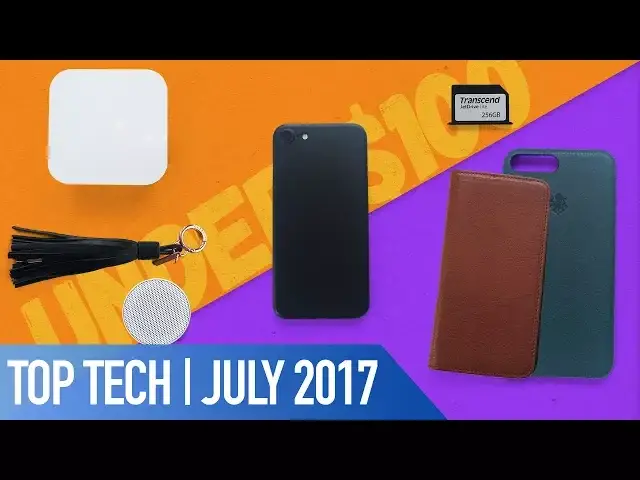
So here it is, my best tech under $100 for July 2017
0:19
So let's get started. First up is for all you parents out there
0:24
Circle is a product from Disney that allows you to set time limits for individual family members tech usage, block websites based on your child's age and even pause internet
0:32
access entirely when it's time to log off. Circle is actually a small white cube that sits anywhere in your house but probably best
0:38
near your router and is about the same footprint as an Apple TV
0:42
Setup is super easy taking a matter of minutes and is simply a case of linking it to your
0:46
home wifi network through the free companion app. Once connected you can create individual profiles for each member of your family
0:53
Circle includes 5 presets that will automatically block certain websites as necessary for the
0:57
age groups so you don't have to go through the process of fine tuning or you can block
1:01
individual sites by adding the domains manually. You can also restrict internet use by time or day or the amount of time per day
1:07
For instance for a specific child you can allow a total of 5 hours per day online or
1:12
you can allow unlimited access between the hours of 9am and 9pm
1:16
You're in complete control and Circle makes it very easy to handle being in that position of power
1:21
Every family with kids, especially younger ones should own a Circle and I've yet to see
1:24
something that manages and restricts internet use more effectively. $99 gets you the Circle and everything it's capable of, no subscriptions needed
1:32
And it's capable of saving you a lot of time and stress
1:37
If you're on the lookout for a new luxury case for your iPhone 7 or 7 Plus then look
1:40
no further than the selection from Nodus. From the packaging alone you can tell that they make quality products
1:46
They have two styles available for both the iPhone 7 and 7 Plus, either in the slim shell
1:50
case or a wallet style access case. They're both made from vegetable tanned Italian leather and are compatible with their magnetic
1:56
docking system. The shell case has a polycarbonate core to protect from knocks and drops which is then
2:01
covered in the leather and has a microfiber lining to protect the iPhone when installing
2:05
and removing the case. The shell feels super nice in the hand and adds a little bit of extra grip to the phone
2:10
as well as luxury. It also comes with their MagShore docking system which is a tiny little magnet with
2:15
some 3M tape on the back so you can mount this in your car or bike
2:20
The access case is a portfolio case which attaches to the iPhone with micro suction
2:24
Simply place the phone onto the case and press down. Then the phone is well and truly stuck on there
2:29
Even when I shake the case, that iPhone is going nowhere. There's also a slot for any cash or cards you want to carry which will fit around 3
2:36
cards comfortably but you'll have to buy the MagShore magnet separately. I've had a few Nodus cases in the past and they've always been top quality and aged beautifully
2:44
over time. For $70 they're also a steal for what you're getting in return in terms of quality and function
2:49
If a leather case is not your thing and you're after something minimal and ultra thin, Peel
2:55
cases produce by far the sleekest cases out there. Not only are they just 0.35mm thin but they're completely branding free
3:03
There's no huge logos printed across them anywhere so this is as minimal as it gets
3:08
They're also great if you've been planning to switch up your black iPhone for a jet black iPhone which you can do in seconds with their jet black case
3:14
With the peel case on the iPhone, it genuinely isn't noticeable in the hand whatsoever apart
3:19
from a tiny subtle lip that protrudes around the lens. While it does offer some protection, it's obviously nowhere near military grade
3:26
I've actually dropped mine with this case on it and it did save my phone from yet another scratch
3:30
Though it's definitely more style over protection. The case comes in 7 colours so you can easily switch up the look of your iPhone quickly
3:37
and easily without the use of skins and for $24.99 they're cheap enough to buy more than one
3:44
If you're a member of our female audience or if you're looking to buy a present for your tech loving girlfriend or mum, Case Defy have a super convenient lightning cable which
3:51
is disguised as a tassel for a handbag. The tassel and cable itself is made from lamb leather and from first glance you can't even
3:58
see the cable. It's fairly short so it's convenient to carry a cable on you at all times but it has both
4:03
USB and lightning connections and is long enough to plug into a laptop
4:08
It comes in 4 different colours including a tan, pink and white as well as the black
4:11
I have here so it can complement plenty of purses or handbags
4:15
It's even saved my battery in the past when my iPhone was about to die on a train and
4:19
luckily my fiance had this on her bag and there were USB sockets on the train so I was
4:23
able to charge my phone through the journey. If you have trouble getting to sleep or if like me you can't sleep in silence then the
4:31
Lectro Fan Micro might be the product for you. It plays 10 different relaxing sounds including 5 fan sounds, 4 white noise sounds and a calming
4:39
ocean soundtrack. It's got this cool swivel design so it's perfect for travel and you can either have the sound
4:44
playing upwards or forwards. It's also got Bluetooth so you can use it as a speaker to play music from one of your
4:49
connected devices and for the size of the speaker the audio can go pretty darn loud
4:54
It's also crystal clear for the small form factor. The battery will last around 16 hours playing the sleep sounds or 6 hours of music depending
5:01
on the volume. For the $35 price tag and it's tiny size, this little speaker is definitely a piece
5:06
of top tech. Last but not least is the JetDrive Lite from Transcend
5:11
A storage expansion card which seamlessly fits into your MacBook to increase the storage
5:15
up to an extra 256GB. The prices vary depending on storage size and MacBook compatibility with the 128GB card
5:23
coming in for around $70 or for the 256GB version it retails for around $159
5:29
The JetDrive slides straight into your MacBook's SD card slot and instantly boosts the storage
5:33
capacity of your MacBook. There are plenty of other manufacturers producing expansion cards that will fit into your MacBook
5:39
but these ones from Transcend use the highest quality flash storage and have blazing fast
5:43
read speeds of up to 95MBps and write speeds of up to 60MBps
5:49
I've personally always used an expansion card with my MacBook Pro as it's 128GB of storage
5:54
is easily eaten away by all the software that I use so having extra storage is essential
5:59
Transcend also went one step further than a lot of it's competitors by producing a free
6:03
companion app to download to your Mac which offers recovery and power save functions
6:07
Plus if that's not enough, they're also resistant to water, dust and shock. Well, that's it for this video but if you'd like the chance to win almost everything in
6:15
this video, check out the link in the description to find out how
6:19
Also if you enjoyed this video, go ahead and hit that like button and don't forget to hit
6:23
subscribe so you don't miss a single video from Cult of Mac. I'll catch you in the next one
#Consumer Electronics
#Consumer Electronics
#Product Reviews & Price Comparisons
#Electronic Accessories
#Gadgets & Portable Electronics
#Media Streaming Devices
#Virtual Reality Devices