Up next in 10



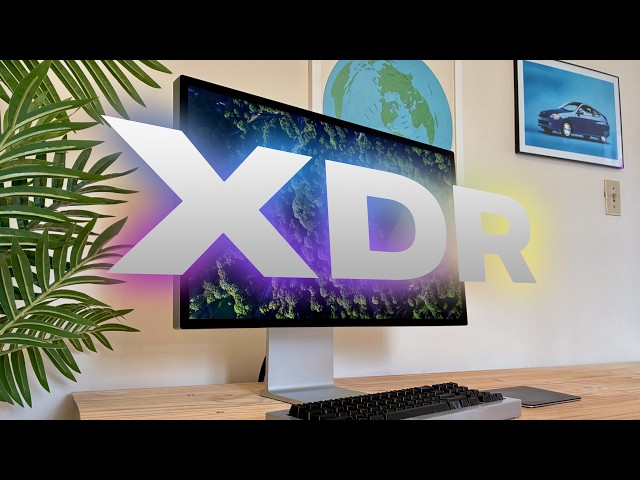
Apple’s new flagship desktop display, the Studio Display XDR, is what you get out of a blender when you combine the mini-LED panel of the former Pro Display XDR, the high adaptive refresh rate of the MacBook Pro, and the 27-inch 5K screen size of the regular Studio Display. It’s a brilliant combination.
Produced by Extra Ordinary for Cult of Mac
Music composed by Will Davenport, arranged by D. Griffin Jones
Chapters:
0:00 Introduction
1:28 Design
4:42 120 Hz Adaptive Sync
6:34 HDR brightness
8:29 Thunderbolt 5
10:43 Apple ecosystem niceties
12:00 Cameras, speakers and microphones
13:23 The computer hiding inside
14:46 Conclusion
Follow us!
Threads: https://www.threads.net/@cultofmac
Mastodon: https://mastodon.social/@cultofmac
Instagram: https://instagram.com/cultofmac/
Show More Show Less View Video Transcript
0:00
Apple's new flagship desktop display,
0:03
the Studio Display XDR, is what you get
0:06
out of a Blender when you combine the
0:08
bright miniLEDD panel of the former Pro
0:11
Display XDR, the adaptive high refresh
0:14
rate of the MacBook Pro with the 5K 27in
0:18
size of the regular Studio Display. It's
0:22
a brilliant combination. At 32.99, it's
0:26
significantly cheaper than the monitor
0:28
it replaces, albeit a little smaller.
0:31
Apple made much smarter trade-offs on
0:34
what to include and what to leave out.
0:37
Ironically, now it's the 1599 regular
0:40
studio display that's the bunk product
0:43
in Apple's lineup. It misses the top new
0:46
feature, 120 Hz adaptive sync, and it's
0:50
almost twice as much as the new
0:52
competition from Asus, BenQ, and Vonic.
0:56
The Studio Display XDR stands tall in a
1:00
class of its own.
1:04
Three features make Apple displays stand
1:07
out from the crowd. The build quality
1:09
and materials are leagues above
1:11
everything else with mil aluminum bodies
1:14
that are incredibly sturdy. Apple
1:16
displays offer much higher resolution,
1:19
delivering super crisp text and images.
1:22
The color accuracy and quality are also
1:24
top tier, ensuring a bright and precise
1:27
image. The Studio Display XDR bears much
1:30
more resemblance to the regular Studio
1:32
Display than the former Pro Display XDR.
1:36
[music] It doesn't have the distinctive
1:38
lattice holes milled into the back. Its
1:41
ports are now in the lower left rather
1:44
than the center right. And more
1:47
obviously, it's a 27in 5K panel, not a
1:50
32-in 6K panel. By default, the Studio
1:54
Display XDR comes with shiny cover
1:56
glass. Even on this glossy version,
1:59
Apple said it reduced reflections to
2:00
just 1.65% 65% due to [music] a custom
2:04
anti-reflective coating that reduces
2:06
glare by three times. While I normally
2:09
position my monitor with its back to the
2:11
window, I tested how it would look on
2:13
the opposite side of the room. The
2:14
window should be brightly reflected in
2:17
the glass, making half the screen hard
2:19
to see. Instead, it's barely affected.
2:22
The nanoextured glass, a $300 option, is
2:25
microscopically laser etched to diffuse
2:28
light across the entire surface. It
2:31
totally eliminates reflections. It isn't
2:34
your typical matte display which washes
2:36
out colors and reduces contrast. If
2:38
you're worried about losing color
2:39
fidelity on a nanoexture display, I
2:42
challenge you to go to your Apple store.
2:44
On the table in the back with all the
2:46
Pro Max, they usually have one glossy
2:49
and one nanoexture display side by side
2:52
so you can do a direct comparison.
2:54
I bet you won't be able to notice any
2:57
difference in color fidelity. I
2:59
recommend the nanoexture option if you
3:01
have a ceiling light or window that
3:03
reflects on your display. The Studio
3:05
Display XDR comes with a tilt and height
3:07
adjustable stand by default. On the
3:09
lower-end Studio Display, this is a $400
3:12
upgrade. Unlike the former Pro Display
3:15
XDR, the stand doesn't rotate between
3:18
portrait and landscape. Perhaps that's
3:20
why it's only $400 and not $999.
3:25
This actually caused a little bit of a
3:27
problem for me. You see, all of the
3:30
floors in my house are a little bit
3:31
uneven, especially my office, which both
3:34
tilts backwards and a little to the
3:37
right. So, I compensate this by tilting
3:40
my monitor a little bit to the [music]
3:42
left to make it even. But the Studio
3:46
Display XDR doesn't tilt. So, I had to
3:48
fold some cardboard and place it
3:51
underneath the table legs on the right
3:53
side to sort of balance it out. And at
3:56
first, I overcorrected a hair, but in
3:58
the days since, the cardboard was
4:00
flattened, and now it's kind of even.
4:03
Apple's height adjustable stand isn't
4:06
like other displays that simply slide up
4:08
and down. Instead, it has a short
4:10
articulating arm. That means that when
4:13
you put it in its extreme high or low
4:15
position, it's slightly further away
4:17
from you. When it's in the middle, it's
4:19
slightly closer to you. Its range is
4:21
also somewhat limited. It goes a little
4:23
higher than my Vonic display, but not
4:26
nearly as low. I'm not sure what it is
4:28
about normal sliding monitor stands that
4:30
Apple designers find so reprehensible.
4:33
If you're going to do something weird
4:34
and different, the end result should be
4:36
cooler, like the iMac G4's fully
4:38
articulated arm that tilts and swivels
4:41
all around. The biggest upgrade of the
4:43
Studio Display XDR over the regular
4:45
model is the high 120 Hz refresh rate.
4:49
PC monitors have had 120 Hz for years
4:51
now, but I've never seen one before on
4:54
such a high resolution display. It looks
4:57
absolutely incredible.
4:58
>> [music]
4:58
>> Even the most basic animations in Mac OS
5:00
are a constant reminder of its buttery
5:03
smoothness. Scrolling a page in Safari,
5:05
[music] swiping a bunch of messages and
5:07
mail to archive them, minimizing a
5:09
window to the dock, it's stunning. 120
5:13
Hz is what all the hardcore gamers love
5:16
for the precision that comes from its
5:18
high refresh rate. Hardcore gamers tend
5:21
not to love the Mac. But if you are the
5:24
niche within the niche within the niche,
5:26
a Mac user who games with an XDR,
5:30
you're going to love it. You'll need a
5:32
pretty modern Mac to drive the XDR at
5:34
120 hertz. Any M4 or M5based Mac can
5:38
drive it no problem. Any M2 or M3 model
5:42
[music]
5:43
needs the Pro Max or Ultra chip to
5:46
support it at 120. Any other M series
5:49
Mac can drive it, but only at the
5:51
standard 60 Hz. And likewise for Intel
5:55
Macs [music] that have Thunderbolt 3.
5:58
The MacBook Neo can only drive it at 60
6:00
Hz at 4K resolution. [music]
6:03
120 Hz with adaptive sync isn't exactly
6:06
the same as [music] Apple's prootion
6:08
technology. Adaptive sync is an
6:11
industry-wide standard, whereas prootion
6:14
is Apple's [music]
6:15
exclusive implementation on the iPhone,
6:18
iPad Pro, and MacBook Pro. Now, both
6:21
support frame rates between 47 and 120
6:24
hertz, but adaptive sync can be
6:27
fine-tuned for specific workflows. You
6:30
can prioritize either the lowest latency
6:32
or highest quality. [music] The other
6:34
major upgrade of the XDR over the
6:36
regular studio display is the miniLEDD
6:39
panel. This puts 2,34
6:43
individually lit LEDs behind the display
6:46
rather than a single uniform backlight.
6:50
For displaying standard content, it gets
6:52
much brighter up to a,000 nits instead
6:55
of 600. And for HDR or high dynamic
6:59
range content, it gets up to a retina
7:02
scorching peak of 2,000 nits. The Studio
7:05
Display XDR has two ambient light
7:08
sensors, one on the front and one on the
7:11
back, hiding inside the Apple logo.
7:14
Again, I thought I was in the clear
7:15
putting the back of my monitor towards
7:17
my office window, but on a sunny day,
7:20
sunlight falls on that rear sensor and
7:23
turns the brightness down to its minimum
7:25
setting.
7:27
I turned the automatic adjustment off.
7:29
You've never seen your photo library
7:31
like this before. Your iPhone probably
7:33
has an HDR screen, but there is a world
7:36
of a difference between a 6-in screen in
7:38
your hands and [music] a 27in display in
7:41
front of your eyes. Your favorite shows
7:43
and movies like Doctor Who and probably
7:46
some other ones too, I wouldn't know,
7:48
have never looked better. Unlike an OLED
7:51
display where each pixel is individually
7:53
lit, this miniLEDD panel lights up
7:56
clusters of 6,400 pixels at a time. That
8:00
means that if you have a single pin
8:01
prick of light, like a starfield, then
8:04
you might see some haze around the light
8:07
parts of an image. This is called
8:09
blooming. [music] The XDR has been
8:11
engineered to avoid this problem as much
8:13
as possible. It has a custom timing
8:16
controller that can operate the
8:17
backlight at eight times the speed
8:19
[music] of the pixels so that it can
8:21
instantly compensate for parts of the
8:24
image that are more susceptible to this
8:25
effect. And indeed, I don't really
8:28
notice it. Apple updated both versions
8:30
of the Studio Display with Thunderbolt
8:32
5, which is great if you have a high-end
8:34
Mac that supports [music] it, although
8:36
it's also backwards compatible with
8:38
Thunderbolt 3 and 4 as well. Thunderbolt
8:41
5 enables the next generation of high
8:43
power peripherals. [music]
8:45
You can use the other Thunderbolt port
8:47
on the display to plug in a second
8:49
display or any other Thunderbolt
8:52
peripheral like external storage or a
8:54
dock. The Studio Display doesn't offer a
8:57
great number of ports. Two of them are
9:00
Thunderbolt, indicated by the little
9:02
lightning icon. The one you're supposed
9:04
to plug into your Mac has a dot under it
9:06
and supports charging up to 140 watts,
9:09
beefy enough for the biggest [music]
9:11
MacBook Pro. The other two ports are
9:15
some variety of USB 3. Even Apple's
9:19
technical white paper doesn't tell you
9:21
precisely which version. All four ports
9:24
face straight out the back. They're the
9:27
only interruption on the surface. That
9:29
makes it super easy to plug in a cable,
9:31
even completely blind. [music] Offering
9:34
only four ports in total, none of which
9:37
are USBA, is a little inconvenient. USBA
9:41
does still exist, as much as Apple likes
9:44
to pretend otherwise. The only computers
9:46
Apple sells with USBA ports being the
9:49
Mac Studio and the Mac Pro. The ports
9:51
are positioned on the far right side of
9:53
the monitor. And annoyingly, I keep my
9:56
Mac Mini on the far left on a separate
9:59
table to reduce the risk of water
10:01
spills. The included Thunderbolt cable
10:04
can just barely reach. And
10:07
unfortunately, longer Thunderbolt cables
10:10
are insanely priced. as powerful and
10:13
high bandwidth as Thunderbolt 5 is. It's
10:15
probably the reason why the Studio
10:17
Display XDR is only 5K compared to the
10:20
Pro Display XDR's 6K. Apple had to leave
10:24
a little bit of bandwidth headroom to
10:26
carry data for the other ports. It's sad
10:30
for everybody who got used to the 32-in
10:32
size, dozens of people I'm sure, but I
10:36
think it's a reasonable sacrifice. The
10:38
smaller size is probably [music]
10:39
why this new display costs a third less.
10:43
So, why do people spend so much more
10:44
money on Apple monitors compared to the
10:47
plethora of third-p partyy options?
10:49
There's one big reason. All of the
10:52
little ecosystem integrations. The
10:55
Studio Display XDR doesn't have a power
10:58
button. It just wakes up when your Mac
11:00
does. That means you can plug a wired
11:03
keyboard or mouse into the display and
11:06
hit either one to wake up your Mac from
11:08
sleep. A third-party monitor might turn
11:11
off the accessories when it goes idle.
11:13
You also know that an Apple display is
11:15
going to come perfectly and precisely
11:18
calibrated to match your MacBook out of
11:20
the box. No need to fiddle with a clunky
11:22
onscreen menu trying to get color
11:25
profiles to match. You can also hit the
11:27
brightness and volume keys on your
11:28
keyboard and it'll just work. No
11:31
fiddling around with display drivers or
11:34
crummy thirdparty software from your
11:35
display manufacturer. Plus, it comes
11:37
with True Tone and Night Shift. True
11:40
Tone adjusts the display [music] to
11:42
match the color temperature of the room,
11:44
making it look more natural in warmer or
11:46
cooler environments. And Night Shift
11:49
reduces the amount of blue light at
11:51
night or in the dark, making it feel
11:53
easier on your eyes. Personally, I'm not
11:56
a fan of either one, but I know they're
11:59
popular features. The 12 megapixel
12:01
camera also got an upgrade. It's okay as
12:04
a webcam for the occasional video call.
12:07
I recorded an episode of the Cult of Mac
12:09
podcast with it, and no one complained
12:11
or anything, but for $32.99, I'd expect
12:15
something a little [music] better.
12:17
There's a noticeable upgrade between
12:19
this and using an iPhone in continuity
12:22
camera, as I've been using [music] for
12:23
the rest of the review. It now supports
12:25
desk view, which takes the bottom
12:28
portion of the [music] ultrawide image
12:30
and skews it to make it look like you
12:31
have a second top-down camera. It
12:35
requires kind of a long desk to make it
12:38
work. If I put the display in the middle
12:40
of my twoft deep desk, it's more like
12:43
legs view. The Studio Display XDR
12:46
features the same six speaker system and
12:49
studio quality microphones as the
12:51
regular Studio Display. The speakers
12:55
genuinely shocked me. I am amazed at how
12:58
much bass they can put out. It was the
13:01
1986 Doctor Who theme by Dominic Glenn
13:04
that truly shocked me. The microphones,
13:07
on the other hand, are just all [music]
13:08
right. I wouldn't dare record a podcast
13:11
or a video with them. The Pro Display
13:13
XDR didn't come with a camera, speakers,
13:16
nor microphone. So, I guess the
13:19
inclusion of these things at all is
13:21
technically a big improvement. The
13:23
regular Studio Display has an A19 chip
13:25
inside. The XDR has an A19 Pro chip,
13:30
which apparently has 12 GB of unified
13:32
memory [music] and 128 GB of storage.
13:36
That technically makes this display a
13:39
more powerful computer than the MacBook
13:42
Neo. It also means your display is
13:44
running a full operating system that
13:46
needs software updates and everything.
13:49
It's a very paired down version of iOS,
13:52
but it's still much more software than
13:55
you get in, you know, any old scepter
13:57
monitor. It's all mostly invisible
14:00
except for when it crashes. About half
14:01
an hour after I plugged it into my Mac
14:03
Mini, as I was meanwhile setting up my
14:06
iPhone 17e, I look over and the left
14:09
two/irds of the screen are gray static
14:12
and the right third of the screen is
14:14
flickering magenta. and then the Mac
14:17
Mini suddenly reboots. Either the Mac
14:20
Mini or the display had a kernel panic
14:23
or something. Then the display didn't
14:25
come back on until I rebooted the Mac
14:28
Mini again. I wish my iPhones weren't in
14:31
the middle of transferring data,
14:32
otherwise I would have captured it. Now,
14:35
previously, Studio Display owners say
14:36
that the issues do become less frequent
14:39
over time. They're now pretty reliable.
14:42
So, all these bugs will get ironed out
14:45
probably. Four years ago, everyone luded
14:48
the launch of the Studio Display and
14:50
laughed at that ludicrous Pro Display
14:52
XDR. [music]
14:54
Now, the tables have turned. It's the
14:56
Studio Display that's overpriced and
14:58
underfeatured in its class. You can get
15:00
a 5K 27in 60 Hz display for half the
15:05
price from Asus, BenQ, or VSic. Apple
15:10
reinvented its high-end display as a
15:12
product that makes much smarter
15:14
tradeoffs. It's still a
15:16
professional-grade reference monitor for
15:17
film, graphic design, and now even
15:20
medical industries. It's still a premium
15:23
product, but at 55 to 66% of the
15:26
previous cost, it's accessible to many
15:29
more people. Or maybe it's more accurate
15:32
to say it's slightly less niche. Either
15:36
way, the Studio Display XDR is the best
15:40
monitor you can buy. I'm D. Griffin
15:44
Jones with Cult of Mac.
#Entertainment Industry
#Online Media
#Consumer Electronics