Up next in 10



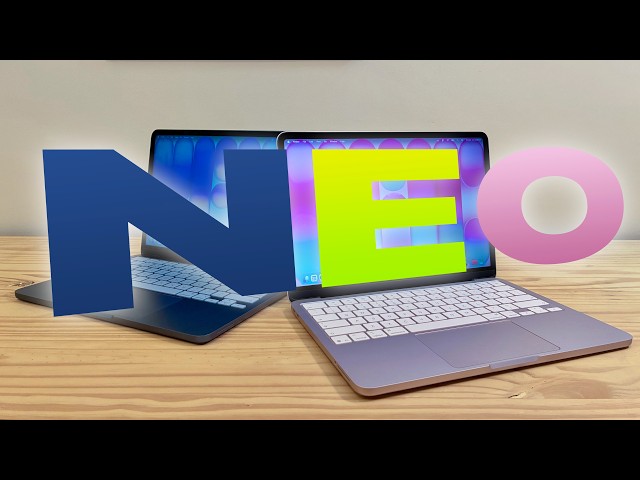
The MacBook Neo exceeds all expectations and defies all logic. It’s a $599 computer that’s not slow. It runs on an iPhone chip, yet it’s incredibly fast with unbelievable battery life. The MacBook Neo will be a lot of people’s first exposure to the Mac. I wanted to know what their experience will be like — and I think they’ll be very happy.
Chapters:
0:00 Introduction
2:02 What I ordered
3:59 Design
5:46 Speed tests
7:08 Charging and battery life
8:26 Display, keyboard and trackpad
10:45 Speakers, microphones and camera
12:32 Ports
14:07 Conclusion
Follow us!
Threads: https://www.threads.net/@cultofmac
Mastodon: https://mastodon.social/@cultofmac
Instagram: https://instagram.com/cultofmac/
X: https://x.com/cultofmac
Facebook: https://www.facebook.com/cultofmac
Show More Show Less View Video Transcript
0:00
The MacBook Neo exceeds all expectations
0:03
and defies all logic. It's a $599 laptop
0:08
that's not slow. It's a laptop that runs
0:11
on an iPhone chip, yet has unbelievable
0:14
performance and battery life. The name
0:17
itself, Neo, tells you that this is not
0:20
a computer assembled out of spare parts.
0:22
It's a bespoke industrial design with a
0:25
brand new display and feature set. That
0:29
feature set excludes a few things that
0:31
longtime members of the cult will
0:33
consider quintessentially Mac. It has no
0:36
ambient light sensor, Mags Safe
0:38
connector, or backlit keyboard.
0:41
Nonetheless, this will be a lot of
0:44
people's first exposure to the Mac, and
0:47
I wanted to know what that's like. I
0:50
think they'll be very happy.
0:53
The MacBook Neo marks the start of a
0:55
totally new product line from Apple.
0:58
This is the most affordable all-in-one
1:01
Mac ever. It directly targets the $500
1:04
to $700 market of Chromebooks and
1:06
Windows laptops, and PC makers are
1:09
quaking in their boots. On top of that,
1:12
it comes in an array of vibrant colors.
1:15
How did Apple pull it off? The MacBook
1:17
Neo is the first Mac to be powered by an
1:19
A series chip, typically only used for
1:22
iPhones, iPads, and other less
1:25
power-hungry devices. The universally
1:27
praised M series chips inside the
1:30
mid-range MacBook Air and the high-end
1:31
MacBook Pro offer such incredible
1:34
performance that they honestly deliver
1:37
too much power for very casual users. By
1:40
putting an A18 Pro in the MacBook Neo
1:43
and cutting a few corners, Apple created
1:45
a laptop to take on the PC manufacturers
1:48
who until now maintained a strangle hold
1:50
on the low-level market. Although
1:52
obviously not as capable as Apple's
1:54
higher-end offerings, the MacBook Neo
1:56
delivers an impressive amount of power
1:59
at Apple's lowest price ever, the
2:02
MacBook Neo comes in only two options.
2:05
You pick storage tiers, either 256 GB or
2:09
512 GB, the latter of which comes with a
2:12
Touch ID sensor in the keyboard. You
2:15
have no options for processor, memory,
2:18
or screen size. I wanted to test just
2:21
how far the cheapest MacBook would take
2:24
me. After all, this is the configuration
2:26
most people are going to buy. For $599,
2:30
you get a 13-in liquid retina display,
2:33
an A18 Pro with a 6 core CPU, 5 core GPU
2:37
and 16 core neural engine, 256 GB of
2:41
storage, 8 GB of unified memory, two
2:45
USBC ports, Wi-Fi 6E, and Bluetooth 6.
2:49
Pony up $100 more and you get 512 GB of
2:52
storage. Pay $100 less if you order from
2:56
the education store. I chose the basic
2:59
MacBook Neo model in blush, but because
3:02
I simply couldn't help myself, I also
3:05
bought the higherend model in indigo.
3:08
This actually ended up saving me, I
3:10
missed the delivery of my first MacBook
3:12
Neo while I was at the Apple store
3:14
picking up all of my other products. So,
3:16
I spontaneously bought the second
3:18
MacBook Neo while I was there. The low
3:20
amount of built-in memory begs the
3:22
question, why doesn't Apple just offer a
3:25
799 model with 12 GB of unified memory
3:28
or an 8.99 model with 16 GB? That would
3:32
certainly bridge the gap between the
3:33
MacBook Neo and the MacBook Air. But,
3:36
it's possible this is the first of
3:38
several limitations that come with the
3:40
A18 Pro chip. It's the same chip that
3:43
was used on the iPhone 16 Pro, which
3:46
only came with 8 GB of memory. On the
3:49
plus side, if there's a 2027 MacBook Neo
3:53
based on the A19 Pro chip, that will
3:56
probably come with 12 GB of memory. The
3:59
MacBook Neo is the first Mac laptop in
4:01
nearly 25 years to come in so many
4:04
bright, fun colors. You can choose from
4:08
silver, blush, indigo, and citrus. It's
4:13
an iMac to go. Even the keyboard is
4:16
color matched, although it's kind of
4:18
subtle. And it comes out of the box with
4:20
a matching accent color for buttons,
4:22
switches, and drop- down menus set up in
4:25
Mac OS. The MacBook Neo looks familiar
4:27
if you've ever used an M2 or later
4:30
MacBook Air. It has the same flat
4:32
uniform design with no tapered wedge
4:35
shape and big rubber feet. The display
4:38
is rounded on the top corners and square
4:40
at the bottom. Thankfully, it doesn't
4:43
have a notch. On the outside, the lid
4:46
itself isn't as squared off. It's a
4:49
little more rounded, too. Unlike the
4:51
iMac, it has a black bezel around the
4:53
display, not a white one. The face of
4:56
the MacBook Neo is probably black
4:58
because it also has a rubber gasket and
5:00
plastic hinge that would be harder to
5:02
color match if it were all white like
5:04
the iMac. The rubber feet on the bottom
5:06
are a little thicker than those on the
5:08
MacBook Air. I wonder if this is for
5:10
extra water resistance. The added ground
5:12
clearance could help save it from water
5:15
spilled on a table nearby. The Apple
5:17
logo isn't a polished piece on the top
5:19
of the laptop. While it's still a
5:21
separate piece of metal that's precisely
5:23
cut and fit back together, it's a matte
5:26
texture. It's more subtle. As a whole,
5:28
the fit and finish of the design does
5:30
not feel cheaper or lesser in any way.
5:34
Everything down to the hinge feels
5:36
absolutely pitch perfect. Apple decided
5:39
that a premium aluminum unibody is an
5:42
essential part of what makes a MacBook a
5:45
Mac. Concerns that a MacBook with an A
5:47
series chip would be too slow are vastly
5:51
overblown.
5:53
People forget just how powerful the A
5:55
series chips are. I tested the MacBook
5:57
Neo on the same set of work tasks I do
6:00
regularly. Video editing, podcasting,
6:03
transcribing audio, building an app in
6:06
Xcode, and running Python scripts. I
6:08
used a college project from a course on
6:10
data mining. and I compared the results
6:13
to my Mac Mini, a 2023 model that runs
6:16
on an M2 Pro chip. Three of the five
6:19
tests were basically a tossup. Video
6:22
rendering and code compilation, two of
6:24
the more complex tasks, completed a
6:27
little faster on the M2 Pro thanks to
6:30
their extra CPU and GPU cores. But as a
6:33
whole, similar performance to the $2,300
6:37
computer I bought just 3 years ago can
6:40
now be had for $5.99.
6:44
And anecdotally speaking, both computers
6:46
still feel perfectly fast. While I was
6:49
at it, I also created a virtual Windows
6:51
11 machine in UTM. It ran pretty
6:54
snappily, too. Even while it was eating
6:56
up half of the 8 GB of memory, it didn't
7:00
even slow down while I simultaneously
7:01
launched Final Cut Pro, Logic Pro, and
7:04
Pixelmator Pro. All on battery power.
7:08
The MacBook Neo enjoys Apple's signature
7:11
allday battery life. It gets a whopping
7:14
16 hours on a charge despite the fact
7:16
that it has a much smaller battery than
7:19
the other MacBooks. I stress tested my
7:23
MacBook Neo and it easily lasted me all
7:26
day every day. The 20 watt charger that
7:29
comes with the MacBook Neo isn't
7:31
particularly high powered, so it charges
7:33
kind of slow. It estimated 4 1/2 hours
7:37
to get to 100 when I plugged it in
7:39
almost dead. The included cable also
7:42
isn't as long, only 4 1/2 ft instead of
7:46
6 ft. It's just long enough to reach
7:49
from a floor outlet to the front of a
7:51
standard height desk. But when you have
7:54
all day battery life, the only
7:56
inconvenience is where you choose to
7:58
plug it in overnight. The Neo charges
8:00
via USBC, so you can really use any
8:03
power adapter and cable you want. I use
8:06
the MacBook Neo on the same sofa where I
8:08
use my Vision Pro, so I used its
8:10
slightly beefier 30W power adapter, the
8:13
maximum the Neo can take. It's a shame
8:15
Apple couldn't add MagS safe charging
8:17
for the price. It would have cleared up
8:19
one of the two USB ports for extra
8:21
peripherals and would have made it a
8:23
little more clumsy people friendly. The
8:26
MacBook Neo packs a 13-in Retina
8:28
display. It's not prootion with super
8:31
smooth refresh rates and it's not HDR
8:34
bright, but it doesn't need to be. It's
8:37
already leaps and bounds better than
8:39
anything else in the Neo's price class.
8:42
It has a crisp resolution of 2408x506.
8:47
I'm so used to 27in desktop displays
8:49
that a 13-in laptop feels a little
8:52
cramped, but that's just a personal
8:54
preference. While the display doesn't
8:56
have an ambient light sensor, nor True
8:58
Tone for color matching the environment
9:00
of the room, it still automatically
9:03
adjusts for brightness, allegedly. I'm
9:07
not entirely sure how. I still found
9:10
myself fiddling with the brightness keys
9:12
a lot. At 500 nits of maximum
9:14
brightness, the Neo only struggles in
9:16
peak outdoor lighting or if there
9:19
happens to be a beam of pure sunlight
9:21
searing through a window. The bright
9:23
color of the keys kind of makes up for
9:26
the lack of a backlight. In the dark
9:28
with the computer in light mode, the
9:30
screen reflects enough light off the
9:31
keys that you can still make them out
9:33
kind of. The keyboard now comes with
9:35
symbols instead of words for delete,
9:38
shift, caps, lock, and tab. This has
9:41
been standard on international keyboards
9:42
for some time, but it's new to the US
9:45
layout. Curiously, the escape key is
9:48
still written as ESC without its
9:51
associated symbol. The trackpad isn't
9:54
solid state and haptic like the MacBook
9:56
Air and MacBook Pro. It physically
9:59
clicks. It's like the trackpad in the
10:01
iPad Air's Magic Keyboard, so you can
10:04
imagine it like a trampoline. It's
10:07
hinged around the edge so that you can
10:09
still click anywhere on the surface with
10:11
the same amount of force and it'll
10:13
click. It's a stronger click than I'm
10:15
used to. I have my Magic Trackpad set to
10:18
the softest setting possible, but it
10:21
still feels first class. It's plenty
10:24
spacious for all the Mac multi-touch
10:26
gestures. It doesn't have force touch,
10:29
which I use all the time to quickly
10:32
preview links in Safari and Mail, rename
10:35
files in the Finder, and define words.
10:38
In the time that I've been testing it,
10:40
I've probably tried to use Force Touch
10:42
on the Neo about a hundred times. Apple
10:45
positioned the speakers in MacBook Neo
10:47
in a rather odd place towards the front
10:50
of the laptop, pointing out the sides.
10:53
Normally, the speakers are positioned
10:55
pointing up from underneath the
10:57
speakers.
10:59
Despite that, they sound pretty good.
11:01
Honestly, internally, they have a very
11:04
big sound chamber, which probably helps
11:06
quite a bit. You'd think that sitting
11:08
the laptop on a thick blanket or
11:10
comforter would muffle the speakers, but
11:12
it doesn't seem to be much of a problem.
11:14
The sound is reflected up towards your
11:17
ears. The problem is apparently my
11:20
hands. When I pick up the MacBook Neo to
11:22
carry it, that is exactly where my hands
11:26
want to grab it. When I take my hands
11:28
off the keyboard to sit back and watch a
11:29
video, that's where I want to rest them.
11:32
If I'm doing a complex Mac keyboard
11:35
shortcut, that's exactly where my palm
11:38
sits. The MacBook Neo comes with two
11:40
built-in microphones as well. You don't
11:43
have to worry too much about noise since
11:45
it doesn't have an internal fan. It's
11:48
good enough for the odd video or
11:49
FaceTime call, but it's not exactly
11:52
podcast quality. The MacBook Neo comes
11:54
with a basic 1080p webcam. It doesn't
11:58
support center stage nor desk view,
12:00
though I don't think anybody will be
12:02
weeping over that. It's okay. The
12:06
picture quality is a little muddy, even
12:08
in a pretty well-lit room. Weirdly, it's
12:11
missing that little green light that
12:13
indicates when the camera is on. This is
12:15
a hardware security feature on all other
12:18
Macs. The camera cannot be activated
12:22
without that little green LED lighting
12:24
up. For the MacBook Neo, Apple relies on
12:26
a green dot that appears in the menu
12:28
bar. I sure hope that doesn't become a
12:31
problem. The MacBook Neo sports a pair
12:33
of USBC ports. The one in the back is
12:36
USB 3, which supports charging, display
12:40
output, and data transfers at up to 10
12:42
Gbits per second.
12:44
It's display port, which means it can
12:47
output 4K resolution at 60 Hz. Not
12:51
enough for Apple's own 5K studio
12:54
display. The other port is USB 2 and
12:58
supports charging and data transfers up
13:00
to 480 megabits per second. If you try
13:03
plugging a display into that second
13:05
port, you'll see a notification telling
13:07
you to try the other one. So, people
13:09
will learn over time. I don't buy the
13:11
argument that the people using this
13:13
computer simply don't care about display
13:15
output or high data transfer. Sure, a
13:19
technically minded person would know
13:20
that the MacBook Air supports
13:21
Thunderbolt 4, but lots of technically
13:25
minded people are only able to afford a
13:28
MacBook Neo. It's not like everybody has
13:30
thousands of dollars sitting around to
13:33
buy the computer that perfectly suits
13:35
their needs. That is to say, the lack of
13:37
support for high power peripherals is
13:39
disappointing. But there is a good
13:41
reason for it. The A18 Pro doesn't
13:44
support Thunderbolt. If you think about
13:46
it, every iPhone and iPad ever shipped
13:48
has only ever included one port. If
13:52
anything, we should be glad that we have
13:54
that second USB 2 port at all. The
13:56
magic, or depending on your perspective,
13:59
the curse of USBC, is that most things
14:02
you go to plug into that port will still
14:04
work just a little slower. The MacBook
14:07
Neo utterly shatters the argument that
14:10
in order to do real creative work, you
14:12
need to buy a MacBook Air or MacBook Pro
14:15
because the fact is this computer will
14:17
be used by millions of teenagers and
14:19
young adults who will discover their
14:21
lifelong creative outlets. I was there
14:24
once spending $550 on a used 4-year-old
14:28
MacBook Pro from eBay. Today, that
14:31
amount of money gets you a brand new
14:34
MacBook. A slightly compromised one,
14:37
sure, but so was my early 2008 MacBook
14:40
Pro. The MacBook Neo ends the idea that
14:44
a cheap computer is a slow computer. In
14:47
fact, not slow doesn't even do it
14:49
justice. It's incredibly fast and
14:51
capable. A lot of people are going to
14:54
fall in love with the Mac on a MacBook
14:56
Neo. I'm De Griffin Jones with Cult of
14:59
Mac.
#Consumer Electronics