0:00
If you're desperate to take your house parties to the next level, this could be the gadget
0:04
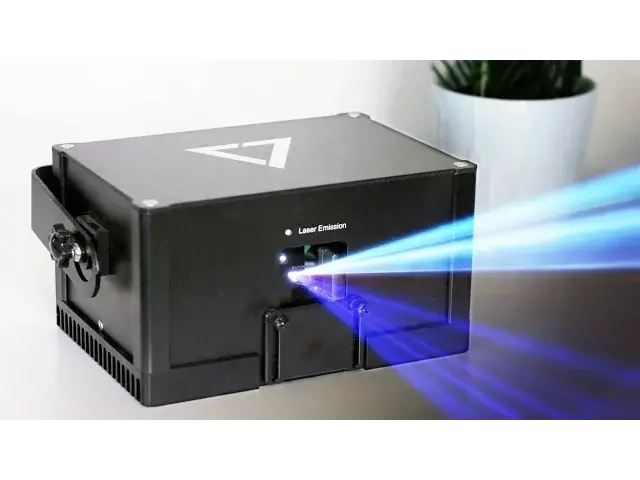
for you. Inside this Peli case is the Wicked Lasers Laser Dock
0:08
Introduced on Indiegogo this past September, the Laser Dock is a home laser show system
0:13
which houses a laser projector and music visualiser in one. Simply plug it into your Mac or PC to create your very own light shows in a flash
0:21
Inside the case you'll find the Laser Dock itself, the power supply, a really nice long
0:25
USB lead and a little bag with a set of keys and an interlock, which is a safety cut off device
0:31
Setting up the Laser Dock couldn't be easier. Screw in the interlock at the back, which connects two wires together and if the wire
0:37
in the back was to get disconnected it would stop the projector working
0:40
The laser itself is covered by a metal plate for safety, so once you've slid that down
0:44
simply connect the power and USB cables and insert the key and turn on to the on position
0:49
Then flick on the switch. You'll then need to download some software
0:54
One of them is the Laser Dock app which has over 100 presets to create your own personal light show, where you can select a preset or allow the software to shuffle through them
1:02
You can also use this to set up your image position and colour. It uses the microphone in your computer to visualise graphics to the beat, or you can
1:09
download software such as the Sound Siphon app which you can then use in conjunction
1:12
with the Laser Dock app to sync up your visuals and sound, which reacts a lot quicker than
1:16
when using the microphone. You can also create your own graphics for the lasers to project out, but it's not as
1:22
simple as I would have hoped just yet. As you can see, the lasers are really nice and bright even in daylight, but where they
1:27
really come to life is at night, and if you combine it with a smoke machine, the results
1:32
are pretty outstanding. I didn't think I was going to be as impressed with the Laser Dock as I actually am
2:01
It may be a bit of a niche product, but if you're living the bachelor life and having
2:05
frequent house parties, or if you're a DJ and need something portable enough to take
2:09
from show to show, this is definitely the kit you want. Add to that the ease of set up and the amazing spectacle it emits, the lasers look even better
2:17
in real life. It's surprisingly difficult to capture on camera, and there's certain animations which
2:21
are simply hypnotising. There's only two problems the Laser Dock has at the moment, firstly availability
2:28
It actually can't be shipped to the US at the moment due to the lack of FCC approval
2:32
which will take around another 6 months to obtain. Outside of the US, it doesn't seem to be a problem though
2:37
The second problem is the software. While the Laser Dock app is easy enough to use, I was hoping creating my own graphics
2:43
and animations would be a lot easier. As it's open source though, a lot of people will be able to create some amazing visuals
2:50
Overall, it's an amazing piece of kit, which if you have the need for, you've got to try it out
2:56
Well, that's it for this video. If you'd like more information on Wicked Lasers, I'll make sure to leave a link in the description
3:01
down below. Also, if you enjoyed this video, go ahead and hit that like button, and don't forget
3:07
to hit subscribe so you don't miss a single video from Cult of Mac. I'll catch you in the next one