Up next in 10



More Apple news: http://www.cultofmac.com
We're back with Episode 7 of iSetups!
In this video we’ve got setups from Esteban Aguilar, Gerardo Gutierrez and Zachary Hicks.
For a full list of products featured check out the links below along with links to my setup lists.
I’ve tried to find the exact or as similar as possible products within Amazon.
Cult of Mac office setup: https://kit.com/SteSmith/cult-of-mac-...
My personal home setup: https://kit.com/SteSmith/my-home-setup
Esteban Aguilar's Kit: https://kit.com/SteSmith/isetups-episode-7-esteban-aguilar
Gerardo Gutierrez's Kit: hhttps://kit.com/SteSmith/isetups-episode-7-gerardo-gutierrez
Zachary Hicks's Kit: https://kit.com/SteSmith/isetups-episode-7-zachary-hicks
———————————————————————————————————————————
Show More Show Less View Video Transcript
0:00
Hey, what is up guys? Steepen Cult of Mac here back with episode 7 of iSetups
0:08
We've had about a month off or so thanks to WWDC and a lack of submissions, but the starting
0:13
to pour in again, so we're back. And this week we've got submissions from Zachary Hicks
0:18
Giroldo Gutierrez and Esteban Aguilar. So let's get started. First up is from Zachary Hicks. A first-year medical student
0:29
with his black and white themed setup. This main computer is a 2014 Mac Mini
0:34
which I'm guessing is hidden away somewhere under the desk or in one of the cupboards, as I can't spot it anywhere
0:39
But it apparently has an I-5 processor, 8 gigs of RAM, and a 256 gig SSD
0:44
He uses it mainly for his medical studies, opening around 40 PowerPoint documents and PDFs at a time
0:49
as well as watching online lectures. On top of the built-in storage, Zach also has a 2-terabyte external hard drive to store media
0:56
as well as a 1-terabyte hard drive which is using the time machine backups. He's using the Magic Trackpad 2 and Magic Keyboard 2 along with 2 27 inch Acer monitors
1:06
which I'm taking a guess from the pictures are the G276HLs set up beautifully floating in
1:11
the corner of the desk thanks to that dual monitor stand. For his audio, Zach's using the Logitech Z 506 5.1 speakers
1:19
As he says, these serve his needs for watching lectures, playing music and so on, so it doesn't
1:23
need anything big or fancy. The monitor on the left is hooked up to an Apple TV which is mounted just behind the desk for watching Netflix Also hidden underneath the desk you find the HDMI switcher which makes it easiest to switch from the Apple TV to the Mac Mini on the left monitor Also there you can see an iPad which is a 128 gig 9 inch iPad Pro
1:41
which is in a super nice and minimal stand, which are used for taking notes and studying on the move, along with his Apple Pencil
1:47
To the left of the keyboard, you can see as 128 gig iPhone 7, sitting on a gold Apple iPhone dock
1:53
along with a pair of AirPods, as well as a pair of Solo 3 wireless headphones. Zach says he's most proud of the cable management in his setup, as there's not a cable in sight, including underneath the desk
2:03
He's accomplished this by using TechFlex cable sleeving and command cable bundlers mounted around the back of the desk
2:08
I love how clean and organized this setup is, with everything originating from those centre screens and working outwards
2:14
Great job, Zach. Next up is Gerardo, with a super simple minimalist setup
2:19
His main computer was a 2015 MacBook Air for creating keynote presentations and editing video clips for his job
2:25
as well as, and these are his words, trolling social media and YouTube
2:29
But dreaming of a super minimal setup, Gerardo passed on his MacBook to his son
2:33
and has gone down the route of an iPad Pro centric setup. For this, he chose a 12.9 inch iPad pro
2:39
along with the Zag Slim Book. He loves the fact that he can dock in his iPad
2:42
to look like a laptop or he can connect it via Bluetooth. Unfortunately, he didn't stick to this for long
2:48
As I mentioned earlier, his job requires him to make keynote presentations and edit videos
2:52
the latter of which isn't the easiest for everyone on an iPad. His solution was to set up an old Mac Mini hidden in a home shelf under the desk This then connects to the iPad through Duet Display so he doesn have to have a second monitor on the desk And his slim keyboard can switch back and forth from the iPad and the Mac Mini Ultimately Gerardo now has the Ultimate iPad set up
3:11
So whether he's trolling the internet, watching Netflix, or working, he only has to rely on one
3:15
device, apart from he needs more power and he can connect back to a secret Mac Mini
3:20
As I mentioned, his ultimate goal was to keep the desk super minimal, which he's achieved in leaps and bounds
3:24
With the release of iOS 11, I could see the Mac Mini being hidden back into the Closy
3:28
as with the files app it makes it a whole lot easier to keep presentations and videos organized
3:32
whether they're on the cloud or the iPad itself. Plus with how easy iMovie is to use on the iPad, I'd really suggest to you, Gerardo
3:39
to give it another shot come September. Gerardo also has a pair of beats X, which are my current favourite in-air headphones, I'm
3:45
still loving them seven months on, or however long it is. The original Apple Watch and iPhone 6 Plus can also be spotted, but my standout has got to
3:52
be those Stormtrooper and Darth Vader figures, tying it all together. If anything, I wouldn't add anything to the desk, as minimal is the key here, but what
4:00
about some art? Finally, we've got Esteban's setup from Guatemala, with his mid-2012 MacBook Pro
4:06
setup, which has a 250 gig SSD and 8 gigs of RAM
4:10
Estaban has just graduated from high school and is now working as a graphic designer until
4:13
he starts college in January. He uses his setup for everything from browsing the web and watching Netflix to video editing
4:20
his graphic design, and the occasional bit of gaming. His MacBook is sitting in a DIY dock, which is actually just a box
4:25
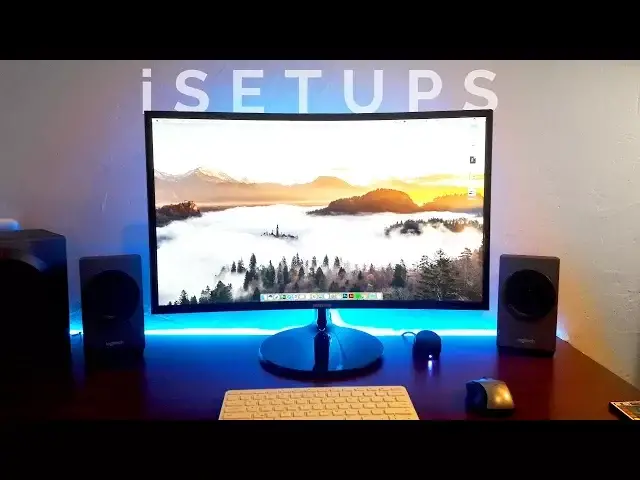
that is cut out to keep his MacBook propped upright. If you looking for an upgrade estimate make sure to check out Henge Docs I done a full review which I link to in the description down below Back to a set though and his MacBook is hooked up to a 27 Samsung LCF H curve display which he recently just picked up
4:42
For his speakers, he's using the Logitech Z-337 system, which actually has Bluetooth built-in
4:48
They can get super easy to grab his MacBook and run when he needs to take it to college
4:52
In the corner there, we can also see his headphones of choice, which are the beats solo 2s
4:57
As peripherals, he's using a Logitech M505 mouse along with a white anchor keyboard, which
5:02
actually looks a little bit out of place next to the silver and black theme he's got going on here
5:06
I'd personally switched that out for something like the Logitech Easy Switch K-811, which would
5:10
keep with the Logitech theme, or the pricey but very Apple-esque Mateus Space Grade keyboard
5:16
Around the back of the desk, he's got some LED strips that nicely highlight the desk
5:19
You know I'm a fan of these, and they really make the setup pop
5:23
Overall it's a great setup, and if a gun was held to my head, the only things I'd change
5:26
at the keyboard and again maybe adding some artwork onto the wall. Still keeping it clean, but adding
5:31
one or two more focal points. Great setup though, Esteban. Well, that's it for this episode
5:37
of iSetups. But let me know in the comments section down below, which of this week's submissions
5:40
was your favourite. Also, if you'd like to submit yours, all the details of how to do so are in the
5:45
description just beneath this video. If you're enjoying the series, go ahead and like and share
5:49
The more people we get watching, the more submissions will get. And make sure to hit that
5:53
subscribe button and that little notifications one, so you can stay up to you
5:56
date with the latest videos from Cult of Mac. I'll catch you in the next one
#TV & Video
#Online Video
#Computer Hardware
#Desktop Computers
#Laptops & Notebooks
#Consumer Electronics