Up next in 10



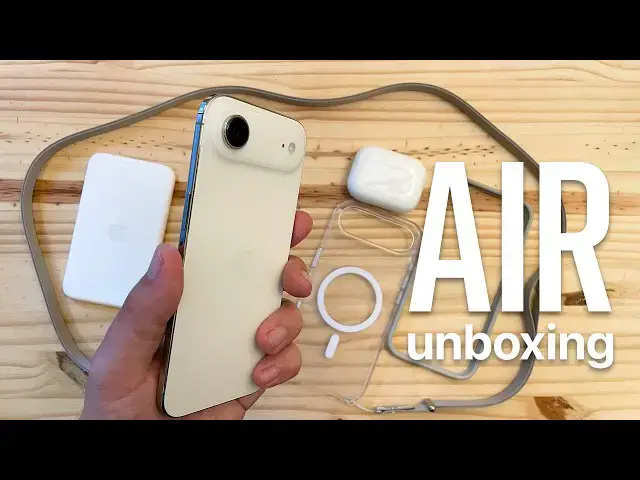
Unboxing and first impressions of the #iPhoneAir with its Bumper case, clear case, MagSafe battery, #AirPods Pro 3… and one more thing!
Produced by Extra Ordinary for Cult of Mac
Music composed by Will Davenport, arranged by D. Griffin Jones
Chapters:
0:00 iPhone Air
2:20 Bumper case
3:50 Clear case
4:27 Crossbody strap
4:59 MagSafe battery
6:01 AirPods Pro 3
7:20 Overall impressions
8:15 One more thing…
Follow us!
Threads: https://www.threads.net/@cultofmac
Mastodon: https://mastodon.social/@cultofmac
Instagram: https://instagram.com/cultofmac/
X: https://x.com/cultofmac
Show More Show Less View Video Transcript
0:02
Good evening. The day has finally come
0:04
because we are today going to be
0:06
unboxing the iPhone Air, the iPhone
0:10
cross body strap, the iPhone clear case,
0:13
the iPhone Air bumper, the iPhone Air
0:16
battery, and for posterity, AirPods Pro
0:20
3. Without further ado, let's jump right
0:23
into it. I should say I have touched the
0:27
iPhone 17 Pro. I have not touched an
0:30
iPhone air yet. This is going to be my
0:32
first reaction to it. Here we go.
0:38
Holy.
0:43
That is pretty insane.
0:46
That is
0:49
That is ridiculously thin. I can't
0:52
really describe how insanely thin that
0:55
is. Jesus. It's like a credit card. Can
0:59
you guess which color I ordered? This is
1:01
supposed to be the gold color. Not
1:05
especially gold looking if I do say so
1:08
myself. Kind of looks silver. This needs
1:12
to be held to be believed. That is just
1:14
insane. Okay, so I have a few points of
1:16
reference here compared to the iPhone 4
1:21
compared to the current iPhone 16 Pro. I
1:24
mean, just look at that. one of the
1:27
thinnest phones before the iPhone 7
1:29
Plus. I was worried the bigger size
1:33
would mean it would be harder to hold in
1:35
the hand. Holding my iPhone 16 Pro in
1:37
the hand, I mean, it's so thick my arms
1:38
my hands have to wrap around it. This
1:42
I've got room to spare. You know, I've
1:44
got to I've still got to adjust my grip,
1:45
but you know, my phone my thumb can
1:47
reach almost to the opposite side again
1:49
on a bigger screen. If you like big
1:51
screens, you don't really have to
1:53
sacrifice your one-handed ability. But,
1:55
you know, that edge is just so thin and
1:58
so barely gold that it's almost hard to
2:00
tell. You can see the camera plateau is
2:01
all shiny and reflective. It feels a lot
2:04
tackier than the than the bottom and the
2:06
rest of the phone. And I feel like if
2:07
the whole thing was tackier, it might be
2:09
easier to hold in a hand. Hello.
2:12
When I was holding it in my hands
2:14
two-handed, you just feel like the
2:16
thinnest edge just like running across
2:18
your hand. Let's look at some of our
2:20
accessories. Starting with the bumper.
2:26
tan color. Pretty thin. Still has the
2:29
pass through camera control sensor
2:32
there. Okay. Just squeeze in. The last
2:35
corner is a little hard to do, but so
2:36
you lose some of the thin feeling in
2:38
your hand because it does add a little
2:41
bulk around the edge, but you do still
2:43
feel how thin it is, you know, wrapping
2:46
your hand around the back and touching
2:48
the screen. The dramatic feeling in the
2:50
palm of your hand is a little lost. Also
2:52
annoying about this case, the camera
2:55
plateau and the camera lens still
2:58
protrudes.
3:00
So even with the bumper case, it still
3:03
rocks on the surface of a table.
3:06
Not great. Honestly, I was kind of
3:08
hoping that Apple would have a design
3:10
that sort of gets thicker around the top
3:12
and still protects the plateau, but uh I
3:14
guess they they really wanted that
3:16
uniform bumper even more than that. So,
3:19
in that case, I don't really see why
3:21
anybody will buy this case because the
3:24
people who want to go caseless aren't
3:26
going to be satisfied because it's so
3:28
thick around the edge, but the people
3:30
who want phone protection aren't going
3:31
to be satisfied because it still exposes
3:34
the most important part of the phone. I
3:37
mean, not only do you have your one and
3:38
only camera on the back, but literally
3:41
all of the phone components of the phone
3:44
are in this plateau up here on the back.
3:48
it's not going to feel protected. I
3:50
think I'm actually going to like this
3:51
one more. So, this is the clear case.
3:55
This case covers the entire surface of
3:56
the back phone, but it actually is
3:59
thinner as well. You can see the uh
4:02
bottom surface there adds just very
4:05
small amounts of thickness to it. And
4:07
it's actually, you know, more protective
4:10
because it protects the rear camera
4:13
plateau, the lens itself. it no longer
4:16
sticks out. The iPhone 6, 6S, and 7 were
4:20
among the thinnest phones Apple had ever
4:21
made until the iPhone Air, but put an
4:24
iPhone Air in a case, and it's still
4:26
thinner. Now, we will try the crossbody
4:29
strap. All right, we've got directions.
4:34
And then we have these two tabs here. I
4:37
imagine I probably have to take the case
4:38
off to do this. This takes a lot of
4:40
dexterity.
4:42
There we go.
4:44
put it through
4:47
and click.
4:49
So, this isn't going to be the uh you
4:51
know take on and off willy-nilly. This
4:53
is very much install on your favorite
4:55
case. Okay. So, we will carry that on
4:59
and we will unbox the iPhone Air Mag
5:02
Safe battery.
5:04
Thin light
5:07
USBC port on the bottom. It's got a very
5:10
soft texture to it on the back and the
5:13
front. Little impossible to read gray
5:15
text there. Very nice in the hand. I
5:18
love the feeling of this. And we'll just
5:20
stick it on. Pretty substantial in the
5:23
hand now that I've got all the
5:24
accessories on it at once. The battery,
5:26
the case, the strap. But, you know, now
5:29
we've doubled the battery life of this
5:30
phone. Let's see what it's like without
5:32
the case. With the battery,
5:36
that's not so bad. Still a little heavy,
5:39
but not bad overall. I believe we just
5:41
figured out today that the battery
5:43
that's inside the MagSafe battery is
5:47
actually the very same part of the
5:50
battery that goes inside the phone. So,
5:52
you are literally just doubling your
5:53
battery life when you buy this MagSafe
5:55
battery. And of course, when you have
5:56
the battery pack on the phone, the
5:57
camera no longer touches the table. Rock
6:00
solid. So, while we're at it, we'll take
6:02
a look at these AirPods. Obviously, I
6:04
can't set them up while the other phones
6:06
are doing their thing, but we can at
6:08
least get them out of the box, see how
6:10
they look. And here we go.
6:16
And here we have our other tips,
6:19
as in ear tips. We have a lanyard strap
6:23
on these as well, USBC port, and uh
6:27
speakers. The case no longer has a
6:29
button on it. It's all capacitive, so
6:31
you just got to double tap to connect to
6:33
other devices. You can stick it on a
6:36
MagSafe charger, Apple Watch charger, or
6:39
just plug it in. A few points about the
6:40
case. The case isn't any smaller than
6:43
the previous one. In fact, it's actually
6:45
slightly larger than the AirPods Pro 2,
6:49
and it has less battery inside. The
6:52
previous case would get you up to 30
6:54
hours total. Now, it only gets you up to
6:57
24. They put less battery in it. Uh, but
6:59
that does mean that it's less heavy, the
7:01
overall package. And the earbuds
7:03
themselves do have more battery life
7:04
than before. They now get 8 hours on a
7:08
charge if you have noise cancelling on
7:11
as opposed to just 6 hours on a charge.
7:15
You know, with less battery in the case,
7:16
that is less time overall. You win some,
7:19
you lose some. So, there we have it.
7:20
First impressions. iPhone Air. Super
7:23
light, super comfortable in the hand.
7:25
Mindblowing. You have to go to an Apple
7:27
store and hold this. It's fantastic. I
7:30
guess it's worth noting the iPhone Air
7:32
has pretty much the same battery life as
7:34
the iPhone 16 Pro according to Apple.
7:36
So, you really might not need the
7:38
MagSafe battery, but if you do and you
7:40
want to double your all day battery
7:42
life, get a combined 40 hours. It's what
7:45
you got to do. It's pretty heavy
7:47
overall, but it is a very nice product.
7:50
Clear case, I think this is the way to
7:51
go. It covers and protects the whole
7:53
phone. It doesn't make it feel very big,
7:56
honestly, because I mean, look how thin
7:58
it is on the back. Cross body strap,
8:00
pretty slick. A little fiddly to set up,
8:02
but I think a lot of people will enjoy
8:04
it. The bumper case I really wanted to
8:07
like, but honestly, it seems to be the
8:08
worst of both worlds. It makes the phone
8:11
feel thick in the hand and it doesn't
8:13
protect the whole phone. But, as you
8:14
know, this is not Apple's first bumper
8:16
case. I do have one more thing to unbox
8:19
today. I found a new old stock iPhone 4
8:25
bumper case that I'm going to take a
8:27
look at for comparison today. Comes in
8:28
this form fitting plastic case with a
8:30
little cardboard sleeve on the back. So,
8:32
we're just going to pop this off here.
8:38
Rubber and plastic construction.
8:41
Click it in here. So, times have
8:43
obviously changed since this original
8:45
bumper case. You can see uniform
8:48
thickness all the way around. But of
8:49
course, the phone had uniform thickness
8:51
all the way around. You know, that pin
8:53
prick there on the corner is the camera
8:55
as opposed to uh this. That's what 15
8:58
years will do. Metal buttons on the edge
9:00
of the case. Very nice, very clicky
9:02
round circular buttons and a metal power
9:06
button on top. Feel nice in the hand.
9:09
The new bumper case doesn't have metal
9:12
buttons. It's just got, you know,
9:14
plastic
9:16
all the way around. Does not live up to
9:18
its grandfather in that regard. So,
9:21
there we go. That's the full unboxing of
9:23
the iPhone Air and all its accessories.
9:25
Remember to like and subscribe and hype
9:27
this video. I will have a full review of
9:30
the iPhone Air next week on this very
9:31
same channel. I'm Driffin Jones with
9:34
Cult of Mac.