Up next in 10



More Apple news: http://www.cultofmac.com
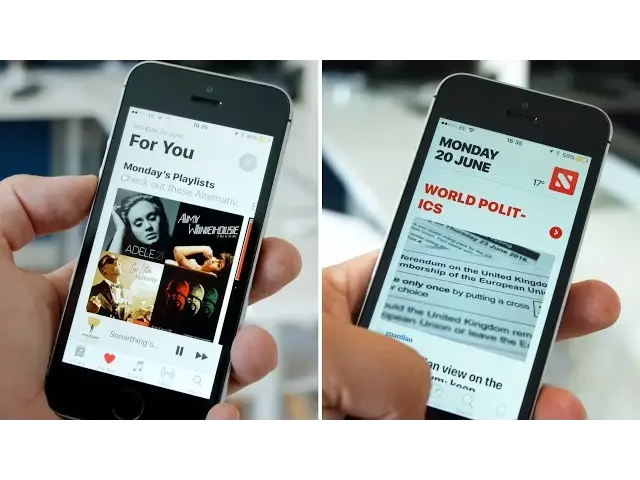
Updates for macOS, tvOS, watchOS and iOS were all announced at 2016’s WWDC keynote, but within iOS 10 there’s also much-needed design updates for both the iOS music and news app.
Follow us!
Twitter: https://twitter.com/cultofmac
Facebook: https://www.facebook.com/cultofmac
Instagram: https://instagram.com/cultofmac/
Show More Show Less View Video Transcript
0:00
Updates for Mac OS, TV OS, Watch OS and iOS were all announced at 2016's WWDC keynote
0:09
But within iOS 10, there's also much needed design updates for both the music and news apps
0:14
The big update brings huge changes to Apple Music's user interface, as well as minor improvements
0:19
to navigation. Now, when you open up Apple Music, you're taken straight to the library tab where you'll
0:24
find your playlists, artists, albums and so on. An edit button at the top right allows you to customise and select which category options
0:31
you'd like to see within the library tab. At the bottom of the screen, there's a section of large album artwork I've recently added
0:37
music down below, making it easier than ever to check out your latest albums
0:42
Going into any of the categories at the top takes you into your full library of content
0:47
with a cleaner user interface concentrating more on album artwork. New 3D touch options let you delete songs or add them to a playlist
0:54
The new menu even shows up for non-3D touch users with a simple long press
0:59
The now playing screen is more gorgeous than ever, with a focus on album artwork
1:03
The clean interface removes the back button, allowing you to swipe down to return to your library
1:08
To see what's coming next, just swipe up. 4U has gotten some big improvements to help you find new tunes
1:14
Upon entering, you'll be greeted with curated playlists Apple Music thinks you'll enjoy
1:18
as well as new releases Apple's algorithm thinks you'll love. One of the biggest changes is a brand new browse tab that replaces the old, new tab
1:25
Across the top there's new and featured banner artwork, while scrolling down shows a new
1:29
curated playlist option organised by activities, moods and genres. Apple also put a top charts option so you can see what's hot right now
1:37
The next tab along is radio, so you can find beats 1 nice and easily
1:41
Of course along with some specific beats 1 shows so you can access them on demand, as
1:46
well as a timetable of upcoming shows. Next of the big changes comes to the search tab, which is dominated by big and bold titles
1:54
You can easily find recent searches, along with trending searches below the search bar
1:58
which has had a slight design refresh, but pulls up the same categories as previously
2:03
Overall, music is a lot cleaner, concentrating on the big and bold titles and album artwork
2:09
Now onto news. The app that I've barely ever opened, although in iOS 10 it is a lot nicer and more useful
2:17
Apple announced a surprising 60 million monthly active users, so the new redesign will probably
2:21
be welcomed by many. Opening up the new and improved Apple News app starts with the For You tab
2:27
Again following suit of the Apple Music redesign, everything is cleaner and bolder, with the
2:32
top portion of the app displaying the days date along with current temperature
2:36
The layout is a lot easier to navigate, reminding me a little bit of Flipboard
2:40
Scrolling down the For You tab you'll find selections of news tailored to your interests
2:44
with nice big images for the headline stories and a grid layout for any extra stories
2:50
Clicking into a story is just as pretty as before. The text is nicely presented and spaced out, again giving you the option to change the
2:57
text size in the top right. Next to For You, there's a Favourites tab with a tile view of all of your favourite
3:02
publications and categories. So if you want to read about a certain subject or from a certain publication, you've got
3:09
quick access. There's then the Explore tab to add more interests and publications to help fill out
3:14
your news reading options. Then the last two tabs, Search and Saved are pretty much the same as we've seen in the
3:19
original News app. Apple News now includes subscriptions though to help support your favourite publications
3:25
straight from within the News app, along with breaking news alerts on the lock screen, similar
3:29
to apps like BBC News already do now. With both of these apps still being in beta, we could see some further redesigns before
3:35
the general release this fall
#Music & Audio
#Music Streams & Downloads
#Consumer Electronics
#News