Up next in 10



How to find apps using CultofMac.com's App Finder tool.
Show More Show Less View Video Transcript
0:00
welcome to app tap on cult of mac app
0:03
tap is a new service that allows you to
0:05
find and share great apps for your
0:07
iphone and ipad this is a brief tutorial
0:11
to help you get the most out of your app
0:12
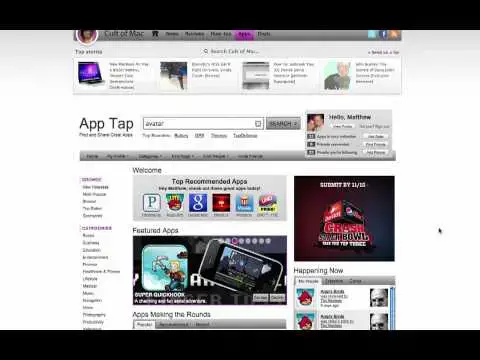
tap experience the home page of app tap
0:16
gives you a number of different ways to
0:17
find and discover apps we have a
0:20
powerful search feature you can browse
0:23
by category or you can see what the
0:26
community recommends through top
0:27
recommended apps and apps making it
0:30
round additionally in the happening now
0:34
section on the right you can see what
0:36
the community is exploring in real time
0:39
and you can see what our app gurus are
0:42
expert reviewers think of different apps
0:47
but the real power of the app tap
0:50
experience is the social discovery and
0:52
targeted recommendations features so as
0:55
a first step in getting the most out of
0:57
app tap we recommend that you join app
0:59
tap by logging in with your Facebook
1:00
account this will allow you to see your
1:03
friends apps get personalized app
1:06
recommendations and share your favorite
1:08
apps in your app collection with your
1:10
friends once you've logged into Facebook
1:15
you'll see your profile picture and your
1:17
name and several options the first thing
1:21
you want to do is add in your apps to
1:22
your collection you do that by simply
1:25
clicking the add apps button this will
1:28
prompt you to launch the app collector
1:31
the app collector will automatically
1:33
sync your iphone apps with your app tap
1:36
account once you've done that the number
1:40
of apps in your collection will display
1:42
right here the next thing you want to do
1:45
is to add your friends you do so by
1:48
clicking the fine friends button this
1:50
will find your Facebook friends that are
1:52
also on app tap I have nine friends
1:56
found and I'm following all nine of them
1:59
this allows me now to see all the apps
2:02
in my friends collections as well as any
2:05
new apps that they'll find along the way
2:08
once you're done click on done the more
2:11
friends you have on app tap the better
2:13
recommendations so we encourage you to
2:15
invite your friends at this point app
2:21
tap has the information both your
2:24
friends and the apps in your collection
2:25
to give you the best recommendations
2:27
possible now with your friends under my
2:32
people section in happening now you'll
2:35
be able to see when your friends look at
2:38
other apps what they think of those apps
2:40
and when they share those apps I
2:44
recently saw the movie avatar again and
2:47
I've heard from a friend of mine that
2:49
there was an avatar app from their
2:52
iphone I don't remember exactly what
2:55
it's called so I'm going to sit for
2:56
avatar and it's the first result the
3:03
next experiences see the app detail page
3:06
yeah detail page provides you everything
3:09
you'll need to know to make a decision
3:10
about whether or not you want to get a
3:12
nap we have videos images the
3:18
description and also reviews now I've
3:23
already rated and reviewed this app as
3:26
have two of our appt gurus you'll get a
3:29
brief overview of what they thought of
3:32
the app as well as access to the full
3:36
review on their website if you'd like to
3:40
share this app it's as easy as clicking
3:43
one of the share options and that gets
3:47
posted to your wall purchasing the app
3:52
is also quite easy you have three
3:54
options you can scan the QR code you can
3:58
email yourself a link and download it on
4:01
your phone or you can access the app and
4:04
download it via itunes on your home
4:07
computer
4:11
now that you've added your apps to your
4:14
collection on that tab and you've added
4:17
your friends as well as their apps the
4:21
apt App Engine is giving you the best
4:24
recommendations possible for apps for
4:26
your iPhone and your iPad now it's time
4:30
to discover apps and have fun
#Mobile & Wireless
#Mobile Apps & Add-Ons
#Online Goodies
#Social Network Apps & Add-Ons
#Photo & Video Sharing
#Photo & Image Sharing
#Social Networks
#Video Sharing