0:00
Hey, what's up guys, Stephen Cults of Mac here and in this video I'm taking a look at
0:05
the iPhone apps that Apple has crowned the 10 best of 2016
0:09
The list you see within the app store will vary depending on your country, but in this
0:13
video I'll be using the UK list, but I'll make sure to leave notes to let you know where
0:17
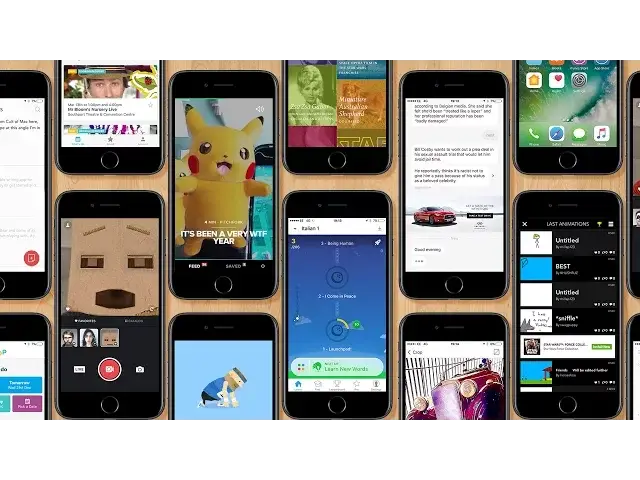
else it's also been featured, so let's get started. First up is Bear, a stunning, easy to use writing app for notes and blog posts
0:28
It's easy to see why Apple chose this app for the shortlist. Bear allows you to write beautifully in plain text or while linking up with other users
0:35
It's great for writing everything from quick notes or lists to lengthy essays and blog posts
0:40
It also features a focus mode to help you concentrate on the task at hand and is super
0:44
easy to add images. It's also packed with stunning themes and typography, but best of all you can easily
0:50
choose what type of export you need, so whether you need a simple PDF or text full of HTML
0:55
code for your blog post. Feet Sports is surprisingly the only game within the top 10 list within the UK iPhone
1:01
app store, and not only is it aimed towards kids, but it's beautifully simple
1:06
It's a multi-event sports game where you or your child plays as Feet the Sailor as you
1:10
compete through numerous sports games such as running, swimming, shot put and more
1:14
But for each sport, they're easy to get the grasp of. For example, when swimming, running and cycling, kids have to tap on the screen as fast as
1:21
they can. Where if they're able to alternate tapping between two fingers, as if they were legs
1:25
or arms, it'll make Feet go faster. It's a really nicely animated game which will keep kids, young and maybe even old entertained
1:31
for hours. If you've ever enjoyed making cartoons by drawing stick figures on a notepad and flicking
1:38
through the pages, you're going to love Folioscope, as it's pretty much the same principle
1:42
You draw out animations frame by frame within the app, seeing ghosts of your previous few
1:46
frames in the background, allowing you to trace and make smooth animations
1:50
I'm personally not the best as you can see, but some people have completely mastered this
1:54
app. Once you've completed your animation, you can upload it to Folioscope for the world to see, share it within your favourite apps or even save it as a GIF
2:04
Now I think Hoop is a UK based only app, as it's the only country it's featured on, plus
2:08
it's completely location based. But hopefully it'll expand to the states and elsewhere soon
2:13
If I'm wrong, feel free to let me know in the comments section down below. But Hoop is one of my new favourite apps, as it searches the surrounding area to your
2:19
home or your current location to see what's on for your kids
2:23
Enter your child or children's ages into the app, enter your location and Hoop will
2:28
bring up a list of great family day suggestions for you to scroll through, a majority of which
2:32
are actual decent suggestions. To me, it's a lifesaver. Next on the UK list is Hyper, which is an app I originally came across on the Apple TV
2:41
Hyper has a team of filmmakers behind it, curating a brilliant video for your viewing purposes each and every hour
2:46
If you're the type of person to have a few minutes to sit back and watch a brilliant video, Hyper is the app for you
2:52
Not only does it find videos you may never have seen without it, but the app itself is
2:55
also beautifully designed. Which can also be said for the Apple TV app, and it makes it a joy to swipe through videos
3:01
in a Tinder style fashion. This is easily one of my personal favourite apps of the year
3:06
If you've ever wanted to learn a new language but struggled, Memrise is here to help
3:10
The app teaches you any language of your choice in a quick, structured, fun and surprisingly
3:15
memorable way. The app starts off by teaching you three words a day, by reading them to you, asking you
3:20
to choose them from a list and asking you to answer questions
3:24
The fast-paced, repetitive nature adds a game element to the learning, whilst actually making
3:28
you remember the words. I've only been using it for a few days, but already I'm actually learning a little bit
3:33
of Italian. Whether it's going to make me fluent or not is still yet to be seen, but I'm definitely
3:38
having some fun along the way. Masquerade has got to be the standout app on this list, as it's one I've had hours of
3:44
fun playing with along with my daughter. Similar to the face tracking features within Snapchat, Masquerade tracks amazing animated
3:50
faces, accessories and more onto your face. Turn yourself into a hero, an animal or even a celebrity without doing a thing
3:58
It's great fun and the app works brilliantly well with a wide selection of options
4:03
Brighten up your day and give it a go. It's free. I recently covered Prisma in my best iOS photography apps video as it transforms any standard photo
4:11
into a beautiful work of art in the style of famous artists
4:15
If you'd like to see a more in depth look at Prisma, I'll make sure to leave a link to my previous video on it
4:20
But basically, unlike a lot of apps that turn images into paintings, the results from Prisma
4:24
are actually fantastic. Plus it's all done with one simple tap for each style
4:30
Quartz is a whole new way to get up to speed with the latest news. The app is designed to look like a standard messaging app, only the messages coming to
4:37
you are headlines and bite-sized news articles, which you can then choose to learn more about
4:42
in Quartz's non-formal style or click straight through to the source to find the full article
4:47
It's a great way to easily digest the most recent news and add a little fun to what can
4:52
be, in 2016 at least, a dreaded task. Last on my UK app store list is Viki, a reader for Wikipedia, which essentially rehouses Wikipedia
5:02
within a new gorgeous interface with typography that would have made Steve Jobs proud
5:06
You can swipe through the most read articles, search for a subject or check out nearby places
5:12
It's a simple yet beautiful app which, if you're constantly using Wikipedia, would definitely
5:16
come in handy. Well that's it for this video, but let me know in the comments section down below what
5:21
has been your favourite app of 2016. Also we're planning to create an end of year Cult of Mac Q&A video, so if you've got a
5:29
question for myself or any of the Cult of Mac team, tweet them to me personally at SteveSmith10
5:34
with the hashtag ComQ&A. Well until next time, if you enjoyed this video, go ahead and hit that like button and
5:41
don't forget to hit subscribe so you don't miss a single video from Cult of Mac. I'll catch you in the next one