Up next in 10



More Apple news: http://www.cultofmac.com
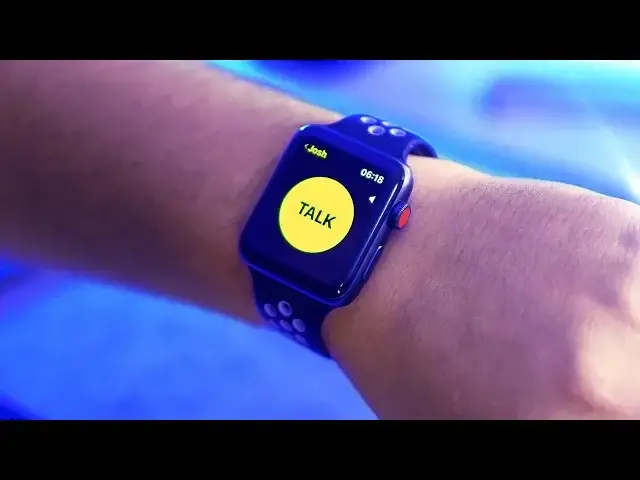
Apple has finally released Beta 2 for macOS Mojave, iOS 12 and watchOS 5. While there’s not anything all too exciting in iOS 12 and I’m still combing through Mojave, in watchOS 5 walkie-talkie mode is now fully working, so in this video, I wanted to bring you a quick hands-on look at just how it works.
Thanks to Josh for help! https://twitter.com/@jw331_
Follow us!
Twitter: https://twitter.com/cultofmac
Facebook: https://www.facebook.com/cultofmac
Instagram: https://instagram.com/cultofmac/
Show More Show Less View Video Transcript
0:00
What's up guys, Steve from Cult of Mac here and Apple has just released its second round
0:03
of betas for macOS Mojave, iOS 12 and watchOS 5 to developers
0:07
While there's nothing too interesting in iOS 12 and I'm still making my way through
0:11
macOS Mojave, in watchOS 5 beta 2, walkie talkie mode is now fully functioning
0:16
So in this video I wanted to bring you a quick hands on look and show you exactly how it works
0:21
Let's get started. Ok, so here's my Series 3 Apple Watch running watchOS 5 beta 2 and let's dive straight
0:30
into the walkie talkie app. In the first developer beta, there was a splash screen saying the feature was coming soon
0:37
You can see that here while it updates and now that the app works, it has a brief description
0:42
To use this feature, you need to have a contact who is also running watchOS 5 beta 2
0:47
If you scroll down you'll see a list of people from your contacts. Unfortunately there's no way to see whether they have an Apple Watch so you've just
0:54
got to know. But I just have to tap on a contact and then they're added to my walkie talkie list
0:59
with this nice yellow contact card. If I want to add anyone else I can just hit the plus button underneath and up top there's
1:05
an availability toggle which I'll come back to in a minute. To start chatting, tap on the person you want to communicate with and you'll get
1:12
this giant talk button which you tap and hold for the length of your message
1:18
Once you release it will automatically send to the person if you're connected. Although I don't think Nikias is awake at the time of filming this
1:24
Not to worry though as I have one of our trusty viewers Josh who was kind enough to add me so I could film this feature at 2 in the morning
1:31
Once Josh has added me, I get a pop up request which I can choose to allow or dismiss
1:35
Of course I will allow. Now I should be able to start talking straight away but we did have a few glitches to start
1:41
with which isn't surprising as this is an early beta. But after a few failed attempts..
1:47
Testing, testing, testing... It finally started to work. Hey Josh how are you
1:56
I'm doing great thanks, yeah I seem to be working pretty well
2:04
That was really quick. I'm surprised how quick you can reply, I thought there might be a bit of delay
2:11
Yeah I was actually testing this out with a buddy of mine a little bit earlier and we
2:18
were pretty surprised at how well it's working even on being available in this beta right now
2:25
It's pretty cool. The sound quality is great, especially in these short bursts
2:28
It makes much more sense than a phone call, at least it does to me
2:32
It's rare that I use my watch to make a full call but for these short walkie talkie conversations
2:36
it's great. It uses the speakers built into the Apple Watch which of course aren't the loudest but
2:42
I can hear Josh just fine and can always connect up AirPods if needed. Awesome, yeah it's pretty quick, no hiccups, the audio sounds great and yeah this is sweet
2:56
Brilliant, well thanks a lot for that Josh. If I exit the app you can see there's a little yellow icon up top which shows up on every
3:02
watch face which you can use to quickly enter the walkie talkie app
3:06
If you need to turn the walkie talkie app off you can tap the availability toggle I mentioned earlier and it also removes the icon from the watch face
3:13
To become available again just head back into the app and toggle it on or tap on one of
3:17
your contacts. After just initially using the app I already love it
3:22
Especially how quick it is, it's more fun than a text and makes a ton more sense than a phone call
3:26
I'm already thinking of different uses for it, for example I think this could be super
3:30
handy to a film crew on set. Overall it's a really nice feature that still has some bugs to work out but the main downfall
3:37
for me and I suspect a lot of other people is having enough friends with an Apple watch
3:41
It could be super handy if this feature also worked on iOS but I am super thankful to Josh
3:46
for being kind enough to step in so I could show this feature off
3:51
Well that's it for this video but let me know your thoughts on walkie talkie mode in the
3:54
comments section down below. Do you think it should make it's way over to iOS so you can use it whether you've got
3:59
an Apple watch or not? Let me know your thoughts, I would love to hear them
4:03
Also if you enjoyed this video please hit that like button, subscribe if you haven't already and I'll catch you in the next one
#Consumer Electronics
#Consumer Electronics
#Voice & Video Chat
#Technology News