Top stories

A New Kind Of Heist: Six Apps For Free

Those crazy MacHeisters are at it again, and this time the deal is even harder to resist.
The first ever MacHeist Nano won’t cost you a penny. You can download, without charge, fully licensed copies of ShoveBox, WriteRoom, Twitterific, TinyGrab, and Hordes of Orcs. If 500,000 people take part (which I think is a pretty safe [...]

Getting More iPhone Home Screens – And Keeping Them

A couple of weeks back, I wrote Temporarily Get More iPhone Home Screens Via Cunning Bug Exploit, but had heard staying away from the iTunes Applications tab within my iPhone was probably a Very Good Idea. Reader Larry Pressnell noted that since the most recent iTunes update, his extra screens have been accessible in iTunes.
Since [...]

Cult of Mac Favorite: MobileStacks Is the Best Reason To Jailbreak. Period.

I really like Stacks on my Mac. Stacks makes it fast and easy to find files, folders and apps right from the Dock. It makes managing a Mac pretty slick with all sorts of little UI tricks. That’s why I recently gave MobileStack a go on my jailbroken iPhone.
I must say that it lives up to the [...]

Gallery: Behind the Scenes From Two Classic Apple TV Ads

Is this Steve Jobs driving a tank in a classic Apple TV spot from the late 1990s? That was the rumor at the time: Jobs was making cameos in Apple commercials.
Ken Segall, the TBWA ad man responsible for naming the iMac and Think Different, reveals the truth after the jump. He also shares some rare [...]

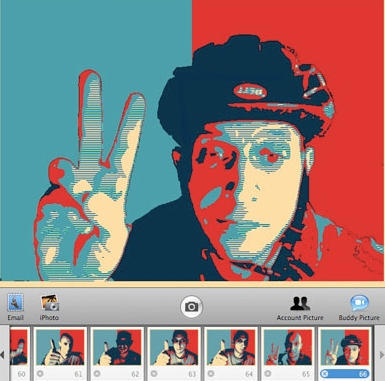
Yes You Can: Obamafy Yourself With Photo Booth Plug-In

If you liked the red-white-and-blue look of the Barack Obama “Hope” poster designed by street artist gone viral Shepard Fairey, Dubi Kaufmann has made a plug-in for Photo Booth that allows you to “Obamafy” your photos.

With over 4,450 downloads and counting, just about any photo you pop into it will take on iconic status. Still, Obamafying yourself won’t get you elected. As Kaufmann says, the free app is “an exercise in pop culture and is not part of any campaign nor it is an endorsement for either candidate.”

Download zip file here, then expand it. Copy the file Obamafy.qtz to /Library/Compositions, then launch Photo Booth and enjoy the Obamafy plugin.

Via Tech Side Up

About the author

nicole_martinelli

Nicole Martinelli was born in San Francisco and has lived in Milan and Florence, Italy. Cultish tendencies and love for DIY increased while living on the Old Continent, where tech came late and cost more in Big Mac index terms. She's written for Wired.com, The New York Times and Newsweek, and since 1999 on her site, Zoomata. If you're so inclined, friend her on Facebook.

Email the author | Read more posts by Nicole Martinelli.

23 comments

    how do you make this work in tiger?

    [...] ett plugin till Photo Booth. Om du gillar Obamas Hope-poster är detta absolut någonting för dig! Ladda ner Obamafy här. Extrahera filer och lägg den i: Macintosh HD-Bibliotek-Kompositioner. Sen är det bara att starta [...]

    [...] | Cult of Mac Enviar [...]

    [...] Cult of Mac Like this post? Click here to be the first to know when the next one [...]

    [...] Yes You Can: Obamafy Yourself With Photo Booth Plug-In. addthis_url = ‘http%3A%2F%2Ffabrikade.sg%2Findex.php%3Fmain_page%3Dblog%26p%3D335′; addthis_title = ‘Design+and+T-shirt+Links+from+2008-11-24+to+2008-11-29′; addthis_pub = ”; [...]

    [...] Yes You Can: Obamafy Yourself With Photo Booth Plug-In. addthis_url = ‘http%3A%2F%2Ffabrikade.sg%2Findex.php%3Fmain_page%3Dblog%26p%3D335′; addthis_title = ‘Design+and+T-shirt+Links+from+2008-11-24+to+2008-11-29′; addthis_pub = ”; [...]

    Is there a Flickr group?

    Are Photobooth plugins Photoshop compatible? Or is there a photoshop plugin?

    [...] limit it to the powerful few copycats? Andrew Sullivan followed up his original post with news of a plug-in that allows you to “Obamafy” your very own self. Go ahead, get red, white, blue, and [...]

    The name is misleading. The powerful poster of President Obama was the distinct creation of Shepard Fairey. This plug-in should be called the Fairey “Obama Hope” plug-in, or something that incorporates the artist’s name.

    I see McCain has gotten into the act too! LOL http://angrymccainsticker.com

    Thank you for writing about my pop culture experiment.

    dubista asked “how do you make this work in tiger?” -no.

    Robert asked “Is there a Flickr group?” -not yet.

    Susan Kitchens asked “Are Photobooth plugins Photoshop compatible? Or is there a photoshop plugin?” – Photobooth plugins are not Photoshop compatible and I did not make a photoshop plugin.

    Bill said that “The name is misleading. The powerful poster of President Obama was the distinct creation of Shepard Fairey. This plug-in should be called the Fairey “Obama Hope” plug-in, or something that incorporates the artist’s name.” -That would be long and confusing. I mention and link to shepard Fairey’s site.

    Cute! I can add one in my outgoing mail.

    socialist

    [...] if you do have a Mac running Leopard (OSX 10.5) try this, or if not, and you’re running Adobe Flash version 10 go here.  [...]

    [...] if you do have a Mac running Leopard (OSX 10.5) try this, or if not, and you’re running Adobe Flash version 10 go here.  [...]

    [...] can Obamaize yourself. If you are a Mac user and have a Photo Booth application you can download a plug-in effect. I used Photo Booth and my Mac Book Pro to create my portrait. If you are an Adobe [...]

    [...] was an instant campaign meme, spawning Sarah Palin versions and a DIY Photobooth application. In fact, a version of the piece is already in the permanent collection of Washington’s [...]

    This did not work for me. I put the file into the Composition folder and started up Photo Booth, but do not see the effect. Is there anything else you have to do? I expected it to be in the 3rd “tab” after the strecth, squeeze, etc effects.

    What am I missing?
