Top stories

A New Kind Of Heist: Six Apps For Free

Those crazy MacHeisters are at it again, and this time the deal is even harder to resist.
The first ever MacHeist Nano won’t cost you a penny. You can download, without charge, fully licensed copies of ShoveBox, WriteRoom, Twitterific, TinyGrab, and Hordes of Orcs. If 500,000 people take part (which I think is a pretty safe [...]

Getting More iPhone Home Screens – And Keeping Them

A couple of weeks back, I wrote Temporarily Get More iPhone Home Screens Via Cunning Bug Exploit, but had heard staying away from the iTunes Applications tab within my iPhone was probably a Very Good Idea. Reader Larry Pressnell noted that since the most recent iTunes update, his extra screens have been accessible in iTunes.
Since [...]

Cult of Mac Favorite: MobileStacks Is the Best Reason To Jailbreak. Period.

I really like Stacks on my Mac. Stacks makes it fast and easy to find files, folders and apps right from the Dock. It makes managing a Mac pretty slick with all sorts of little UI tricks. That’s why I recently gave MobileStack a go on my jailbroken iPhone.
I must say that it lives up to the [...]

Gallery: Behind the Scenes From Two Classic Apple TV Ads

Is this Steve Jobs driving a tank in a classic Apple TV spot from the late 1990s? That was the rumor at the time: Jobs was making cameos in Apple commercials.
Ken Segall, the TBWA ad man responsible for naming the iMac and Think Different, reveals the truth after the jump. He also shares some rare [...]

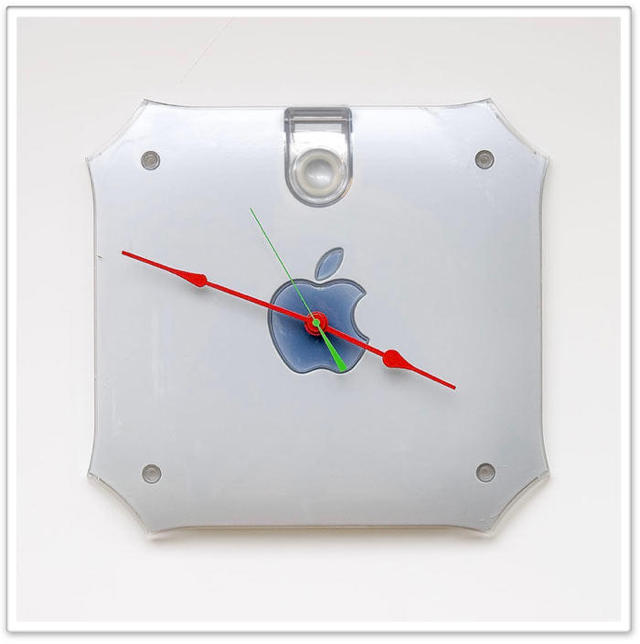
Turn Your Dead PowerMac G4 into a Wall Clock

g4_clock.jpg

Can you think of another company whose outdated and obsolete products get repurposed as art pieces even a fraction as often as do those from Apple?

How about a late 20th century PowerMac G4, which, as a 10 year-old desktop might possibly still be good enough to run your elementary school children’s games and learning software, but for all practical purposes is probably better suited as the inspiration for a wall clock to remind you, time after time, how gear Apple cool is.

At a mere $60, these may not last long and you should look into turning your own dusty G4 into a DIY project.

[iPhoneSavior]

About the author

Lonnie Lazar

Lonnie Lazar is a writer, musician, web designer attorney. He writes about Apple for Cult of Mac and Mac|Life, and about VoIP and telecommunications for Voxilla. Follow Lonnie on Twitter @LonnieLazar, join the Cult of Mac on Facebook, and find Lonnie's photos on Flickr.

Email the author | Read more posts by Lonnie Lazar.

5 comments

    My PowerMac G4 systems are still running just fine. Run great with Tiger.

    I’d rather turn my old my old G4 into a media server.1 G4 Gigabit+1Sata card+1 2TB Sata HD+leopard install = 1media server.

    Those hands! My God… those hands!

    I still have a Quicksilver G4 that gets use for light (but reliable) video editing, photoshopping and web browsing, and know people that have souped-up ones for AE rendering and as media servers. Not bad for a 10-year-old ‘obsolete’ machine, eh?

    Got rid of the G4 when I got my MacPro, still got a working G3 Blue and White, but can’t bring myself to trash it. Will be trawling e-bay for some spares and repair G4’s though.

