I’ve spent a week or so playing around with the beta release of Picasa for Mac, and here are some thoughts.
-
– It’s FAST. It does a superb job of pulling in your iPhoto collection in no time at all. Scrolling through it all is much faster than similar scrolling in iPhoto itself.
-
– It’s considerate. It makes a point of co-existing with iPhoto, and asks nicely for your permission before making a copy of an image that’s being edited. As a consequence, it means people can try Picasa out without worrying about damage to their iPhoto database.
-
– It finds your photos without fuss. Start it up, and it pokes around in all the usual places (and any other places you instruct it to poke in), looking for new pictures. These then get neatly added to the archive.
-
– It does things my mum will love. The collages, the integration with Picasa Web Albums – these are features I have little interest in myself, but my mum (who has never got on well with iPhoto) will love them.
-
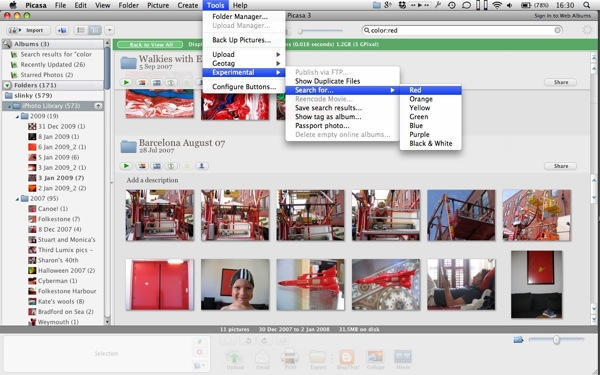
– I like the the color searches (as shown in the photo above). Ask it to find “red” stuff and it will. Great for collages, photo books, or artistic projects.
Naturally, as with any beta, there are going to be some teething problems. One bug I’ve noticed is that right-clicking on an image and selecting “Move to (named) album” doesn’t work. And Picasa does seem to take a loooooong time to look through the images already on the camera, and decide if they are duplicates or not. But it does get there in the end.
Beta status or not, Picasa offers a decent alternative for photo management for people who don’t want to spend the kind of money required for Aperture or Lightroom.



14 responses to “Things I Like About Picasa For Mac”
At last! I just can’t work with iPhoto, any ideas when Picasa will be formally released?
If you seriously need softwares like Aperture or Lightroom but can’t afford them, Picasa won’t be of any help.
Not the same league.
The speed of Picasa alone is enough to make me love it.
How come Google can do this and Apple cant?
The app could really use some form of color management…
@James Frazer: Don’t wait for an official release. Picasa for Mac is good enough now. Google leaves the “beta” tag on products way too long.
I do have one question that someone may be able to answer. Does the Mac version not include pictures in subfolders, when a folder is added to Picasa? I use Picasa on Ubuntu (a decent Wine-port of the Windows version), all I have to do is add a folder, and all the pictures in subfolders show up. Not so in the Mac version. Am I missing a preference or something?
Things I don’t like about Picasa for Mac: no PowerPC version.
Still, I’m glad it’s there for when I upgrade.
Things I don’t like about Picasa: it works on the original files, it finds all files on system even where you don’t want it to, and the quality of PNGs (I use iPhoto to manage drawings as well) that come out in the web galleries is really poor.