Top stories

Apple Devotes Entire Home Page To Jerome York Obituary

20100318-york.jpg

If ever you needed a sign that Apple was a different kind of technology company, this is it.
What other computer manufacturer would remove its top-selling, hype-inducing, industry-altering new product from the prime spot on its website home page, and replace it with an obituary to an investor?
This is one of those “Here’s to the [...]

Coming Soon: Steve Jobs, the Sitcom

Fake Steve creator Dan Lyons just signed a deal to bring Steve Jobs to another small screen near you.
The half-hour series called “iCon” is billed by the presser as “a savage satire centering on a fictional Silicon Valley CEO whose ego is a study in power and greed.”
Making sure the barbs prick will be the [...]

What’s Next For the iPad? A Tabletop iPad, According to Xerox PARC Circa 1991

Way back in 1991, just as Apple was transitioning from 68k to PowerPC chips, the braniacs at Xerox PARC were predicting it’s entire iPod, iPhone and iPad strategy. And next up for the iPad is a blackboard-sized device.
Nearly 20 years ago, just as personal desktop computers were taking off, researchers at Xerox started thinking about [...]

iPhone App Arms Users With Silent Panic Button

A new app called Silent Bodyguard features a panic button that sends an SOS distress signal with GPS coordinates to potential rescuers without alerting onlookers.
While the $3.99 app, available on iTunes, isn’t the first ICE (in case of emergency) app, this one is backed by Dr. Clint Van Zandt, former FBI chief hostage negotiator and criminal [...]

Tether Your iPhone Today, For Free, Without Jailbreaking It

Picture 56(2).png

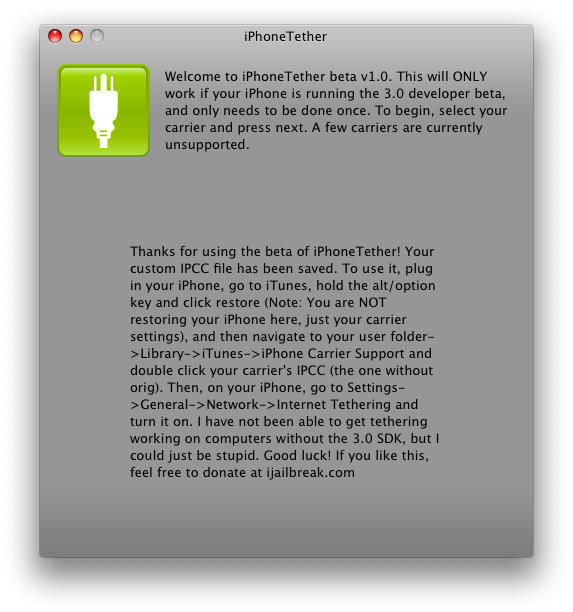
Despite the great hue and cry that arose Monday in the wake of the news that AT&T will not be among the 22 worldwide carriers to support tethering when iPhone 3.0 debuts, a wonderfully snarky how-to from 9to5 Mac spells out step-by-step instructions for getting your tether on today, for free, regardless of whether AT&T wants you to, without jailbreaking your iPhone.

In fact, the process only works with un-jailbroken iPhones legitimately registered for service with AT&T in the US.

Two important things you need to be aware of before you consider sticking it to the AT&T man:

1. You have to be running iPhone OS 3.0, which, obviously, has not been released officially but which is widely available if you know where to look. A very good place to start would be right here.

2. You have to be running the very first pre-release version of iTunes 8.2, which is more difficult to get ahold of but, depending on just how deep your enmity for AT&T runs, is also out there hiding in plain view.

Beyond that, it’s just a matter of refusing to accept the proposition that you can’t do anything you want to do with something you’ve bought and paid for just because a couple major corporations don’t want you to feel so empowered.

As with anything satisfying in Life, there are risks, but to those who are willing to bear them go the richest rewards.

See 9to5 Mac for further details.

If you enjoyed this article:
Subscribe via RSS or email, or follow us on Facebook and Twitter

About the author

Lonnie Lazar

Lonnie Lazar is a writer, musician, web designer attorney. He writes about Apple for Cult of Mac and Mac|Life, and about VoIP and telecommunications for Voxilla. Follow Lonnie on Twitter @LonnieLazar, join the Cult of Mac on Facebook, and find Lonnie's photos on Flickr.

Email the author | Read more posts by Lonnie Lazar.

One comment

    Worked like a charm but tip – don’t need pre-release anything. Use final release iTunes but enter “defaults write com.apple.iTunes carrier-testing -bool TRUE” (no quotes) into terminal with iTunes closed. Open iTunes and have iPhone plugged-in. Option-click “Check for Updates”. Select the tether file from the instructions and that’s it. Setup your iPhone as a bluetooth device and it’ll discover the PAN functionality. Once setup, click the bluetooth menu, select your iphone and click “Connect to Network”.

    I was getting roughly 1.5 down & .5 up via bluetooth on initial tests.

Add your comment

Name(Required)

Mail (required, but not published)

Website

Comment

Buy Inside Steve's Brain Buy from Amazon.com Buy from Barnes & Noble

