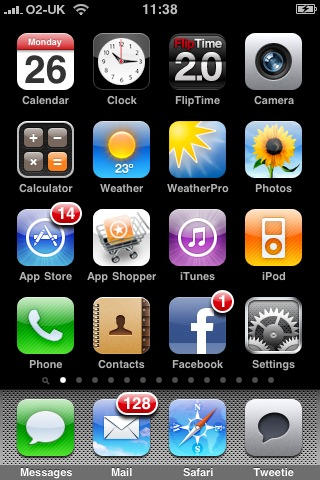
Temporarily Get More iPhone Home Screens Via Cunning Bug Exploit
11:23 am, October 26th, 2009, Craig Grannell

More than the default number of home screens, via a bug exploit.
As I noted a couple of weeks ago, I want a way to view all my iPhone apps on my iPhone, not just through iTunes. I review lots of iPhone apps and am a keen iPhone gamer. When apps vanish into the void, I forget they’re there (and so Spotlight isn’t much use), and it’s absurd that I can only delete apps in the void when using iTunes. I should be able to do this with just the device.
On Twitter earlier today, I said “iPhone now has 14 pages of apps (via cunning bug exploitation); time to do a major ‘review and delete’ session,” and people have asked me how I did this. Hat tippage must go to British games journo Stuart Campbell and web dev Dayanah, who independently discovered the exploit I now use, although the process of how to take advantage of it appears variable. In my case, it’s roughly as follows:
- Ensure the device’s home screens are all totally full, and that Voice Memos is the last app on the final one.
- Drag an app from one screen to the next, thereby ‘bumping’ Voice Memos into the void.
- Download an app to fill the space left from app-dragging in step 2.
Voice Memos, irked at being bumped, should now make its way back to your first home screen, and you should have a brand-new second page. If you’re lucky, the new page will also include apps previously in the void. If not, reboot and these things will happen. Rinse and repeat the process to get more pages.
One warning: this is only a temporary solution. Open your device in iTunes and select then the Applications tab and your extra pages will probably vanish. In my experience, the same happens during a sync. However, as a means of accessing ‘hidden’ apps between syncs, it’s better than nothing, until Apple gets its finger out of its butt and finally provides a means of viewing more than an arbitrary number of apps on its mobile devices.

Posted by Craig Grannell in Apple, How tos, iPhone 3G S, iPhone Apps | Comment on this article


I think what Apple should do is create a constant scroll that is independent of each other for each of the four lines. So instead of having a set number of “pages” there can be a set number of apps per line and you can swipe left or right on each line and it’s like a loop of the apps. If that makes any sense? Also, instead of holding down on an app to be able to delete it, set them for double tapping and put in the settings the ability to delete without having to select “no thanks” to rate the app (too time consuming)…
Erica, on October 26th, 2009 at 12:21 pm
Or just jailbreak your iphone and use Categories. I only have 3 pages currently but probably would have 10 or 11 without Categories
Jason, on October 26th, 2009 at 12:35 pm
… or Jailbreak your iPhone and install “Categories”
MidWest Doc, on October 26th, 2009 at 1:30 pm
Sorry, this isn’t really related, but I’m interested in that App Shopper app that appears on the screenshot of your iPhone. I searched for it in the App Store (Canada) and could find it. Do you know the name of the developer? Thanks
Kris Loewen, on October 26th, 2009 at 1:39 pm
@Kris—Sorry, but it’s just a web-page shortcut that I made in Safari.
Craig Grannell, on October 26th, 2009 at 1:58 pm
Thank you
I appreciate the article!
Kris Loewen, on October 26th, 2009 at 3:29 pm
Good article!
1) Realize that even if you can’t “see” one of your installed games when you have more games than pages, it is still there with all of your hard earned stats and or saves right where you last left off (assuming the game can save on exit). The only downside being that you can only access the apps by the Search function.
2) As long as you avoid the new iTunes new “Applications” tab of Sync, I’ve managed to continue to sync my device fine without losing my extra pages.
3) The combined sad fact of two above points is that NOW if I want to delete an app on my iPod touch that isn’t showing up on one of my pages (I’ve got some 20 pages now and still have too many apps installed) I have no way to delete it.
LordGek, on October 26th, 2009 at 3:43 pm
There is no way that you need that many apps.
Jack, on October 27th, 2009 at 1:55 am
@Jack: Why not? The apps are plentiful and the games are cheap. When I had a C64, I had hundreds of games. I have a similar number for more modern systems also. If Apple’s trying to push the iPod touch as a premier gaming platform, it needs to enable people to easily access in a tactile manner whatever they have installed on their systems.
Or, to put it another way: imagine if you could only find what was on your Mac via Spotlight, aside from the first 120 or so items. You’d go nuts.
Craig Grannell, on October 27th, 2009 at 4:40 am
Why do we have to go through this sort of stupidity? Why doesn’t the iPhone have an infinite number of screens? Or the ability to put similar apps into folders, so that they can be accessed easily?
Why does Apple use a serial interface so often? Why does it make us scroll and scroll and scroll to get were we are going, instead of just making things a tap or two away?
The entire serial access paradigm is horrible, and is not scalable. It sucks.
Try accessing your Zappa albums in coverflow. If you have 10 albums, it’s adequete. If you have 1000 albums, it is useless.
Same thing with Springboard. If you have 10 apps, it works OK. With 100, it is horrible.
iGenius, on November 3rd, 2009 at 1:37 pm
I used this trick to get over 20 screens (and it seems I can do more, I just got sick of the process, as it took over an hour to do). In fact there are more screens on my iPhone now than there is room for dots at the bottom (see flickr links below). Overall though, it seems to take forever to boot now and the phone seems slightly more sluggish, though that could just be the 380 apps I have installed. I can see why Apple limited it to 11 screens. But I agree with iGenius, the serial method is NOT working. I like the folders idea, and Categories is one more reason I am tempted to jailbreak my phone.
I also found that I can access the Applications tab of my phone in iTunes and keep the screens, but as soon as I resort anything, it goes back to default.
http://www.flickr.com/photos/9563501@N08/4074162478/
http://www.flickr.com/photos/9563501@N08/4073403415/
kb, on November 3rd, 2009 at 10:16 pm
I found this page trying to figure out why I could only get 11 screens on my ‘less than a month old’ iPod Touch. I’ve been trying to keep apps organised by categories on different pages.
This limitation seems pretty stupid to me.
I’d rather just have the search screen with a big long list of apps and the ability to type the first few characters of the name, like in quicksilver or the vista/7 start menu.
One of the reason’s I have so many apps is that I am evaluating stuff, I have many free/lite versions and even some duplicate paid programs (i’ve bought several PDF readers looking for a good one and they all suck).
We need an app lanucher app to replace apple’s dismal interface.
CascadeHush, on November 12th, 2009 at 6:33 am
