All items tagged with "utilities"

Apple Changes Its Mind, Lets DragonDrop Into Mac App Store

Apple Changes Its Mind, Lets DragonDrop Into Mac App Store

Where it belongs... DragonDrop in the Mac App Store

Apple has changed its mind about DragonDrop, the file moving utility that we reviewed here a few weeks ago, and granted the app a place in the Mac App Store after initially saying it would never back down.

Read the rest of this post »

Voice Dictation Works Well On Older iPhones [Review]

Voice Dictation Works Well On Older iPhones [Review]

Record, transcribe, send text on your older iPhone

Voice Dication, or Voice Dictation – Voice To SMS, Email, Facebook, Twitter And Other Apps to give it its full name, is a voice control app from Europe, designed to offer something vaguely Siri-like to those of us still stuck in the Dark Ages on our pre-4S iPhones.

Does it work? Well yes, actually it does. Better than expected.

Read the rest of this post »

Find and Use Hidden Files More Easily with InvisibliX [OS X Tips]

Find and Use Hidden Files More Easily with InvisibliX [OS X Tips]

Mac OS X hides files in many ways. One way, a holdover from its Unix legacy, is with dot-files. In other words, if a file is named with a period before the file name (.Hiddenfile), that file will not show up in the Finder. One way to show these files is with a Terminal command like this:

defaults write com.apple.Finder AppleShowAllFiles YES

This works all well and fine, but requires a second trip to the Terminal to reverse it (by changing the YES to NO, natch). Today, we’re going to tip you off to an app that does something similar, yet without the need to hop into Terminal.

Read the rest of this post »

TinkerTool Is A Useful Pocket Knife For Tweaking Your Mac’s Hidden Controls [50 Mac Essentials #50]

Tinkertool icon

TinkerTool is the Swiss Army knife you need for your Mac.

With its blades you can activate – or deactivate – all sorts of features that are normally hidden from view.

Read the rest of this post »

Create Folder Structures in Seconds With This Free Mac App [50 Mac Essentials #37]

Structurer icon

Structurer is a clever free tool for rapidly creating file and folder trees without any messing about in Finder.

Read the rest of this post »

Subscribe to the Cultcast

50 Mac Essentials #30: Notify

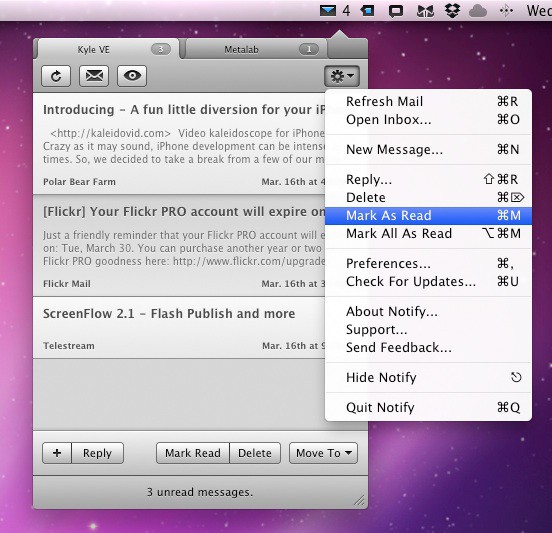
Notify for OS X

If you use Gmail, MobileMe, or a standard IMAP email account, you might enjoy the seductive unobtrusive behavior of Notify, which does quite a lot more than simply notify you of new messages.

That’s its most basic function, and in that it does the same job that many of its rivals do for free.

But Notify offers so much more, to the point where it’s very nearly a replacement email client – but one that sits out of the way in your Menu Bar.


Read the rest of this post »

50 Mac Essentials #23: Hazel

Hazel logo

Hazel is software genius. It’s one of those tools that looks so simple to start with, but after a while, you realise just how powerful and flexible it could be.

Read the rest of this post »