Citing sources “familiar with the matter,” a new report suggests Apple will launch its new lineup of iMacs tomorrow, May 3rd, featuring Intel’s newest family of Sandy Bridge processors, and the company’s high-speed Thunderbolt port in place of the current Mini DisplayPort.
Apple has recently been taking steps to ensure a smooth roll-out of the new iMacs, according to the same sources, who apparently continue to provide accurate information when it comes to Apple’s plans, says the AppleInsider report. One confirmed that a “visual night” is scheduled for the early morning hours of May 3rd, “so it is highly likely that whatever new product that is going to be refreshed or introduced will be done on [that day].”
A “visual night” is when several Apple retail employees are called in to work throughout the evening and into the early hours of the morning to make changes to store layouts, often removing old products to make room for new ones.
Previous reports have already speculated that Apple was getting ready for the imminent launch of updated iMacs, and stock of the current generation all-in-one is slowly diminishing. The last time the iMac family was updated was some 9 months ago.
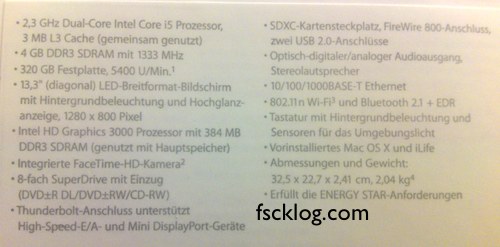
Fscklog has just posted a photo of what they believe are the specs to the new 13-inch MacBook Pro, which should be due out any day now.
Here are the specs, translated from German
• 2.3Ghz Sandy Bridge Dual-Core Intel Core i5 Processor with a 3MB L3 Cache
• 4GB of DDR3 RAM clocked at 1333MHz
• A 320GB hard drive
• a 13.3-inch diagonal LED backlit display with a 1280×800 pixel resolution.
• Intel HD Graphics 3000 with 384MB of DDR3 RAM.
• An integrated FaceTime-HD camera
• An 8x Superdrive
• Two USB 2 ports, an SD card reader, FireWire 800, a MiniDisplay Port, Ethernet and, most interestingly, Thunderbolt port (this is very possibly the Apple-branded implementation of Light Peak we’ve been hearing about).
Overall? It seems the 13-inch model is not the radical re-imagining we’ve been hearing about for the last few days. It’s not made of Liquid Metal, there’s no SSD and the new MBP has an identical chassis design to the old model. Short of the new Thunderbolt port and the leap to Sandy Bridge, these aren’t markedly different than the last generation of 13-inch MBPs. That said, the 13-incher is the entry-level MBP model. Perhaps Apple has something more radical afoot for the 15- and 17-inch models.
After the jump, a look at the new MacBook Pro’s marketing materials and a close-up view of the Thunderbolt port.
Apple has delayed shipping MacBook Pros on its online store for 3-5 business days… delaying the earliest day you can have a MacBook Pro shipped to you to well-ahead of the rumored Thursday launch of the next-gen MacBook Pros. Given how religious Apple’s Tim Cook is about supply, this has all the markings of an official MacBook Pro refresh.
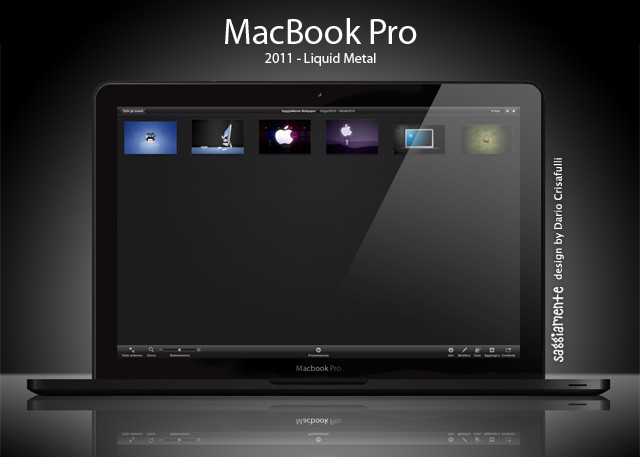
2011 MacBook Pro mockup by designer Dario Crisafulli.
It’s new MacBook Pros next Thursday February 24, according to MacRumors, citing a “reliable” source.
We’ve since heard reliable confirmation that this information is accurate and that the expected release date is next Thursday, February 24th. The move would be a bit unusual for Apple to launch new machines on a Thursday. So, if you are about to buy a new MacBook Pro, wait until next week.
MacBooks were last updated a year ago with Intel Core i5 and i7 chips. The new machines are likely to get Intel’s latest Sandy Bridge processors, which are faster and a lot less power hungry. Rumors that the machines will have cases made of Liquidmetal are unlikely, but they will probably will be lighter, thinner and have higher-resolution screens. A big price drop is predicted too.
Apple’s said to be releasing five new models, which will include two new 13-inch versions, two new 15-inch versions and one new 17-inch version.
Yesterday, Intel announced a massive hardware recall that surely stopped the hearts of a few investors: the Cougar Point chipset used for their cutting-edge Sandy Bridge CPU had a hardware bug that caused the SATA 3GB/s port to degrade over time, potentially harming hard drives and other devices connected to it.
All things considered, it’s not actually a huge issue. Intel expects that over 3 years of use it would see a failure rate of approximately 5 – 15% depending on usage model. Still, at the end of the day, Intel expects to spend a billion dollars recalling and replacing the chipset. Oof.
The good news, of course, is that a Mac owner, this won’t affect your current system a whit: there aren’t any Macs available with Sandy Bridge just yet. Here’s the bad news, though. That imminent imminent Sandy Bridge MacBook Pro refresh? That might get delayed.
Short of an official announcement from Apple, it’s anyone’s guess whether or not Apple’s next-generation desktops and notebooks will use Intel’s recently unveiled Sandy Bridge architecture… but even if Cupertino defies expectations and sits this CPU gen out, don’t sweat it: you’ll at least be able to put yourself together a Sandy Bridge Hackintosh.
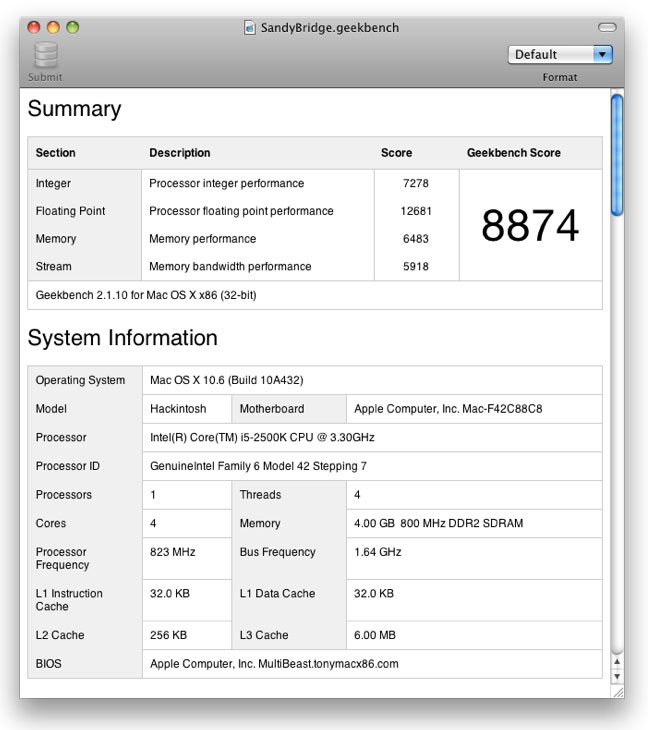
With remarkable alacrity, hackers with early access to Sandy Bridge wasted little time upon the lapse of Intel’s non-disclosure agreement to install Mac OS X on a Sandy Bridge processor, pushing Snow Leopard onto a machine running the new Intel Core i5-2500K CPU running at 3.30GHz.
How’d it run? Not as well as it will once OS X officially supports Sandy Bridge: a Geekbench score of 8874 and an Xbench score of 282.40. As it is, the hackers needed to patch the kernel to even get Snow Leopard to boot. Still, if there was any doubt, the benchmark scores do make it pretty clear that when Snow Leopard starts supporting Sandy Bridge, we’ll all be looking at the fastest Macs yet.
A couple weeks ago, one of my friends brought me a new MacBook Air from the States, and as he delivered it to me, he — a die-hard Windows user — eloquently endorsed Apple’s sexy new, razor thin ultraportable by noting that as far as was concerned, “using this laptop is what living in the future feels like” and that “I’ll definitely buy one, because this computer will get you laid.”
He’s not an exception: I’ve turned more Windows-loving heads with the new MacBook Air than any other laptop I’ve ever owned. It looks like makers of Windows PCs have noticed the same thing, because Acer, Asus and Lenovo are all set to ape the MacBook Air’s incredible design.