All items tagged with "do not disturb"

Luna Enables ‘Do Not Disturb’ With A Quick Swipe On The iPhone’s Lockscreen [Jailbreak]

Luna jbtweak

I often forget that the Do Not Disturb toggle in iOS 6 exists. It’s a great feature for quickly shutting out the noise, but the problem is that you have to open the Settings app to enable. Do Not Disturb feels like something that should immediately accessible.

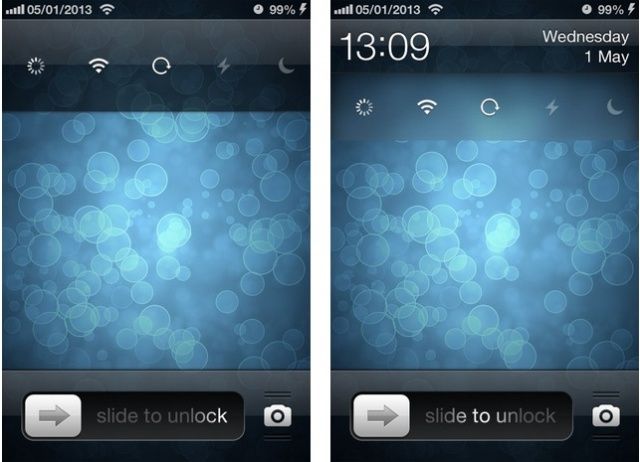
Luna is a new jailbreak tweak based on a concept we showed you at the beginning of the year. From the iPhone’s lockscreen, pull down on the time to enable Do Not Disturb. Pull down again to disable. It’s that simple.

I don’t use Do Not Disturb that often, but this tweak makes toggling it on and off incredibly fluid. When you want the notifications to stop pouring in, just swipe on the lockscreen. Genius.

Luna is available in Cydia now for $2.

Auxo Update Brings New Toggles, Flashlight Improvements & More [Jailbreak]

new-auxo-toggles

Auxo, a popular jailbreak tweak that supercharges your multitasking tray, has been updated to version 1.4-2. The latest release adds a number of new toggles, including one for Do Not Disturb, and makes improvements to the flashlight and respring toggles. It also carries a number of bug fixes.

Read the rest of this post »

Heavy-Duty Do Not Disturb iPhone App ‘Call Bliss’ Adds Blacklist, Maps

call-bliss-4

Call Bliss is an app with its own, industrial-strength take on the iPhone’s newish Do Not Disturb feature. It takes Apple’s basic concept — blocking calls with the flick of a switch, or only letting through calls from selected contacts — and infuses it with management features and more powerful options. And now the app adds two more tricks.

Read the rest of this post »

Upcoming Tweak Brings A Do Not Disturb Toggle To Your Lock Screen [Jailbreak]

Flusterless-Screenshots-1024x903

If you don’t want your iPhone to disturb you during the night, or while you’re in a meeting, you can either stick it on silent and let it vibrate and annoy everyone, or you can use Apple’s awesome Do Not Disturb feature and block incoming notifications altogether.

Flusterless, an upcoming tweak for jailbroken iPhones, will make using Do Not Disturb quicker and easier by adding a handy toggle to your lock screen.

Read the rest of this post »

Schedule Do Not Disturb On Your Mac To Stay Focused [OS X Tips]

Do Not Disturb

I love Do Not Disturb on my iPhone. I’ve got it scheduled to activate at 8 pm each night, and de-activate at 7 am every morning. That way, all except the most important things get to bother me when I’m with my family, in bed, and sleeping.

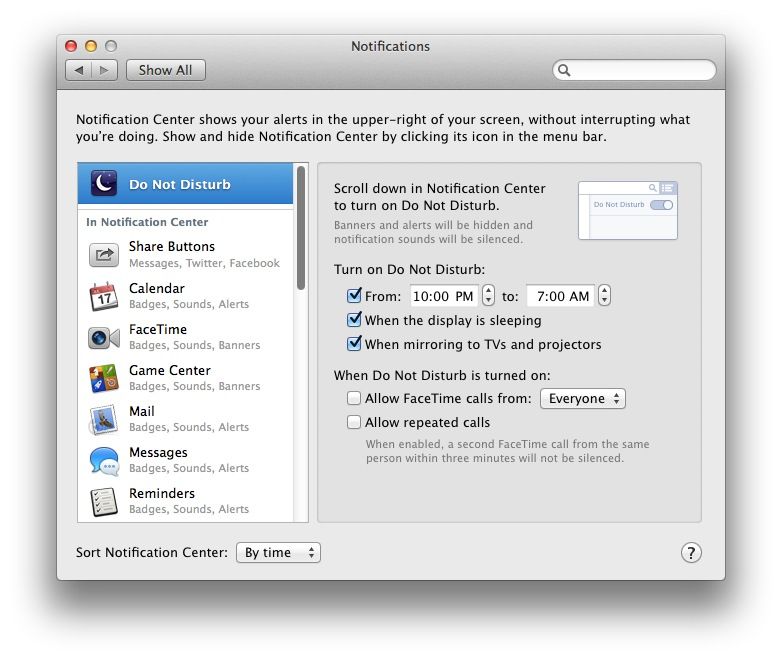
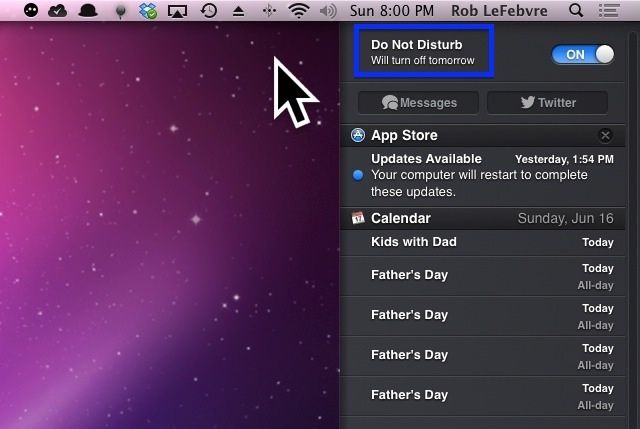
Mac OS X has a Do Not Disturb feature, as well, but it has to be manually activated at the top of the Notification Center by toggling the Show Alerts and Banners button to OFF. Wouldn’t it be cool if you could schedule it to turn off and on at specific times? The Automator script for Calendar below will do just that.

Read the rest of this post »

Subscribe to the Cultcast

Apple Should Turn This Lock Screen Concept Into A Reality For iOS 7 [Video]

iPhone-lock-screen-concept

The iOS lock screen is a boring place. It displays the time, any notifications you’ve received since you last unlocked your device, and a shortcut to the Camera app. But that’s it. When you compare it to Android’s lock screen, which now has support for all kinds of cool widgets, it’s clear there’s room for improvement.

One way Apple could start improving it for iOS 7 is with this awesome concept from Jean-Marc Denis.

Read the rest of this post »

Auxo Designer Reinvents iOS’s Do Not Disturb Feature [Concept]

Sentry-Do-Not-Disturb-concept

Sentry, a designer famous for the awesome Auxo tweak that overhauls the multitasking tray on jailbroken iOS devices, has today published a new concept that reinvents the Do Not Disturb feature that Apple introduced to iOS 6. He doesn’t change the feature itself, he just changes the way it’s activated to make it super quick and simple.

Read the rest of this post »

Why Apple’s Do Not Disturb Feature Won’t Work Properly Until January 7

Do Not Disturb on. Even when you don't want it to be.

Do Not Disturb on. Even when you don’t want it to be.

As I’m sure you’re already aware by now, the Do Not Disturb feature Apple debuted with iOS 6 stopped working as it should on Tuesday as the world turned over into 2013. While it has no problem activating itself when it’s told to, it doesn’t understand when it should shut off, meaning users must do it manually or they’ll miss their notifications.

Apple’s promised that the feature will automatically fix itself on January 7, but why did it stop working in the first place? And why will it suddenly start working as it should on Monday? Well, it seems Apple has trouble when it comes to date and time handling.

Read the rest of this post »

Apple’s New iPhone 5 Ad Showcases Do Not Disturb… The Day After It Stops Working [Video]

Apple’s New iPhone 5 Ad Showcases Do Not Disturb… The Day After It Stops Working [Video]

Do Not Disturb on. Even when you don’t want it to be.

Apple has posted a brand new iPhone 5 ad to YouTube called “Dream.” Featuring tennis stars Venus and Serena Williams, it humorously promotes the Do Not Disturb feature that Apple introduced with iOS 6. However, Apple could have picked a better time to publish it. The clip comes a day after iPhones switched over to 2013 and the Do Not Disturb feature stopped working properly.

Read the rest of this post »

Bug Prevents iOS ‘Do Not Disturb’ From Switching Off On New Year’s Day

Bug Prevents iOS ‘Do Not Disturb’ From Switching Off On New Year’s Day

If you had to get up early on January 1st, I hope you used the built-in Clock app to set your iOS alarm; otherwise you may have spent an unintentional extra few hours in bed. Why? Because the Do Not Disturb feature of iOS 6 switched on as usual on the last day of 2012, and then stayed on.

Many users of Do Not Disturb report that the feature didn’t switch itself off yesterday morning.

Read the rest of this post »