Top stories

Journalists Cover Microsoft, Using Macs

It’s not an easy time for Microsoft — with Steve Ballmer having to field questions about being “buffoons” and an “evil empire”  at the shareholder’s meeting (.doc) — so when they get together “the world’s most influential technology pundits and online writers” (nb: we weren’t invited) for Mobius to discuss super-secret mobile tech you’d think [...]

Guide To Black Friday Apple Bargains: Cheap MacBooks, iPods and Accessories Galore

Here’s a guide for finding the best bargains on Apple-related gear during the infamous Black Friday sales on November 27. We’ve compiled a comprehensive list of gear from leaked photos of sales flyers and descriptions of sales.
The bargains include a 2.26 GHz MacBook + $150 gift card at Best Buy for $999.99 ; a 32GB [...]

Review: Voices Is Today’s Best Thing Ever, Grab It Now While It’s Cheap

New on the App Store is Voices from the clever folk at Tap Tap Tap. You can guess what it does.

Open it up, pick a silly voice. Helium is pretty silly. A microphone appears and the app even clears your throat for you (try it, you’ll see what I mean). Now speak your brains, and [...]

Review: Sony Walkman S540 Series Video MP3 Player

Press releases, you will hardly be surprised to hear, are rarely very interesting. But one arrived in my inbox a couple of weeks ago that made me double-take.
“Sony’s S Series Walkman,” it chattered, “is a serious challenger to the iPod Nano.” Gosh, really? Perhaps the Cult had better have a look at one, then, despite [...]

Share Your iPhone Apps Widget Sadly Not Made of Magic Beans

Less exciting than the app in our dreams.

Less exciting than the app in my dreams.

There are two things that really piss me off about iPhone… Actually, that’s a huge lie. There are loads of things that piss me off about iPhone, but two things in particular make me want to HULK SMASH. The first is that you can’t back-up individual app data. Delete Peggle from your iPhone, reinstall and you have to start from scratch. Clearly, whoever decided on that gem went to ‘cheapskate DS games without battery back-up’ school.

The other issue is that it’s a major pain in the arse (or ass, if you’re American) to rearrange apps on your device’s home screens. The current ‘drag everything about’ system was clearly designed for hardware where it wasn’t possible to download fifty billion apps. And although Spotlight in OS X iPhone 3.0 enables you to find apps within the mess, you shouldn’t be using text-based searching to find apps on such a tactile, touch-based system.

What we’d like to see is this:

If you can’t be bothered to watch that, it shows an iTunes interface for dragging and dropping apps about, the organisation of which would then sync with the device itself. Rumours suggest this functionality might appear in iTunes 9, but I remember similar things being promised before.

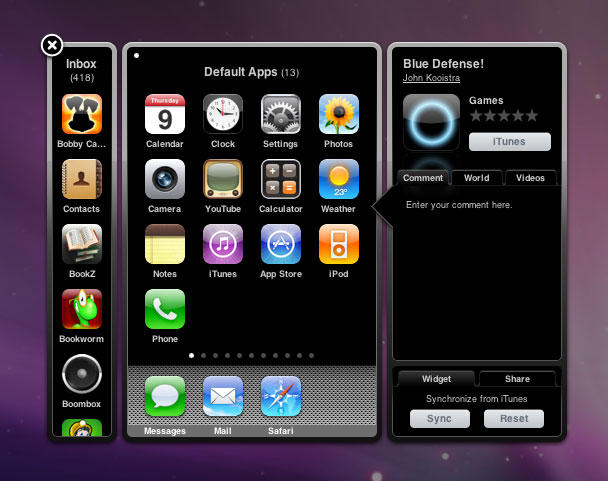
A press release I received this morning about ShareAppScreen made me hope that someone had somehow managed this, outside of Cupertino. I was hoping for magic beans: someone to have figured out how to rearrange iPhone screens using a widget. What I got was baked beans—a widget that’s awkward to use and that doesn’t realise that different iPhones actually have different apps pre-installed. And when you’re done, it can share your screens with your friends, but not with your device, sadly.

Overall, it’s better than using something like Photoshop for testing app arrangements, but other than that, it’s a case of ‘roll on iTunes 9′.

About the author

Craig Grannell

Craig Grannell is Cult of Mac's designer and an occasional contributor. He also runs iPhoneTiny.com, a Twitter-driven reviews site for iPhone apps and games. Follow Craig on Twitter @CraigGrannell and visit his website, Snub Communications.

Email the author | Read more posts by Craig Grannell.

3 comments

    Old complaints are old.

    Oh please not in iTunes 9!!

    what you’re pointing out is that the iphone has outgrown syncing through a music app. I sincerely hope Apple takes some of the bloat out of iTunes and gives us more features in isync.

    I have hoped for this iTunes feature as well. I would add a request to be able to title each page of Apps.

Add your comment

Name(Required)

Mail (required, but not published)

Website

Comment

Buy Inside Steve's Brain Buy from Amazon.com Buy from Barnes & Noble

