Review: 27-Inch iMac, The World’s Sexiest Desktop Just Got Sexier
4:57 pm, October 31st, 2009, Leander Kahney

The sexiest all-in-one computer has long been the iMac, and last year’s 24-inch model was a beauty. But oh my Lord, the new 27-inch machine induces crazy lust. Look at the size of that screen!
I just returned from the Apple store with one. I went to buy the new Magic Mouse. They were out of stock, so I bought the new iMac instead — it comes with a Magic Mouse.
Crazy, I know. I just couldn’t help myself. We’ve already got a 24-inch model, but the 27-inch is so much… bigger.
Yeah, like 3-inches of extra screen makes a difference. But it does. The screen is simply HUGE. There’s no other word for it. If you’re sitting right in front of it, hunched over the keyboard, you have to physically MOVE YOUR HEAD to look from one corner to the other. You get motion sickness if there’s video playing, like being in the front seats of a movie theater.
Thanks to this big beautiful screen, the sexiest desktop in the world got a lot sexier. The question is though: is the screen too big?
Full review after the jump, including real-world benchmarks and tons of pics.

The Screen
Like Apple says, the iMac has always been a great idea. All-in-computers make a lot of sense, especially in the home, where space is at a premium and good looks count.
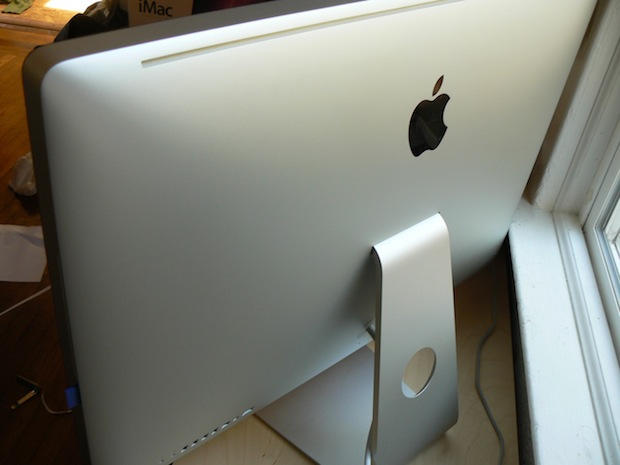
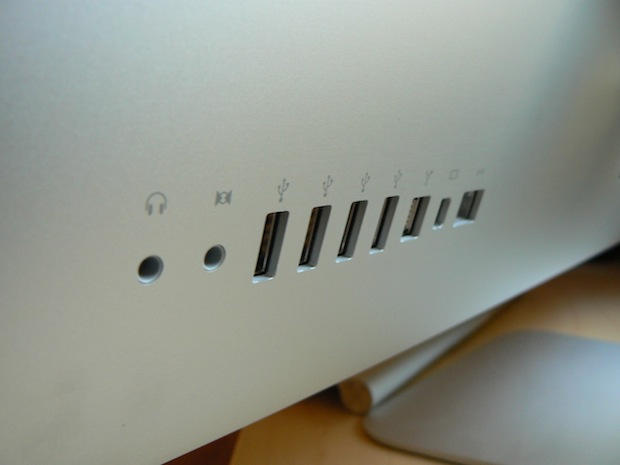
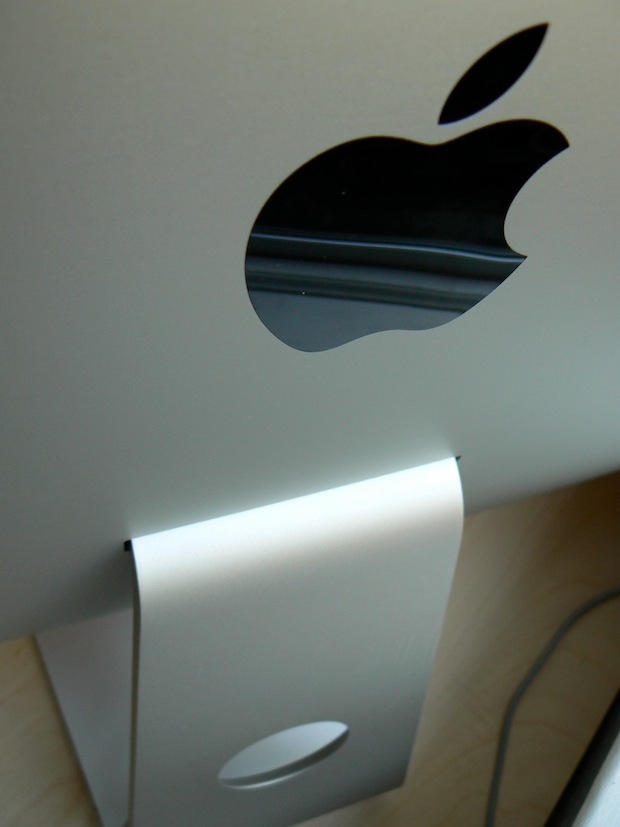
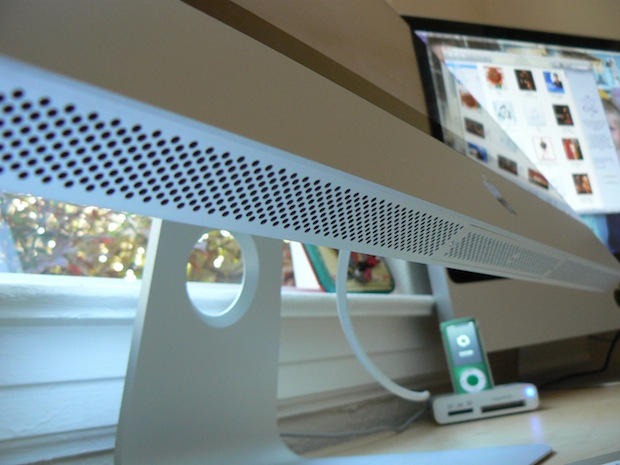
The new iMac is certainly good looking. Even the back is good looking. The black plastic of last year’s models has been replaced by one big sheet of plain brushed aluminum. It’s split only by a cooling vent at the top and a line of ports at bottom left. It’s so big, Apple reportedly had to go to car manufacturers to get it made.

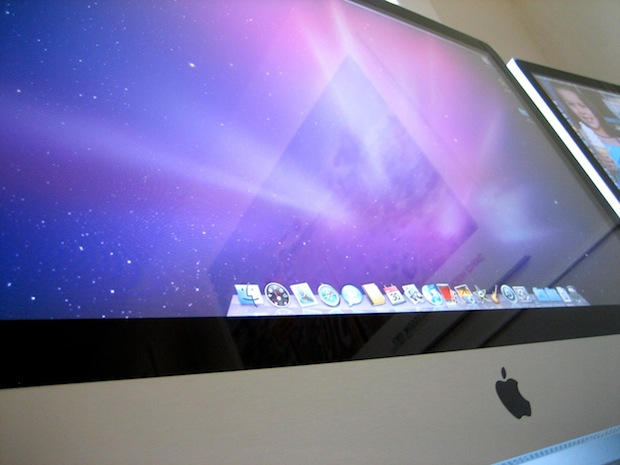
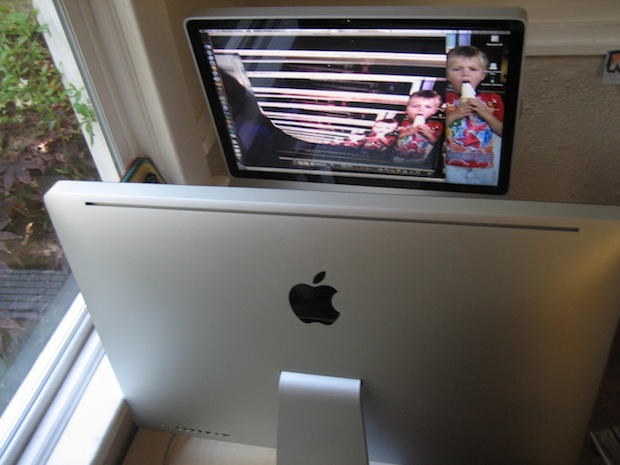
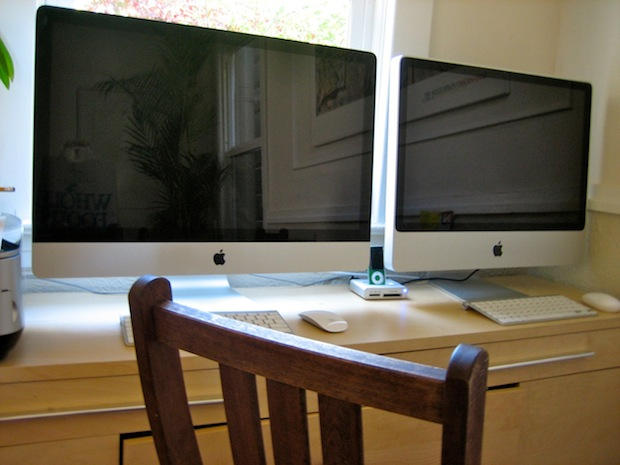
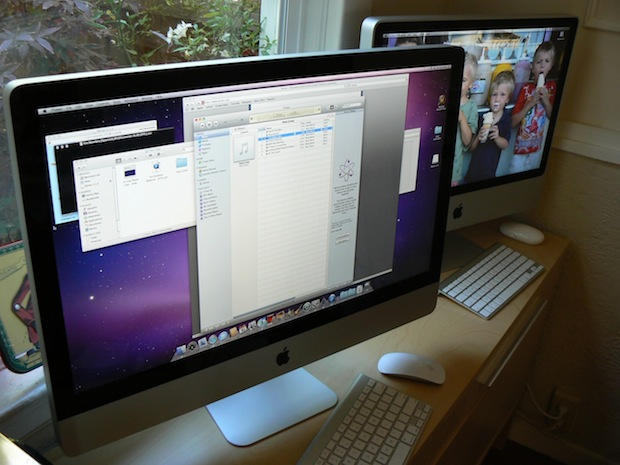
The 27-inch iMac in front of a 24-inch iMac. The angle is deceiving: the new iMac is not twice the size.
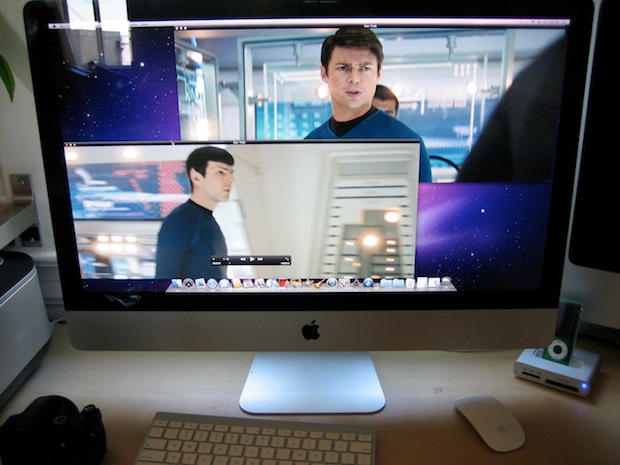
Although the 27-inch iMac is a computer, it’s designed for watching high-definition video. This is a big-ass, internet-connected HDTV that can also send email.
It has the largest LED-backlit computer display on the market. Other all-in-ones, like HP’s TouchSmart 600, and Sony’s Vaio L, have 23-inch- and 24-inch size screens, respectively. Yeah they have Blu-Ray drives and touch screens, but they run Windows.
The 27-inch iMac screen has a 16×9 aspect ratio — the same as HD — and offers a resolution of 2,560-x-1,440 pixels. That’s much larger than HD resolution, which is 1920-x-1080.
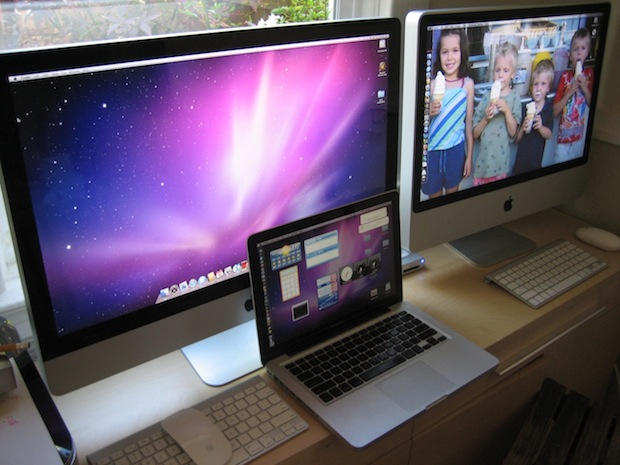
I download several HD movie trailers in 1080p and blew them up full size. They fit the screen perfectly, of course, and displayed considerably larger than the 24-inch iMac next to it, which has a 16:10 aspect ratio and putting black stripes at the top and bottom.
To watch video, you’ve actually got to sit back from this screen. Like I said, it’s too big to sit close. The screen is almost too big. It’s quite a trek with the little Mighty Mouse to move the cursor from one end of the screen to the other. It’s often three, separate mouse-lifting swipes.
The energy-friendly backlit LED throws out a lot of light. Apple boasts the screen is viewable even from extreme angles. Craning your neck to the sides, you can clearly see the picture with no difference in color or image quality. Be warned though: the screen is glossy, which may be an issue for some.
There’s no need for a dual monitor setup with this machine. There’s plenty of room onscreen to have multiple documents open at once. It easily handles two full-size windows side by side with plenty of room for background windows or a wide strip of open desktop.
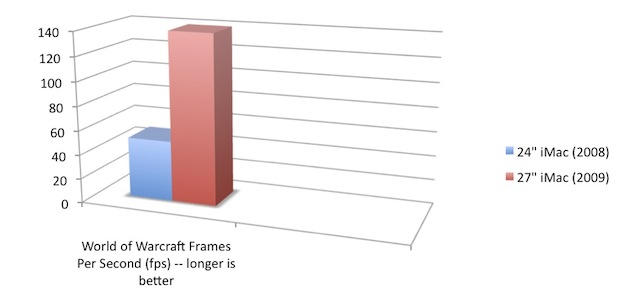
The graphics system is pretty good for a home machine. The ATI Radeon HD 4670 graphics processor (256MB of GDDR3 memory) won’t satisfy hardcore gamers, but scores very well in World of Warcraft. The new machine boasts a frame rate of about 100-140fps (max 140fps), compared to about 50fps (max 54) on the older 24-inch iMac (2.66Ghz Intel Core 2 Duo with NVIDIA GeForce 9400).
SD Card Slot and Magic Mouse
The two major new features are a very handy SD card slot and the touch-sensitive Magic Mouse.
The SD slot is a welcome addition. I use it all the time on my MacBook for offloading pictures from camera memory cards. I haven’t broken out a camera cable in months and have always hated card readers. The SD slot is very speedy on the iMac. Photos transfer in a jiffy.
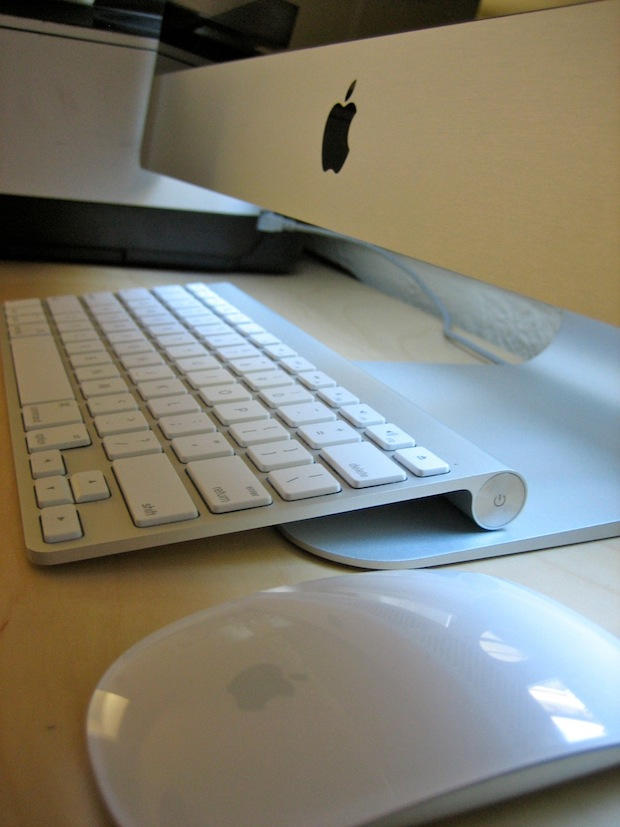
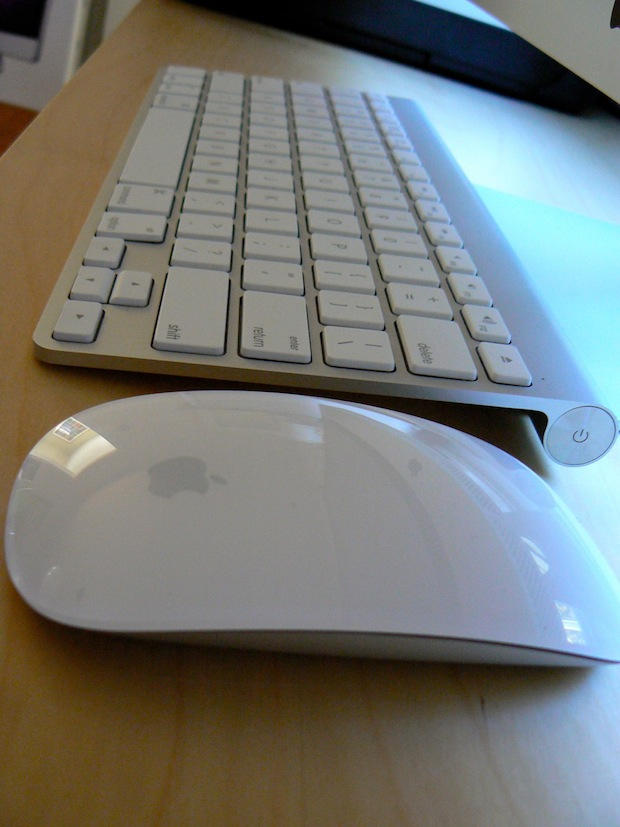
After initial misgivings, the Magic Mouse is growing on me. It was a question of ditching my old multitouch habits and learning to how to use it for what it is — a mouse. I’m starting to find it much more natural to move it around like a mouse and then scroll down windows with a swipe of a digit.
The MM’s two-button set-up works well. Not a hitch. It’s still a bit small for my hand (which is average -sized; it’s not a big a meaty paw) and is maybe a bit too light — it tends to skitter around.

Design
This shouldn’t be a surprise to anyone, but the build quality is superb. This is one well-made hunk of metal and glass. There’s nothing cheap and nasty about this machine. Like an import car, everything works with a satisfying clunk.
The built-in speakers are pretty good. They definitely make a rumble when watching a big, loud movie trailer. You can feel the vibration with your feet. Although Apple says sound has been improved, they maybe not quite as good as previous model. The older 24-inch iMac sounds bassier to my ears. I may be imagining things though.
On the back there’s 4 USB 2.0 ports, FireWire 800, audio minijack, Mini DisplayPort, Gigabit Ethernet and power — the only cable that ships with the machine.
The Mini DisplayPort can be used to hook up another video source, but DisplayPort only (such as a newer MacBook). Some have noted that the 27-inch iMac offers 90 percent of the screen real estate of Apple’s 30-inch Cinema Display — and is $100 cheaper. But whereas the Cinema Display has DVI connectors, the iMac won’t output video from any other source: VGA, DVI or HDMA.
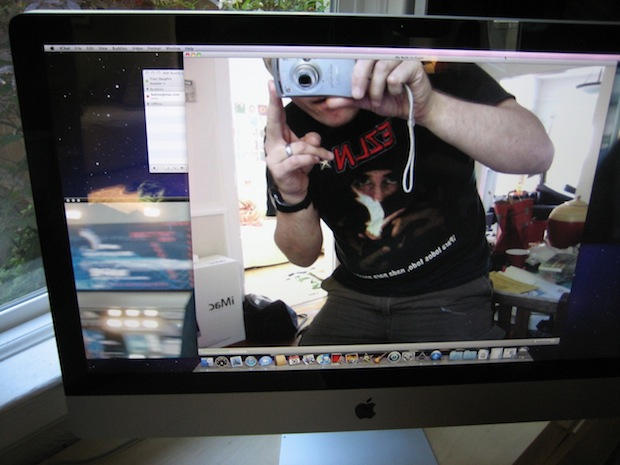
On the front there’s the iSight camera. The microphone is located on the very top of the machine — it looks like a tiny circle of minuscule pixie holes — away from the speakers so’s not to generate feedback.
The quality of video in iChat is much improved. It’s an unbelievable difference compared to the 24-inch iMac. I thought the settings must have been wrong on the old machine, like it was set to VGA resolution or something, but that wasn’t the case. The new iMac looks positively HD in comparison.
Built-in, there’s Bluetooth 2.1 (which the wireless mouse and keyboard connect to) and 802.11n Wi-Fi. The WiFi antenna has been cleverly hidden in a plastic Apple logo top center on the back. There’s some speculation that the all-metal enclosure might interfere with reception, but the signal is exactly the same as the plastic-backed iMac.
The only thing missing is a Blu-Ray player, but don’t cross your fingers. Apple’s unlikely to adopt Blu-Ray until it becomes standard for software and other media, not just movies. Never mind: there’s plenty of HD options online.
Heat and Noise
The machine puts off a little bit of heat. Not as much as a plasma TV, but it feels warm to the touch. Definitely warmer than last-year’s model.
It makes no sound though. The heat is dissipated by three very quiet fans. Apple says the machine runs at less than 20db at idle. I couldn’t hear a thing, even with simultaneous HD movies running and a bunch of open applications.
Speed
This machine is zippy. The base 27-inch iMac has a 3.06GHz Core 2 Duo chip with 4GB of RAM and ATI Radeon 4670 graphics, which is a mid-range GPU. This machine compares to the high-end, custom configs of last year’s models for about the same price as the basic configs. So specs have gone up as the price remains about the same. Apple has added two extra RAM slots (for a total of 4), making it possible to max out the memory at 16GB, though for most of us, 4GB should be plenty.
In November, Apple will offer upgrades that boost the CPU to quad-core Intel Core i5 or Core i7 (both high-power desktop chips) and better graphics (ATI Radeon HD 4850), which Apple says will offer a 1.8x improvement over the basic model. Faster is always better, but for a home machine that’s not doing 3D modeling and complex video transitions, the basic model should suffice.
Everything is faster, as you’d expect. It boots in about 30 seconds, which is pretty fast. However, it’s a new OS install that hasn’t yet been bogged down with a bunch of startup junk.
In real-world tests — encoding AAC audio, converting video formats and so on — the machine is considerably faster than a 2.66Ghz 24-inch iMac.
Real-world Benchmarks:
27-inch iMac (3.06GHz Intel Core 2 Duo with ATI Radeon HD 4670)
World of Warcraft frame rates — 140fps
Converting .AVI video to MP4 — 1,320 seconds
Converting 10.37 min song from MP3 to AAC — 13 seconds
Converting 48 min album from MP3 to AAC — 73 seconds
Compressing 730Mb file — 48.6 seconds
Startup time: 30.8 seconds
24-inch iMac (2.66Ghz Intel Core 2 Duo with NVIDIA GeForce 9400)
World of Warcraft frame rates — 50fps
Converting .AVI video to MP4 — 1,479 seconds
Converting 10.37 min song from MP3 to AAC — 19.7 seconds
Converting 48 min album from MP3 to AAC — 89 seconds
Compressing 730Mb file — 58 seconds
Startup time: 46.7 secs
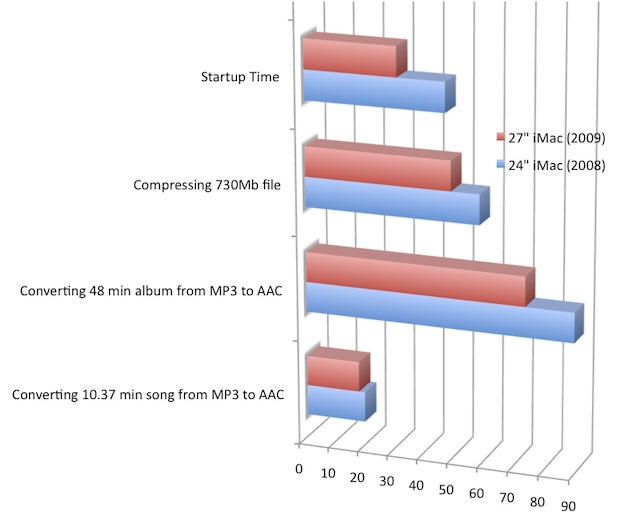
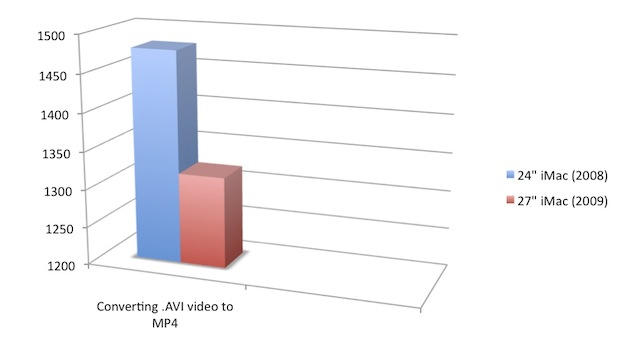
27-inch iMac vs. 24-inch iMac in real-world tests. Shorter is better.

Shorter is better.
Downsides
There’s no Blu-Ray and the iMac outputs video only from DisplayPort sources, so its utility as an external display is limited. The Magic Mouse takes a bit of getting used to, and may be too small and skittish for some.
It’s also not the cheapest all-in-one on the market. Competing machines from HP, Sony, Dell and Gateway are hundreds of dollars cheaper and offer extras like touchscreens and Blu-Ray players. But they run Windows, which is a major liability (I’m going through the nightmare of updating an XP machine to Windows 7, and it’s already ruined my whole weekend).
Summary
* The 27-inch iMac is the sexiest desktop on the planet, no doubt about it.
* The screen is drop-dead gorgeous. The 1080p HDTV in the living room looks fuzzy in comparison.
* It’s not cheap, but it’s a top-flight machine. You get what you pay for.
* It is fast, capable, and a ton of fun to drive.
More 27-inch iMac porn:



Posted by Leander Kahney in Apple, Reviews, Top stories, iMac | Comment on this article


Since you asked, good review, love the pics!
goobi, on October 31st, 2009 at 5:08 pm
Always informative,………..Thanks for your Effort
Hilton
Hilton, on October 31st, 2009 at 5:18 pm
Haha…….you bought a new computer when you were only looking for a new mouse…….you’re as bad as me.
ElectroBoy, on October 31st, 2009 at 5:39 pm
I’m upgrading my Mac next August/September when my current MBP’s three year warranty expires, by which point there should have been a spec bump on the iMacs. I will be making my decision between sticking with the MBP line and moving to an iMac, obviously, the iMac is a lot more power for the money, and as I am becoming more permanent these days and have a Dell Mini 9 hackintosh for any portable needs, I’m pretty certain I will get an iMac.
The 27″ just might be that bit too big, it looks truly epic though.. I wish the 21.5″ had video input and the i5/i7 option, and then it would be far more tempting. Certainly though, specs may have changed by next summer.
Thanks for this review, made me even more tempted to buy this computer
Charlie -
Charlie, on October 31st, 2009 at 5:43 pm
As much as im in love with the new iMac, i think they should have gone the whole hog, and gone with the 30″ model, to match their current cinema display.
Having said that, i am very tempted to go out and buy the new iMac, despite only buying the old model just two months ago. I call it ‘old’ but its brand new.
Andrew Macdonald, on October 31st, 2009 at 8:14 pm
if only I could hook a dvd player and tv tuner to this I could put it in the bedroom as a spare tv… hmm
Kyle, on October 31st, 2009 at 8:32 pm
About the high glare screen. It sucks.
RB, on October 31st, 2009 at 9:02 pm
Kyle,
Um… it has a DVD player, and you can get a EyeTV from elgato for around $150, hook up a antenna (or cable if you like), and you have over the air hdtv and a recorder in addition to a mac.
matt, on October 31st, 2009 at 9:13 pm
There seems to be an error in your performance table
2009 iMac 27-inch (3.06GHz Intel Core 2 Duo with ATI Radeon HD 4670)
Converting 48 min album from MP3 to AAC — 17.7 seconds
2008 Mac 24-inch (2.66Ghz Intel Core 2 Duo with NVIDIA GeForce 9400)
Converting 48 min album from MP3 to AAC — 89 seconds
the 17.7 seconds for the 2009 iMac seems too fast. I would have thought something like 70 seconds.
I hope this helps.
A. H. O. Thabeth, on October 31st, 2009 at 9:47 pm
27-Inch iMac, The World’s Sexiest Desktop Just Got Sexier
The sexiest all-in-one computer has long been the iMac,
Thanks to this big beautiful screen, the sexiest desktop in the world got a lot sexier.
The 27-inch iMac is the sexiest desktop on the planet, no doubt about it.
I think you have problems bigger than you know! Remind me not to touch your mouse.
Greg, on October 31st, 2009 at 10:07 pm
@ A. H. O. Thabeth — You’re right. It’s 73 seconds. Thanks for spotting that and pointing it out. And nicely guesstimated — almost spot on!
Leander Kahney, on October 31st, 2009 at 10:14 pm
as if this huge ass machine available in Apple Indonesian Store, I would buy it straight away!
ncus, on October 31st, 2009 at 10:37 pm
Beautiful….absolutely beautiful.
I am awaiting my 27″ iMac and you have made the wait soooo much more painful.
Also, I am sending you a bill for having the drool removed from my keyboard.
MacAttack, on October 31st, 2009 at 10:40 pm
I am saving.
Deocliciano Okssipin Vieira, on October 31st, 2009 at 10:56 pm
Go go on with your bad self man!! I was in my local Apple Store here in Florida(Aventura Mall) and I saw that 27 inch beast. OMG!!!!!!!! I have some money coming in and you bet I’m going to get that in a few months.
Simply awesome machine.
t, on October 31st, 2009 at 11:16 pm
I like it, can you use the Elgato EyeTV DTT with the new 27″ iMac?
Poppa, on October 31st, 2009 at 11:44 pm
Owned the 24″ version for a year now. This is actually cheaper than what I paid for the “old” model. I feel cheated!
Although I think 24″ is about as big as you want to go for daily use. The aspect ratio is obviously a lot nicer on the 27″ though, if you are watching a lot of movies.
One minor thing, the arrow keys on the wireless keyboard are frustratingly small, I still prefer the wider, corded one, which sits all the way across my lap and with a USB extension can be comfortably used from the couch.
The additional USB port is nice. 3 is a limitation on the 24″ version.
The 4GB ceiling on memory in the 24″ is annoying also. Now lifted to 16GB.
Darren, on November 1st, 2009 at 4:51 am
Hi, I’m interested in the iPod, that is standing on the background. What reader/stand does it use?
trokhim, on November 1st, 2009 at 6:13 am
Hey i just read your review mate, very nice, i havent really found any great mac reviews that are complete yet but i really appreciated yours you covered just about everything


?
but i have been thinking about getting a 27” mac most likely fully kitted out..i only have to buy one then for a couple years
the only thing is i am abit of a gaming fan and i hear the macs dont handle 3d software like gaming very well, what is your opnion mate ? is it fine and some people just get very picky because they wanna run thier games at high spec and play intense for hours
and do you think 27” is too big
varthloukker, on November 1st, 2009 at 6:52 am
Hey Leander, nice shirt you have there! Viva Marcos y el EZLN!
Miguel, on November 1st, 2009 at 8:13 am
Senior editor of cultofmac.com is wingeing bout how hard it is to upgrade xp to 7.
Jon, on November 1st, 2009 at 8:31 am
“Never mind: there’s plenty of HD options online.”
Maybe for you in US, but most of the world does not have iTunes Movies & TV series. That leaves us, what? Nothing?
And iTunes isn’t even FullHD, so there’s no use for 27″ screens high resolution.
Elgato has no products for cable TV. Cable HD would need Conax Pairing at least here in Europe and there’s not a single (legal) solution to do this with any computer on this planet.
So, how “media friendly” this new 27″ iMac is?
You need some über expensive hdmi-displayport converter to hook up blu-ray player and HD-stb to 27″ screen. So you need to buy 4 things.
In this situation, why not to buy real hdtv without stupid double mirror and mac mini?
toke lahti, on November 1st, 2009 at 9:19 am
Btw, pretty funny to read these iMac reviews, when you can spy how reviewers’ home or office look like!
toke lahti, on November 1st, 2009 at 9:23 am
Nvidia is the only one to have a complete GPGPU solution. cude and opengl.
ATI is no where to be seen.
Now i cannot use Jacket which is a GPGPU solution for matlab.
Atleast give me a choice to buy an nvidia chip.
MySchizoBuddy, on November 1st, 2009 at 10:33 am
I meant cuda and opencl
MySchizoBuddy, on November 1st, 2009 at 10:34 am
I really can’t comment on the iMac. I simply think that it is superb. Will probably get one for my office although there is no AutoCAD version for OSX and it runs awfully through XP on Paralles. Anyway, what’s the dock below the iPod on the side?
Keep it up.
ikera
ikera, on November 1st, 2009 at 12:45 pm
It seems there are a few problems surfacing on the Apple support forums about the new 27″iMacs.
http://www.engadget.com/2009/10/29/27-inch-imacs-having-performance-issues/
http://discussions.apple.com/forum.jspa?forumID=1110
Poppa, on November 1st, 2009 at 2:14 pm
Awesome review. Quite why Apple decided to scrap the 24″ iMac I don’t know. I was looking at one in a local comet store last weekend and thought it was a good size. 27″ is just too big really for everyday use. At the same time I think 21.5″ is an odd size too. Hey ho.
Anyway great review and I love the hi res eye candy =D
Ryan E, on November 1st, 2009 at 2:28 pm
I haven’t seen these new iMacs, but I have some concerns regarding ergonomy. Typically, the top border of the screen should be at eye level. This is important for a correct positioning of the neck. This affects the bones and muscles. Also, this is written in my 20″ iMac user’s guide.
I seriously doubt a 27″ iMac is ergonomic, but I need to check this in person.
Apple should get rid of the iMac’s chin and also lower the whole body quite a bit. Of course it all depends on the user’s height, but on my regular desk, my 20″ iMac is already on the height limit.
What should you guys with the new iMacs think?
PR, on November 1st, 2009 at 3:00 pm
I ordered my 27″ last week. I f I had read the reviews, I would not have gotten the 8 gb of RAM. Otherwise, can’t wait for the bad boy to ship. It will be quite the change from my 5 yr old G5 and 21″ viewsonic.
I think I am the only person to order the wired keyboard, thought. I like having the USB ports for our two iPods. Has anyone tried VESA mounts for the 27″?
Paul, on November 1st, 2009 at 3:52 pm
Wow, beautiful pics. I had been wondering this as well when I checked it out in the apple store: is the screen *too* big? You never answered the question, but by the review it seems you thought not.
Aaron, on November 1st, 2009 at 4:30 pm
nice, but…
your 24-inch iMac from 2008 is from 2009 ;P
rurza, on November 1st, 2009 at 5:14 pm
“I ordered my 27″ last week. If I had read the reviews, I would not have gotten the 8 gb of RAM. ”
Paul – what’s wrong with the 8gb config ? I may be missing something but I’ve not heard of problems relating specifically to that RAM setup. As I’m about to order mine, please let us know !
Jack Holland, on November 1st, 2009 at 5:25 pm
What about the Flash problem that’s been reported on the web this weekend?
Have you had any problem as mentioned by others of Flash content playing more poorly than usual on Mac OS?
thanks
Palosny, on November 1st, 2009 at 6:26 pm
I am looking to upgrade to the 27 from the 24.
But I am a bit concerned that although there is more screen real estate that fonts for one will look smaller and thus harder to read they they actually were on the 24″.
Since you have both I would love to hear your opinion.
Thanks
Stefaan, on November 1st, 2009 at 8:18 pm
@Poppa. those problems are NOT with the imacs. they are with Adobe still not updating their flash player.
@PR. part of the reason why they only do a wireless keyboard and mouse with the imacs is so that you can move back easier. if you aren’t choked up on the screen the height is less a concern
as for me, I like it but I do hope that in the very near future they can have a glass with at least a little anti-glare coating (to cut back the reflection) but still keep their environmental program going
Charli, on November 1st, 2009 at 8:56 pm
For the dock questions – http://www.engadget.com/2008/09/26/griffin-intros-simplifi-ipod-dock-card-reader-usb-hub/
There you are.
James
James, on November 1st, 2009 at 9:14 pm
Very nice review! Good work!
And those photos just blown me away…
Rodrigo, on November 1st, 2009 at 9:35 pm
OK. What are these HD options on line that you mention? It’s certainly not iTunes. What else?
saman Jebeli-Javan, on November 2nd, 2009 at 3:44 am
and another thing… good review. thanks for the pics.
saman Jebeli-Javan, on November 2nd, 2009 at 3:44 am
it wuold be nice to have a pic with the same 16:9 trailer running on both machines… aniway, nice review
Paolo, on November 2nd, 2009 at 11:48 am
So I was super close to purchasing two of the new quad core 27″ iMacs; then the Apple Store Manager began trying to talk me out of it and into another model. This sent up a red flag. I searched for reviews and found an article that talks about the new 27″ iMac having some major performance issues. Any new owners out there having these issues?
Our company has to purchase 2 new machines before end of our fiscal year, but I don’t want to be rushed into a poor decision and at first look this is the computer I really want!
Nicole, on November 2nd, 2009 at 12:44 pm
Just ordered the i7 with 8gb ram yesterday, and a slightly better video card than you have on this model.
Have anyone seen any fps test on World of Warcraft on this model? (don’t have to be 8gb ram though, I think 4gb is plenty for that game)
corneliuz, on November 3rd, 2009 at 6:22 am
Awesome review. Great pictures! I’m an Apple fan since the very first iMac. Unfortunately, in Brazil, this piece of art reaches something like US$4,000.
Keep rocking. Regards!
Bob, on November 3rd, 2009 at 5:41 pm
@ trokhim — the iPod stand in the background is a Griffin Simplifi Dock. $43 on Amazon: http://www.amazon.com/Griffin-Simplifi-iPhone-Reader-Aluminum/dp/B001DQNAK2/ref=cultofmac-20
Leander Kahney, on November 3rd, 2009 at 6:24 pm
@Poppa and @Palonsy — I haven’t seen any problems yet, though I’ve been using the machine only a few days. Still, if there was a problem, it should have surfaced by now. I wrote up a quick report here:
http://www.cultofmac.com/video-flash-video-on-new-imac-no-problems-to-report/20368
Leander Kahney, on November 3rd, 2009 at 6:27 pm
@Stefaan — That’s a good point about font size. I just compared the two machines and font size on the 27-inch iMac is considerably smaller. I’d guesstimate maybe 30 percent smaller. It’s quite a noticeable difference.
For me it’s not a problem, as I’ve got good eyesight (I don’t wear glasses).
It’s easy to change the screen’s resolution and the zoom function on the new Mighty Mouse couldn’t be easier.
Leander Kahney, on November 3rd, 2009 at 6:34 pm
I sure hope my local Apple store is out of Magic Mice…
Erin's Dad, on November 3rd, 2009 at 11:27 pm
Do u think we could see a gameplay video of world of warcraft? and does it run smooth with the highest graphics?
Pierre, on November 4th, 2009 at 3:50 am
Hi, do you have a macbook pro with a displayport adapter? can you confirm if apps still run on the 27″ in targetdisplay mode? apple haven’t done something stupid like suspend processes/shutdown networking etc when its running in this mode have they?
Rab, on November 4th, 2009 at 4:52 am
Uuh, I wish the nearby local store still has Magic Mice in stock. Otherwise, I would have to pick up a 27″ iMac too!
Zidni, on November 4th, 2009 at 7:46 am
this is what ive been looking for, a side by side comparison 27 vs 24 …. im 24″ inch iMac user, and because of this post i really2 want to upgrade
…
Great post man ! thanks a lot !
vcool, on November 4th, 2009 at 11:53 am
Just cant wait to get mine
(Ordered last week)
IMAC 27inch
Quad core i7 2.08Ghz
1 Tb HDD
8Go Ram
bluetooth bundle mice,keyboard
gonna get rid of my 24Inch 3.06
Harsenik, on November 4th, 2009 at 3:18 pm
I would not buy this imac for its price. Its good and sexy but without blueray player its only a mean machine not a refined one. Secondly there should have been an HDMI input.
Sorry Steve, I will wait for next summers upgrade. This time the competition has beaten you with the inclusive of the above
Kevin, on November 6th, 2009 at 7:57 am
This is my first mac….and what a screen. My daughter and her hub love the macs and after so many years of the pain of windows…..she told me to bite the bullet and get a mac. I did…went with the 27″ imac. Words cannot describe this computer….and I am a freelance writer….but this thing leaves me speechless. The only problem I am having is neck strain from viewing the screen upward. Got to get a desk that gets my head/body in proper alignment. This screen is so tall for a little short gal like me even with it down as low as possible. Think I will get an apple imac display desk….it’s expensive but adjustable. Oh, i didn’t think I was going to make it out of the store with this baby…..people were falling down in worship….tee, hee.
Pamela, on November 19th, 2009 at 1:36 am
great review… sexy is the word!
i’m about to get one (can’t resist!) but am disappointed that they haven’t seen fit to offer a matte screen… but frankly can’t wait another year to see if they bother to respond to the various petitions…
any thoughts on the upgrades from 3.06 to 3.33 hz? and up to 512 mb graphics card? what is the difference?? i do fair amount of photoshop and some 3d rendering (but not much…) would i notice the difference??
thanks again
gez, on November 20th, 2009 at 8:11 pm
About the motion sickness. I was finding my brand new 27-inch iMac giving me a headache, eyestrain and motion sickness even when viewing regular work and not just the movies.
Immediate relief came when I changed the gamma from 2.2 to the old 1.8! I could feel my eye strain go away. The Windows world uses 2.2 gamma, maybe that is why I get eye strain when using a Windows computer…
Now, I just turn down the brightness to less than half way and set the desktop to 18% grey and all is good.
I will also be getting an anti-glare coating for it as soon as they start shipping for this model. I really don’t need to see myself all day.
Jonathan, on November 23rd, 2009 at 1:35 pm
I had to do a search to see if anyone else was thinking the new screen was maybe a bit too big for their liking and ended up reading your very good review. I just got mine, went for the i7 which was great for me, but thinking the screen is tad too big for regular use (not for watching tv or movies tho of course) and the heat from it bit much, again for sitting close. I have to keep the brightness turned down as well. The mouse is growing on me but there was a definite learning curve and not loving having to pick up the mouse to move it across screen altho now starting to use the zoom feature the mouse has (had to watch the tutorial on the mouse!).
Wish I was loving it more, maybe will just have to adjust the way I sit in front of it, like sit WAY back!
Lori, on November 24th, 2009 at 3:10 am
In Russia the top i7 costs $3430, but still I gonna buy one. Leander, thanks for the photos “In the interior”, now I can see, that this glossy screen is not such a big problem.
Eugene, on December 2nd, 2009 at 9:49 am
I really would love to get the New iMac but every time I ask someone this they all say, I think so? I really don’t know. How will the iMac 27″ deal with hard core web design? And yes I have called the apple story as well.
Marcus, on December 3rd, 2009 at 2:50 am
@Marcus: Most of the pro web designers I know use MacBooks, so the more powerful iMacs should be fine. The Mac also has a number of great web design/dev apps by indies, which you should check out if you’re newish to the platform.
Craig Grannell, on December 3rd, 2009 at 5:09 am
I have run into issues with the sound not working in Bootcamp running XP. The solution was to change the output device in the sound settings in the control panel. The instructions are here: http://adamac.org/27-imac-has-no-audio-in-xp
Andrew, on December 7th, 2009 at 5:11 pm
Excellent Reviews. I thought most of the reviews regarding the new iMac 27 inch had been very critical but positive in the majority. I currently use PowerMac G5, and soon will receive iMac 27 i5 to replace it. I read many other reviews on the technical issues for this machine. I agree that a big disappointment was the absence of the blue ray player. I suspect they will keep this in mind when the next series of updates is released in 2 or 3 years time. I was particularly tempted to upgrade to iMac 27 so I can do video editing (Final Cut Pro). My current machine was completely useless with video editing.
John, on December 17th, 2009 at 8:54 am
Monitors are junk, they all have yellow tinge to a degree.
DennisT, on December 21st, 2009 at 9:10 pm
I have the quad core i5 and notice it takes roughly 30 seconds or so before it goes to sleep. Is this normal for this model? However, I have the $1199 model at work and that one sleeps instantly.
Eddie, on February 3rd, 2010 at 11:54 pm
