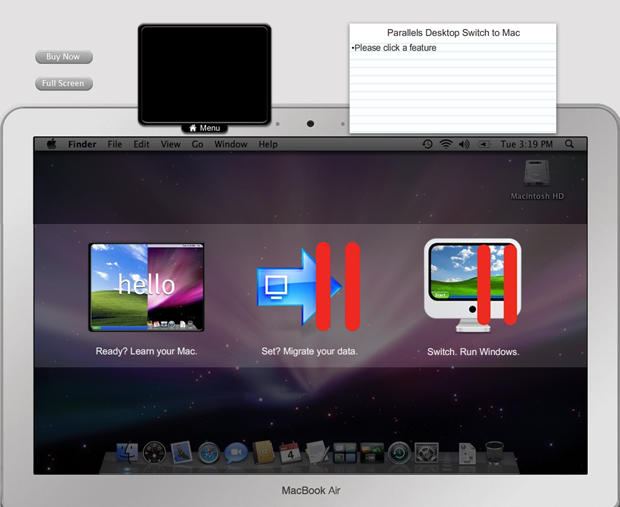
Parallels, regarded by many as the premier virtual Windows solution for the Mac, announced Tuesday a special Switch to Mac Edition, extending a welcome lifeline to computer users who are choosing to embrace the elegance, power and simplicity of Apple’s Mac OS in increasing numbers every day.
Cult of Mac received an extensive tour of the new “Switch to Mac” features recently and it’s a good bet Parallels will deliver on its promise to have former Windows users working comfortably in the Mac UI within hours instead of the more usual learning curve that can often take weeks.
“For years I have worked with switchers coming into Apple stores with questions about how to use their new Mac,” says Saied Ghaffari, Switch to Mac Advocate, who gave us the tutorial demo.
“Parallels Desktop Switch to Mac Edition thoroughly addresses the concerns switchers have,” Ghaffari said, adding, “the product is designed to make moving to Mac as fast and simple as possible, regardless of the level of technical knowledge of the switcher.
Featuring a set of easy-to-use tools and interactive tutorials such as Click to Learn, Watch Saied, and You Try incorporated with Parallels Desktop 4.0 for Mac, the Switch to Mac edition promises to help “Switchers” understand how to operate Mac OS X, transfer all PC data and applications, and seamlessly run their Windows applications on their new Macs.
“It’s like a friend teaching you the Mac at your own pace,” according to Ghaffari.
Parallels Desktop 4.0 Switch to Mac Edition is available from today at Apple stores, at Apple.com and through other preferred retail partners in English, German and French. The suggested retail price (SRP) of the product is $99.99.
Hit the jump for more information and detailed explanation of the Switch to Mac edition’s features.
Switching from PC to Mac is on the rise: analyst reports on operating system market share show that Mac OS X market growth comes at the expense of Windows’ market share: while the overall PC industry saw declines of 3% for the quarter ending in June 2009, Apple sales were up 4% year over year. According to Apple’s Q309 report, half of Macs sold went to customers who had never owned a Mac before.
“The growth in switching is partially due to the ease-of-use and cool capabilities of the Mac,” said Serguei Beloussov, CEO of Parallels. He explained that in the Parallels Switch to Mac Edition “we’ve made learning the new operating system even simpler through interactive on-demand tutorials.”
With the tutorial tools, combined with the intelligent moving tools of Parallels Desktop for Mac, Beloussov’s company offers what could prove to be the best performance and stability for running Windows seamlessly on Mac.
Parallels offers a range of free support options for customers of Parallels Desktop Switch to Mac Edition, from knowledge bases and forums to phone and email support. For more information, visit www.parallels.com/support/.
Parallels Switch to Mac Edition features the following:
♦ Learning Mac OS X — The Switch to Mac learning tools are designed to specifically address any questions or concerns associated with the transition from Windows to Mac. More than two hours of interactive video tutorials help users learn the new interface and functionality of the Mac platform step-by-step, starting with the Mac equivalent of tasks performed on Windows. A quick reference card identifies the most common Windows and Mac command/function differences and puts the correct keystrokes at users’ fingertips.
♦ Making the Move — Also important to new Mac users is getting files and media from their old computer to their Mac. Parallels recognizes that many people need help with this process, and developed a “plug and click” method that moves the entire PC (licensed operating system, applications, files and data) to the new Mac. This includes the Parallels High Speed USB Transfer Cable that connects the two machines and the Enhanced Parallels Transporter: simple, wizard-driven software that walks the user through the move in a few easy clicks. The seamless Mac user experience now starts on the PC side.
♦ Running Windows and Mac side-by-side — Parallels Desktop Switch to Mac Edition includes Parallels Desktop for Mac 4.0, the number one Mac system utility, currently used by more than two million people to run Windows side-by-side with Mac applications. This award-winning virtualization software provides a fully integrated seamless experience, offering users the greatest stability and performance available for running Windows on a Mac, as recognized in 3rd party industry benchmarks³. Parallels Desktop 4.0 for Mac incorporates a range of security, backup and power saving features to give Mac users the easiest way to run Windows on a Mac.

Lonnie Lazar is a writer-musician-web designer-attorney. He writes about Apple for Cult of Mac and Mac|Life, and about VoIP and telecommunications for Voxilla. Follow Lonnie on Twitter @LonnieLazar, join the Cult of Mac on Facebook, and find Lonnie’s photos on Flickr.

