Top stories

Microsoft’s My Documents Folder Makes Triumphant Return – On iPad

20100209-mydocuments.jpg

Earlier today, I was reading Infoworld’s article, The iPad questions Apple won’t answer. The first question they listed was “Can you save and transfer documents to the iPad?”, and their assumed answer was “No”; they suggested that the only way to do this would be to open a document from an email message.
I read that [...]

Top 5 Things To Check Out at Macworld 2010

Macworld 2010 opens today. It is the 25th annual gathering of Mac users. That’s right, 25 years!
But thanks to the absence of Apple this year, this “Mecca for Mac Heads” may be the last. So check it out while you can.

The show runs for 5 days. The Expo showfloor opens on Thursday at noon.
For the [...]

Opinion: MacBook, or iMac + iPad?

20100208-imacipad.jpg

The announcement of the iPad has done a lot of things: it’s stoked up excitement in the Mac using community, it’s got a bunch of developers feverishly coding exciting new stuff, and it’s got retailers and cell phone companies the world over drooling over the money they can make from it.
And it’s also somewhat upset [...]

In Depth: 30 Days with the Nexus One

It’s been a month since my review of Google’s “SuperPhone”, the Nexus One. Since that time, we’ve surfed, updated facebook, navigated, called, played endless hands of cribbage and even tried to freeze it to death on a trip to Dayton Ohio. Follow me after the jump to find out does the “SuperPhone” stand the [...]

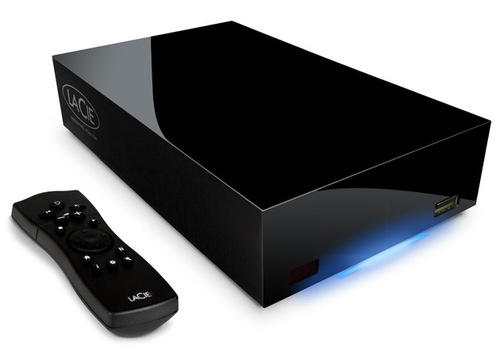
LaCinema Classic HD: A 1TB Networked Media Player for $250

lacinemaclassic

How often do you find a 1TB networked hard drive that stores and pumps out 1080p high-def video wrapped in a black monolith-like enclosure – plus it costs only $250? That’s the word on LaCinema Classic HD from the hard drive folks over at LaCie.

The LaCinema Classic HD will stream 1080p videos, music or photos from your Mac (or PC) to your HD television. You can either use the included HDMI cable or the optional Wi-Fi 802.11n USB adapter for wireless media transmission to your network. A remote control is included.

The LaCinema Classic HD can convert from a simple 1TB network hard drive for storage or can be attached to your HDTV for media playback. Along with a HDTV, the product can also stream to your PlayStation3 or Xbox console.

Priced at $249.99, the device was designed by Scottish-born Neil Poulton.

[Via Company and Gizmodo]

About the author

Ed Sutherland

Ed Sutherland is a veteran technology journalist who first heard of Apple when they grew on trees, Yahoo was run out of a Stanford dorm and Google was an unknown upstart. Since then, Sutherland has covered the whole technology landscape, concentrating on tracking the trends and figuring out the finances of large (and small) technology companies.


Email the author | Read more posts by Ed Sutherland.

7 comments

    I bought one of the non networked ones, Terabyte all black like this, it died after about two months at about 75% full (thank god I had another hard drive for back up as well and only lost a bunch of movies and nothing vital.)

    I went and read a lot of reviews on this and it seems this company has a very consistent track record of their devices just dying for no reason and very little to offer in compensation or data recovery.

    I’d say pass on Lacie products in favor of something a bit more durable and with a better track record.

    Werrr, wrrrr.
    Does it have gbit Ethernet and time machine support?

    What you really should be asking about is whether it comes with an extra couple of power supplies…

    Aphonic,

    What died? The controller or the drive? If the controller on the case died, you can crack it open and just pull out the HD, transplant into a new case and off you go.

    If the drive died, then it’s not really LaCie’s fault as they don’t manufacture the drives. If the HD went, then I’d say it would be Samsung, WD, Seagate, etc. who should pony up the reparations…

    WS,

    I’m honestly not sure what the problem was. I called their tech support and ran through several tests to no avail and they did not offer me any options such as sending it in for them to diagnose and I wasn’t going to spend even more $$$ on having it privately repaired when I could just use that money to buy a better one.

    Thank you for the advice though and I’ll get one of my tech savvier friends to try that, as it’s still sitting in the closet.

    Aphonic,

    You certainly should. Just crack the case and pull out the drive. Before you do that, you can hook it up and consult the Disk Utility to see if it recognizes it and find out the drive (mine lists a SAMSUNG HD103UJ). If it won’t even see it, then you are going to have to physically read it off the drive.

    With this design, you just have to pry out the button. It is similar to the old silver designs but since it’s plastic, should be easier to just break the tabs off.

    Afterwards, you can test it by hooking it up to a PC or getting another external bay. If the drive works, then you still have a drive and it’s only the controller which isn’t the worse thing. If it is truly dead, then contact the HD manufacturer and get a replacement. They should be pretty good at providing you with a replacement.

    Best of luck.

    The thing has an 81 page manual!

Add your comment

Name(Required)

Mail (required, but not published)

Website

Comment

Buy Inside Steve's Brain Buy from Amazon.com Buy from Barnes & Noble