Top stories

Journalists Cover Microsoft, Using Macs

It’s not an easy time for Microsoft — with Steve Ballmer having to field questions about being “buffoons” and an “evil empire”  at the shareholder’s meeting (.doc) — so when they get together “the world’s most influential technology pundits and online writers” (nb: we weren’t invited) for Mobius to discuss super-secret mobile tech you’d think [...]

Guide To Black Friday Apple Bargains: Cheap MacBooks, iPods and Accessories Galore

Here’s a guide for finding the best bargains on Apple-related gear during the infamous Black Friday sales on November 27. We’ve compiled a comprehensive list of gear from leaked photos of sales flyers and descriptions of sales.
The bargains include a 2.26 GHz MacBook + $150 gift card at Best Buy for $999.99 ; a 32GB [...]

Review: Voices Is Today’s Best Thing Ever, Grab It Now While It’s Cheap

New on the App Store is Voices from the clever folk at Tap Tap Tap. You can guess what it does.

Open it up, pick a silly voice. Helium is pretty silly. A microphone appears and the app even clears your throat for you (try it, you’ll see what I mean). Now speak your brains, and [...]

Review: Sony Walkman S540 Series Video MP3 Player

Press releases, you will hardly be surprised to hear, are rarely very interesting. But one arrived in my inbox a couple of weeks ago that made me double-take.
“Sony’s S Series Walkman,” it chattered, “is a serious challenger to the iPod Nano.” Gosh, really? Perhaps the Cult had better have a look at one, then, despite [...]

Cult of Mac favorite: Fresh (Mac OS X utility)

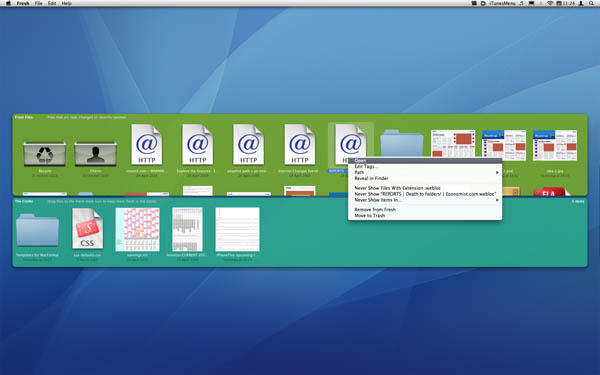
20090427-fresh

What it is: A tool for accessing ‘fresh’ items on your Mac—recently used/saved documents/folders are placed in the Fresh Files zone, and user-defined files you deem ‘fresh’ can be dragged to the shelf-like Cooler. Fresh also provides tagging functionality.

Why it’s good: Initially, this app might nonplus. After all, it effectively duplicates functionality found elsewhere in Mac OS X. However, in a surprisingly short amount of time, Fresh worms its way into your workflow, due to providing a simple and central location for fresh items.

Primarily, It’s great having system-wide configurable access to recent items (you can decide which file types or locations should be ignored by Fresh, and remove single items from its zones), and being able to bring up Fresh to find recent downloads or saved files seems far more natural than rooting around in Finder.

The Cooler proves handy—it’s a more convenient and useful shelf than the Dock. Also, Fresh’s tagging is robust, and the method it employs enables you to do tag searches via Spotlight, meaning you’re not restricted to Fresh’s Tag Search window. And as with any top system add-on, Fresh is stable, usable, and gets out of your way when it’s not needed.

Where to get it: Fresh requires Mac OS X 10.5.5 or later, and costs $9. It’s available from Ironic Software.

About the author

Craig Grannell

Craig Grannell is Cult of Mac's designer and an occasional contributor. He also runs iPhoneTiny.com, a Twitter-driven reviews site for iPhone apps and games. Follow Craig on Twitter @CraigGrannell and visit his website, Snub Communications.

Email the author | Read more posts by Craig Grannell.

9 comments

    Yeap thanks for showing it. Just downloaded it and I think I will fall in love before the demo time runs out!

    Alright… fess up. Do you guys and gals own Ironic Software?

    @The Idiot. There’s nowt shady going on—in fact, I don’t think the Ironic guys are even aware of this post. The idea of this column is to provide ideas for indie apps users might not have discovered, and I’m so far shying away from the usual suspects like Default Folder, although I suspect I’ll cover that eventually. Ultimately, if dev ‘a’ has done two great apps, I’m not going to ignore one of them (although I might leave a bigger gap between them next time round).

    where did you get the icons in the upper left corner?

    Really? I’m with Craig- you guys getting a share of the cost? I just watched one of their videos explaining the usage of Fresh, and it to-the-tee duplicates functionality built into Leopard.

    You know that system-wide-Downloads folder that is in Leopard? Set it as a stack, view contents as a fan, and sort them by Date Added. When you download something, the first icon is the newly downloaded file. And Fresh keeps track of recent documents too, huh? Yeah, so does the finder. But… a recent “things” (applications, documents, servers, volumes, etc) addition to the dock duplicates that functionality even better.

    defaults write com.apple.dock persistent-others -array-add ‘{ “tile-data” = { “list-type” = 1; }; “tile-type” = “recents-tile”; }’

    Add as many as you want, and right click it to change the type. And it’s free. A $9 single-purpose-replicate-included-functionality app isn’t worth it. I’m liking your guys’ blog, but this app is silly.

    @Icon Guy—from here

    @Byran Newell—I thought the same until I started using it, which was kind of the point I was making in the mini-review. Fresh might (mostly) duplicate existing functionality, but it betters it by far. Being able to bring up Fresh, double-click on a downloaded archive and then immediately double-click on the unpacked item is faster and more efficient than Leopard’s equivalent. The reconfigurability for the recent items shown betters a Dock hack. And it’s not like Mac OS X has any robust tagging in it, but Fresh offers that.

    @Craig:
    You check is in the mail! ;^) LOL – One of our users pointed us this way. Thanks for the nice review.

    @Bryan Newell:
    We understand there are nerdier ways to accomplish some of the functionality but remember, there are a lot of users without the knowledge or desire to even know what the shell is (and no, it’s not that thing on a snail, Mom!) I encourage you to give it a try. You just might like it. (It’s prettier too!)

    And, oops… Sorry for the mistyping of your name Byran, (I should have taken that class in high school). Cheers!

    @Bluefrog- no doubt it may be easier to buy a piece of software for the less “nerdy” among us, but your main target market is going to have to be some type of nerd in order to find out about the software, I think. I’ll try it though, and report back.

    @Craig- Your description of archived documents and its functionality is exactly the way it works in the setup I previously mentioned. The odd thing, is that I thought the stacks were set up that way by default. Try it! Download a zip archive. In Safari, it’ll automatically unpack it, and you’ll see it as the first icon in your stack. Even if it’s not automatically unpacked, one click like you mentioned will unpack it and make it the first icon.

    But as I said, I’ll try it- I’ll try anything once. Save for gay porn, and a host of other things :)

Buy Inside Steve's Brain Buy from Amazon.com Buy from Barnes & Noble

