Top stories

Journalists Cover Microsoft, Using Macs

It’s not an easy time for Microsoft — with Steve Ballmer having to field questions about being “buffoons” and an “evil empire”  at the shareholder’s meeting (.doc) — so when they get together “the world’s most influential technology pundits and online writers” (nb: we weren’t invited) for Mobius to discuss super-secret mobile tech you’d think [...]

Guide To Black Friday Apple Bargains: Cheap MacBooks, iPods and Accessories Galore

Here’s a guide for finding the best bargains on Apple-related gear during the infamous Black Friday sales on November 27. We’ve compiled a comprehensive list of gear from leaked photos of sales flyers and descriptions of sales.
The bargains include a 2.26 GHz MacBook + $150 gift card at Best Buy for $999.99 ; a 32GB [...]

Review: Voices Is Today’s Best Thing Ever, Grab It Now While It’s Cheap

New on the App Store is Voices from the clever folk at Tap Tap Tap. You can guess what it does.

Open it up, pick a silly voice. Helium is pretty silly. A microphone appears and the app even clears your throat for you (try it, you’ll see what I mean). Now speak your brains, and [...]

Review: Sony Walkman S540 Series Video MP3 Player

Press releases, you will hardly be surprised to hear, are rarely very interesting. But one arrived in my inbox a couple of weeks ago that made me double-take.
“Sony’s S Series Walkman,” it chattered, “is a serious challenger to the iPod Nano.” Gosh, really? Perhaps the Cult had better have a look at one, then, despite [...]

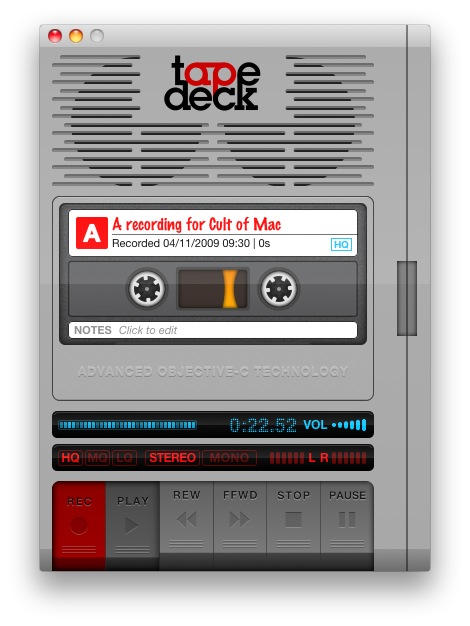
Cult Favorite: TapeDeck

20091104-tapedeck.jpg

TapeDeck is one of those apps that I don’t use very often; but when I need it, I’m glad it’s there.

It’s just got an update which adds support for lossless recording, for those of you who might want to use it to capture something important and import it into another audio app for editing into a song.

That’s a thoughtful new addition, and typical of TapeDeck’s developers: they’re thoughtful, and the app’s features reflect that.

Example 1: the default keyboard shortcuts for operating the tape are the Z-N keys along the lower edge of the keyboard. This doesn’t make sense at first: wait, Z to record? Why? But then you realise that the shortcut keys are in a line along the bottom to match the virtual tapedeck buttons you see on screen. Makes perfect sense.

Example 2: TapeDeck can export your audio to YouTube; but this is YouTube, it was made for video, not audio. So TapeDeck automatically adds an animation of a playing cassette tape, like the one in this example video.

What do I use TapeDeck for? Recording interviews conducted over speakerphone. Recording snippets of singing (I enjoy singing). And recording little audio messages from my son to his grandparents (which they love getting by email). I think it’s a great little app, and good value for $25.

About the author

gilest

Giles Turnbull is a freelance writer in England. He is a columnist for PA, and has written for the BBC, Guardian, Daily Telegraph, MacUser, Macworld, and The Morning News. He has a blog you can ignore and a Twitter account you needn't follow.

Email the author | Read more posts by Giles Turnbull.

One comment

    That is awesome!

Add your comment

Name(Required)

Mail (required, but not published)

Website

Comment

Buy Inside Steve's Brain Buy from Amazon.com Buy from Barnes & Noble

