Top stories

Bottom-Feeding Jeweler Unveils Despicable Diamond iPad for $20,000

We all know the wait for the iPad, at least in the U.S., will be over on April 3, right? Wrong. True connoisseurs know they need to wait until June 1, when Mervis Diamond Importers will unleash the hideous and despicable Diamond iPad on the world. It’s a bejeweled and bedazzled monstrosity boasting 11.43 carats [...]

iPhone App Magnets To Appify Your Fridge

20100312-iphonemagnets.jpg

If – like me – your fridge is black, then these shiny iPhone app fridge magnets from Jailbreak Collective will look very smart indeed displayed on the door.
Just 13 bucks gets you a set of these icon almost-replicas. I say almost because if you look carefully, you’ll see they’re not identical to the Apple originals. [...]

Which iPad To Buy? Get the 32GB iPad With Wi-Fi + 3G. Here’s Why.

If you’re in the market for an iPad — and you know you are, because it’s killer — you’re probably wondering which model to buy.
Naturally, you’re looking at the cheapest $499 iPad, which has Wi-Fi only, but you’re thinking you might also want 3G. After all, you can pay-as-you-go for data, and who knows when you [...]

Is Apple Selling 20K iPads an Hour?

Did you buy an iPad when Apple began pre-sales this morning? If so, you weren’t alone. Indeed, Apple may have sold 20,000 iPads per hour, leading one commentator to suggest the Cupertino, Calif. company was earning $10 million per hour on its new tablet device.
The estimate comes from Andrew Erlichson, CEO of Phanfare, a photo [...]

Blasted Keeps Your Recent Stuff Close At Hand

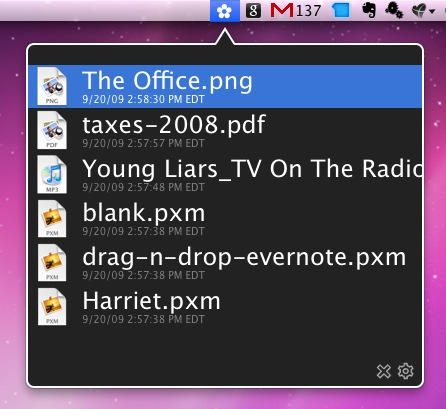
7E20AC51-ABB1-49BC-B3E6-E80AA2CB31B1.jpg

Blasted puts recent stuff in the Menu Bar

Now this looks interesting: Blasted is a Menu Bar app that quietly tracks what you’ve been working on – all the files you’ve created, opened, or modified recently – and makes them available when you need them via an unobtrusive icon.

It’s the work of Ted Roden, who also created the awesome Enjoys Things site.

Of course you could create somewhat similar functionality by creating a Smart Folder of recently modified items and putting it on your Dock, or even hack it into a Stack, but neither of those would seem to offer the neat simplicity of Blasted.

The only drawback is that, right now, there’s no way to try Blasted before paying your money; perhaps not a big deal when we’re only talking about five dollars, but still let’s hope a trial version appears soon.

If you enjoyed this article:
Subscribe via RSS or email, or follow us on Facebook and Twitter

About the author

gilest

Giles Turnbull is a freelance writer in England. He is a columnist for PA, and has written for the BBC, Guardian, Daily Telegraph, MacUser, Macworld, and The Morning News. He has a blog you can ignore and a Twitter account you needn't follow.

Email the author | Read more posts by Giles Turnbull.

12 comments

    Why use this instead of Fresh from Ironic Software? Fresh does the same thing plus it has OpenMeta tagging, and a Cooler for keeping an eye on specific files. It’s only $9 and a trial IS available. XD

    pListOFF: Good tip. I’d completely forgotten about Fresh, which is also an excellent app that does the same sort of job.

    If you have Default Folder, you already have a comprehensive version of this capability. There is also a Recent Items in the Apple menu, and it’s not difficult to put that in the Dock.

    Fresh gives you PREVIEW icons of the files. So if you have DSC008999 and DSC003281 – and you want to email the correct one – you can tell just by looking at the preview.

    Note that we had Fresh on this very site as a favourite a while back: here’s the link

    What are those other menu bar icons?

    Im not sure if im missing something, but why even pay for something like this when you have the Recent Documents/Apps/Servers menu in the Apple Menu?

    How about clicking the Apple Menu and chosing Recent Items? It costs nothing.. has preview icons… and comes with the System…

    I just made a stack that contains all of my recent files…

    But does it have a ‘Porn’ mode like Safari? Sometimes you view files that you don’t want recorded for easy retrieval.
    ;-)

    Seriously, how is this much better than Apple’s recent items which is free?

Add your comment

Name(Required)

Mail (required, but not published)

Website

Comment

Buy Inside Steve's Brain Buy from Amazon.com Buy from Barnes & Noble

