A Quick Look At Opera 10
12:37 pm, September 2nd, 2009, Giles Turnbull
Opera 10 is now available for download, and in the screencast I share some of my first impressions of the new tab design and features.
After recording that screencast, I did a little more exploring. One new innovation is Opera Turbo, a neat idea that I shall look forward to trying next time I’m away from a wifi connection. Once enabled, Turbo compresses the web pages you request and therefore speeds up browsing over slow connections. Opera says it enables “broadband-like speeds”; I’d be interested to hear if any of you have put it to the test.

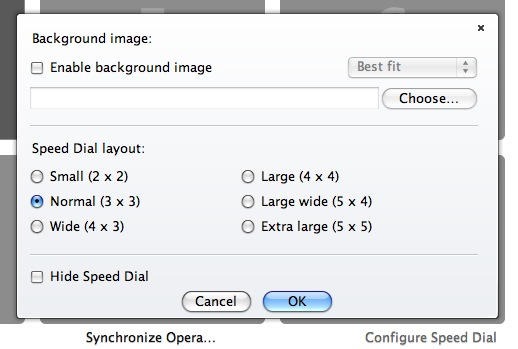
Another new feature allows customization of Speed Dial, which is similar in behavior to (but predates) Safari’s Top Sites. The new Speed Dial can be switched between a variety of layouts, and lets you set your own background image too.
Opera has always been an excellent browser, and in my opinion is well worth having installed. Even if you don’t use it as your default, there are times when its unique tools and capabilities come in extremely useful.
Posted by Giles Turnbull in First impressions, Reviews, Software | Comment on this article
If you enjoyed this article:
Subscribe via RSS or email, or follow us on Facebook and Twitter


I always was tempted to test out new browsers but I keep going back to Safari.
Safari is fast, light, and quick. Its very stable and simple on the eyes I am not sure what would make you change that.
Opera is weird, different shortcuts, and a bit clunky. I am not sure why would any one want to keep Opera. The one good thing I like about it is the full screen view which uses 100% of the screen. Amazing to for reading articles.
Is this the version where you can FTP from your computer?
Why would there be companies that would make free browsers? How do they function?
king, on September 2nd, 2009 at 2:51 pm
I have been an Opera user going back to version 2 or 3 I think, started on a PC and then went to my Mac with Opera. I have liked Opera better than other browsers including Safari. This version really rocks. It seems to be significantly faster than Opera 9, but also faster than the latest version of Safari. I haven’t tried to benchmark the speed, but the pages are definitely loading quicker, and the whole page is loading rather than element by element.
There are some quirky things about Opera and I simply have not had the time to learn them all to optimize my use of Opera. I do like how it handles bookmarked web pages and the new tabs. Printing on occasion can make you scratch your head, such as today when it would only print 1 1/2 pages of a 3 page web page.
The one thing that Safari does is allow me using the Services Menu to select the URL and have it open in Opera. I can’t go the other way from Opera to Safari, or at least I have not found a way to do this, it isn’t in the Services menu when you are in Opera. Why I do this has been that if I click on a link in an e-mail it would open the page in Safari, but I want to bookmark that page in Opera so I had to do a cut and paste until I started using the Services feature. Then its a two click task.
Try Opera 10 I am sure you will be impressed.
Bradley, on September 2nd, 2009 at 4:06 pm
Why do so many “Mac” sites continue to post FLASH, when so many of us are browsing from our iPhones?
John Koester, on September 2nd, 2009 at 8:16 pm
What a daft thing to say. Why do ANY websites continue to post Flash when so many of us are using iPhones?
Back to Opera: I tried it and I can’t bring myself to love it. It obstinately refuses to do what other browsers do, as if to say “I’m special, me, I don’t need to follow the rules.”
Example 1: you can’t Command-click a link to open it in the background. You can Command-click a link to open it in a tab, but the tab activates immediately. There is no Preference option to change that behaviour. The only way to open a link in the background is to Command-Shift-click. That’s very annoying.
Example 2: you can’t double click and drag on text to select whole words. Try it! You double click on a word and it selects the word. Try to drag the selection – it won’t drag.
I mean seriously, why?
owen-b, on September 3rd, 2009 at 4:03 am
Speed, security, out of the box.
Daniel Hendrycks, on September 3rd, 2009 at 5:46 pm
I’m a full time Opera user and i love it.
Besides already mentioned being “out of the box”, where you don’t need to go on a hunt for ad-ons and plug-ins and being able to customize it to my needs, there’s tons of little jewels that makes browsing experience easier and fun.
From mouse gestures, spell checker, widgets, adding custom searches and buttons,… to built in notes, email client and feeds reader, torrent client, irc client which, being all in one device, increases productivity.
And using Opera.Link, i can access my bookmarks, notes, history from anywhere… computer or phone, doesn’t even need to use Opera browser. But i have Opera@UBS always with me anyways
mistressEVIL, on September 4th, 2009 at 2:38 pm
hey there,
i use opera since v6 and i have to admit that i love it.
i don’t understand people having problems with opera. the only thing is ime that people just don’t know better. they don’t know how to use it.
well, i’m a windows-user, but opening a tab works in a lot of different ways, exactly like i want them to open:
1. simply click it -> it opens like the webdesigner wanted it to open
2. shift+click -> new tab
3. shift+ctrl+click -> new background tab
4. rightclick -> choose between open in THIS tab, open in new tab/windows, open in background tab/window
i especially love the keyboard shortcuts. because you can work so much faster with just using the keyboard (ctrl+t -> new tab, ctrl+w -> close tab, ctrl+r -> reload, ctrl+l -> select address bar, ctrl+tab -> switch tabs etc).
and opera has a feature where you just press shift+cursor-keys and you can just go over the links on the page you just see, which can be useful especially if you work with touch pads/notebooks.
also the mouse gestures are just awesome.
opera link which synchronizes your bookmarks, speed dials, notes etc on time between desktop, notebook and mobile phone without user intervention. and you can login via any other browser to use them when you don’t have your opera available.
you can configure the search-functions. type “g weather” in the address-bar to search with google without any more clicks. just use any keyword with any search-engine available (like wikipedia, dictionaries or whatever you want to. i’ve got more than two dozen different search-engines defined.).
you have integrated ad-blocker, can set individual site-preferences (deactivate javascript, refuse/allow to open popup-windows for one site only…), rss-reader, a bittorrent-client, an e-mail-client, you can save sessions, irc-client and a lot more to go
@king
i think you’re speaking of opera unite. it’s still in alpha and will be included in opera 10 with version 10.10 within the next weeks.
thobi, on September 5th, 2009 at 3:45 am
I’ve been an Opera user for years, but when I switched to Mac about 2 years ago, I used Safari and have used it up until a few weeks ago. I decided to go back to Opera and I realized how much I’ve missed this browser. It’s simply wonderful for many of the above reasons written here.
One or two things I still do miss in the new version;
I kinda hoped that the web-panels you can include on the panel bar that appears on the right side when you open tabs were better to navigate in. I use the for sites that are usually being used by mobile users; small light-weight pages sort to speak. It would be very nice if for instance mouse-gestures would work in those web-panels too.
Another thing is that you still cannot change the order of different toolbars. As of now, my personal bar is located above the tab bar. I’d like for it to be able to move beneath my address bar. But I think I just have to learn to live with it
Still enjoying it very much, and loving the way you can almost completely edit the browser to your likings. Even if it’s required to mess with some coding. Hooray for open source!
Frexy, on September 5th, 2009 at 6:35 pm
I’m using firefox, just because of its amazing “awesome bar” as they say. I still don’t understand why safari doesn’t have it… This is the only real feature I miss in Safari, but it really changes the user experience.
. However, it was so awful that I couldn’t let it on. It does lower the quality of JPG, for example. This might be good for a cell phone screen, but reading your favorite newspaper with low quality JPG is just not my thing. Furthermore, in my case, I have a kind of slow link but most of the time the issue is the many requests to many different sites one makes to read a page (any normal page nowadays has 20 or more “items”). This makes the loading of the page slow on my connection, and downloading lighter items does not improve much the speed.
Opera 10 is really nice. The rendering of some web pages can be strange. People check their pages on IE, Firefox, Safari maybe, but rarely Opera. Of course, it shouldn’t matter, but on a normal day of use I can find 2 or 3 sites with “strange” rendering. Nothing that doesn’t allow you to see the page but still…
I’ve tried the “Turbo” for a few seconds before turning it off, so it’s not a full lenght test
I’ve also found a few misbehaving with some flash stuff (I thought it was browser independant, apparently it is not), but also that it uses less CPU than on my firefox.
For me, it’s still 1) Firefox (but I’d like to use another one), 2) Opera, 3) Safari.
Maybe by getting more used to it, I could get Opera to be 1st. The day Safari has a reasonable adressbar, I would be happy to get it to number 1.
Xavier, on September 5th, 2009 at 7:36 pm
Firefox dominated my processor one too many times, and I regretfully switched browsers. Regretfully only because of the time loss in learning new shortcuts and creating new quick searches. I heavily customize by browsing, and I want it to be as keyboard-accessible as possible. I’ve been using Mozilla/Firefox for at least 7 years, and the navigation and keyboard shortcuts are practically hard-wired. However, the speed improvement with Opera was finally unanswerable. Based on its’ features alone, I’ve been quite happy with Opera. Like Xavier, Safari’s address bar makes it a no-starter for me.
I think Opera has most of the features I need, but the transition is bumpy when it doesn’t work like Firefox does. The limitations I’ve run into on Opera so far:
Google Maps: The browser doesn’t erase outlines when I zoom in or out. For an example, see the red shapes on
http://maps.google.com/maps/ms?hl=en&gl=us&ie=UTF8&oe=UTF8&msa=0&msid=117631292961056724014.0004720e21d9cded17ce4
Google Calendar: When I edit an event, the “When” fields (date and time) aren’t visible. Come on, that’s ridiculous. I’ve got some google labs stuff running (Next meeting, Jump to Date, Background image), but disabling them doesn’t fix the problem.
@owen-b: Good point about the problem dragging selected text. I also am annoyed by the lack of an “open tab in background” preference, but I find cmd-shift-click isn’t much harder than cmd-click (in the context of all the other new shortcuts I have to use).
Sometimes something funky happens when i try to activate Opera by clicking on its window when I’m in another program, and I have to alt-tab to get it to be active.
Hope I can use this browser for the next 10 years….
manduca, on September 7th, 2009 at 2:27 pm
Thanks for the short preview. I’ll give it a look, indeed. Looks pretty sharp actually. Might record a screen cast to share with my readers. Cheers!
-Mig
Miguel, on September 7th, 2009 at 9:35 pm
When I first got my Mac for College the first app I download was Opera (I used Opera on my old windows laptop before my Mac) That was over 3 years ago. I have had Opera open for over a month with not one crash, over 150 tabs open no crash and a new page still opens just as fast as it does when I first open Opera. I use almost every feature of Opera, I use the custom searches the most. I don’t have to go to a site to do a search on that site, I can do it right from the address bar. I very rarely have issues with web pages and when it is one it is not Opera but usually the web pages has bad coding and will only allow certain browsers. Plus the size of the download is still smaller than Firefox and even smaller if you add add-ons just to make it be able to do what Opera can do. No need for a separate bit torrent program Opera has it built in.
Chas4, on September 8th, 2009 at 12:50 pm
I’ve been using Opera 10 on Mac for a few weeks now and think it’s the first version I’d happily use. I’ve also tested out the PC version, which seems better than the Mac version. Obviously PC users have a middle wheel to open a tab in the background and for us Mac users that don’t own a mighty mouse or equivalent, this can be a little annoying even though Command-Shift-click is quite simple to use, it’s a bit frustrating you can’t edit the shortcuts. Also I’ve not found a way to hide the tab bar when only one tab is open (works on PC version!). What I do like is I’ve configured the shortcuts so that + zooms in, – zooms out and 0 returns to 100%. No need for the Command button to be used, unlike other browsers! Also the Native skin at last looks good on Mac as I’ve never found one to match Firefox or Safari’s good looking skins. It’s just a shame the Mac version feels a little second rate compared to the PC version (sound familiar?).
Jedy, on September 14th, 2009 at 8:04 am
Hi.
I have been using opera from the days i started using the web.
And i never felt like looking back to any other browser.
The ability to customize opera to our individual preferences is what i like the most in opera.
Opera makes me feel like king..
The wand feature with Ctrl + Enter feature
Paste and go rather than paste and then press enter..Opera makes life so simple..
never had any security issues with opera..
Hari, on September 17th, 2009 at 11:18 am
Opera has never been my favourite browser as I’ve preferred features in Firefox (even over other Mac browsers) and the page rendering issues. Having recently tried Opera 10, it could possibly tempt me away from Firefox. There are a few minor niggles, like having to edit some of the shortcuts to my liking, that are slightly annoying. I miss one click bookmarking, although the bookmark page button from within folders and the customisable view dropdown for all bookmarks are great alternatives. This is basically the first browser for me that has enough features I like or can live with that are equal to or better than Firefox. As long as the majority of sites I view render well (Opera’s main issue to date) then it’s a winner. I wonder if the new visual tabs feature will make it into other browsers in the future?
FX, on September 18th, 2009 at 8:36 am
Opera is a brilliant browser(Internet suite is a better word as it has built in mail client and BitTorrent support) and one can customize it a lot according to their needs (Try buttons in opera that offer similar functionality as add ons in Firefox). Even the short cuts and mouse gestures can be edited. Some good add ons of FF were in fact hard coded in opera itself. In fact there are many good features.
And I will also say that the other browsers are in noway inferior (FFs add ons and Chromes speed are good!). There is stiff competition between browsers and if one comes up with a new innovation others are not far behind in implementing it. This only leads to a better Web experience. And am enjoying it!!
P.S-I use both FF and Opera!
mvk, on November 8th, 2009 at 8:22 am
Love Opera 10 except for the fact that printing does not work correctly. I have turned on print backgrounds in config preft and still does not work. I am curious if anyone else has had this trouble on mac or windows. I am using a Mac.
Chad, on January 6th, 2010 at 10:11 am

