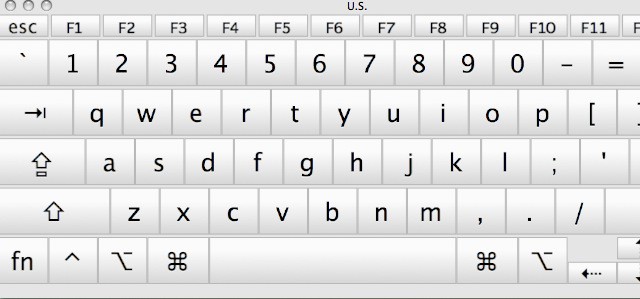
Figuring Out What Keys Generate What Symbols In OS X [Video How-To]

Figuring Out What Keys Generate What Symbols In OS X [Video How-To]

Have you ever needed to insert a special character while typing a document in Mac OS X, but didn’t know how? Apple doesn’t provide an easily accessible way to view which keys generate which characters. Buried in System Preferences though, is a keyboard viewer which will let you figure out which keys give which symbols. This video will show you how to enable this function and use it to discover helpful key combinations.

DON'T MISS
Top Keyboard Shortcuts In Mac OS X [Video How-To]

Apps you might like

  • Zachary

    I have 10.5.8 and don’t have that option under keyboard. I can access “show or hide the Character Palette” in Keyboard Shortcuts and it shows up in my menu bar. Can’t find any option for a keyboard viewer. Are you working with a later version?

    • Michael Steeber

      I’m working with Snow Leopard. I’m pretty sure the option is still there in Leopard, you just have to acess it a different way. You could try searching for it in System Prefrences.

      • christoph

        I think I used to access that setting via the language preferences

      • Invent1

        It is the ONLY WAY that I got it to work for me using Leopard OS 10.5.8, i.e., go to: System Preferences > International > Input Menu > … then I selected checkboxes “Keyboard Viewer” and “Character Palette”and it works exactly as Mr. Steeber said it would.

    • Invent1

      Go to the first or PERSONAL section in System Preferences, then to International, next to Input Menu, and then I selected checkboxes “Keyboard Viewer” and “Character Palette”and it works exactly as Mr. Steeber said it would.

  • Cicciosynth

    Yes, but the question is .. how do you edit that character map? what if I want to have different combinations for different signs?

  • Redsabr

    This doesn’t work. I check the box, and nothing shows up in the Menu Bar.

    • Michael Steeber

      Try restarting the computer. That usually will solve most issues.

      • Redsabr

        Restarted iMac, still does not work.

      • Msintosh

        Hmm, can’t really help you there then. Never heard of an issue with it before.

      • Doremiguel

        It appears it is a retarded iMa =)

  • Anonymous

    here is a list of all the possible combinations from the italian blog http://www.skimbu.it
    http://www.skimbu.it/wp-content/uploads/2011/04/char.jpg

  • http://twitter.com/CalicoAvenger Faye Barth

    I have the Bluetooth keyboard, and it doesn’t save that setting for me (running 10.6.7).

  • http://profiles.google.com/charlieargueta Carlos Argueta

    Nice video. I´m also interested in that Ink icon on the System Preferences, what´s that preference?

  • http://imajoebob.myopenid.com/ imajoebob

    I run 10.4 and it’s been around since at least 10.2. Adding the language option to the menu bar will also add both the character palette and keyboard viewer. As a longtime user of special characters, I was using ASCII characters in DOS more than 20 years ago. It was a great disappointment that Apple doesn’t support anything like the CTL-ALT-code. Trying to write technical reports without an easy access to mathematical, statistical, and Greek characters is a chore.

  • Steven

    Thanks for the clue, but it doesn’t work on a Core 2 Duo MBP running 10.5.8 The system preference combines mouse and keyboard and there is no check box show keyboard and character viewer in menu. Is it because I’m running a laptop?

  • Macmbr

    Keyboard viewer is under International in 19.5.8

  • Macmbr

    Oops, OS X 10.5.8 under International in System settings

  • Donald B. Roberts

    What about taking a screen picture of each of the possibilities, printing them, and then being able to reference them without moving from whatever program you are using?

About the author

Michael SteeberMichael Steeber is a student who is obsessed with everything Apple. He enjoys making videos and runs the MSComputerVideos YouTube channel in his free time. You can follow him on Twitter as well.

(sorry, you need Javascript to see this e-mail address)| Read more posts by .

Posted in How-To, Mac, OS X | Tagged: , , , , , |
