Ben David Walker, a student from the U.K., has designed a new banner notification system for the iPhone that cleverly uses some empty space in the current iOS.
As we reported yesterday, Apple is revamping the much-criticized pop-up notification system in iOS and is buying a third-party app developer for its technology.
The current notification system is a mess. It was designed in 2007 when users had the odd SMS message or alarm, but is useless for 2011 when users have multiple messages coming in from Twitter, Facebook, SMS, as well as alarms, reminders, voicemails and missed calls. There is nowhere in iOS to see them all in one location.
But there would be using Walker’s new system. Here’s how it would work.
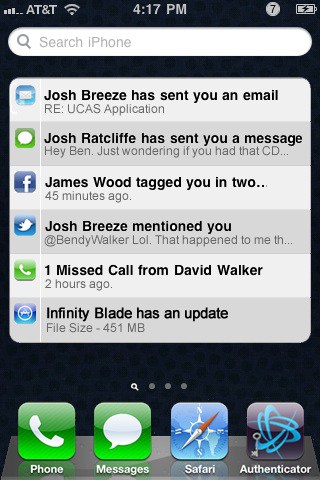
Walker’s notification system uses the empty space on the Spotlight search screen, which is revealed when users swipe right on the Home screen.
Currently, the Spotlight search screen is pretty much empty. Except for the search box at the top, the screen contains a big black space where the search results are presented.
Walker proposes using that space to display banner notifications about incoming email, and messages from Twitter, Facebook and IM. It will also include push notifications from various apps. When the user taps on a notification, they are taken to the appropriate app.
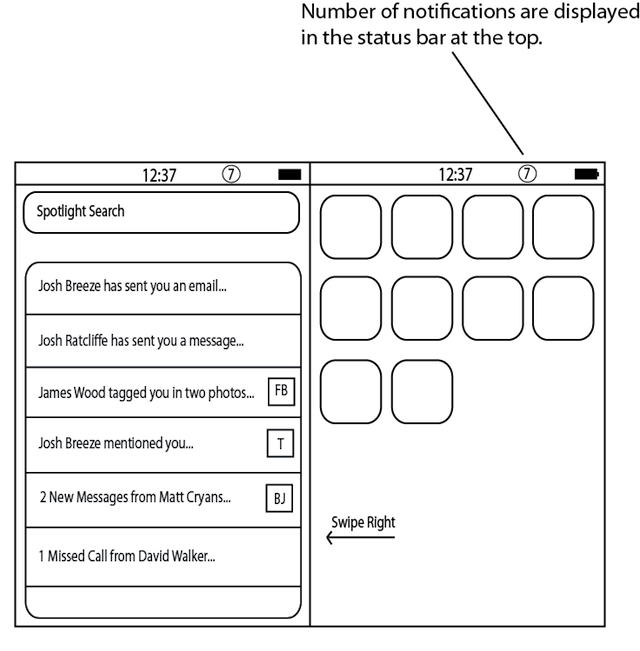
I chose to put it in Spotlight because if it was located on a separate homescreen, then it would mean two swipes to get to either your notifications or Spotlight Search. As it stands in iOS 4.2, Spotlight is massive waste of space (literally speaking). The search bar takes up a tiny portion of the screen and there is plenty of unused space underneath. As you can see in the diagram, simply tapping the Spotlight Search bar will bring up the keyboard and allow you to perform a search instantly. The only difference is that notifications are displayed if you don’t tap on the search bar.
When users initiate a Spotlight search, the notification banners are replaced by search results.
There’s also a small notifications icon in the status bar: a number alerting the user to the number of notifications waiting for them. The user doesn’t hit the number in the status bar — it’s too small a target — but rather swipes right to the Spotlight Search screen.
Walker tried to avoid copying Android, which has a menu that is dragged down from the status bar, and HP’s webOS, which has a slide-up pane.
He also tried to figure out a system that confined notifications to a well-defined area of the OS, and not have them cluttering up other screens. He considered using the area above the multitasking bar, which is revealed when users double-tap the Home button. But Walker thinks adding notifications there would be cluttered and confusing.
He also wouldn’t change the current notification system that is displayed on the lock screen. That system is fine, he says, when the phone is locked, but would clutter up the homescreen when the iPhone is unlocked. That’s why it makes sense to have a separate screen to display multiple notifications — the Spotlight Search screen.
What do you guys think? Is it a good idea? Is there a better way?

Leander Kahney is the editor and publisher of Cult of Mac.
Leander is a longtime technology reporter and the author of six acclaimed books about Apple, including two New York Times bestsellers: Jony Ive: The Genius Behind Apple’s Greatest Products and Inside Steve’s Brain, a biography of Steve Jobs.
He’s also written a top-selling biography of Apple CEO Tim Cook and authored Cult of Mac and Cult of iPod, which both won prestigious design awards. Most recently, he was co-author of Cult of Mac, 2nd Edition.
Leander has been reporting about Apple and technology for nearly 30 years.
Before founding Cult of Mac as an independent publication, Leander was news editor at Wired.com, where he was responsible for the day-to-day running of the Wired.com website. He headed up a team of six section editors, a dozen reporters and a large pool of freelancers. Together the team produced a daily digest of stories about the impact of science and technology, and won several awards, including several Webby Awards, 2X Knight-Batten Awards for Innovation in Journalism and the 2010 MIN (Magazine Industry Newsletter) award for best blog, among others.
Before being promoted to news editor, Leander was Wired.com’s senior reporter, primarily covering Apple. During that time, Leander published a ton of scoops, including the first in-depth report about the development of the iPod. Leander attended almost every keynote speech and special product launch presented by Steve Jobs, including the historic launches of the iPhone and iPad. He also reported from almost every Macworld Expo in the late ’90s and early ‘2000s, including, sadly, the last shows in Boston, San Francisco and Tokyo. His reporting for Wired.com formed the basis of the first Cult of Mac book, and subsequently this website.
Before joining Wired, Leander was a senior reporter at the legendary MacWeek, the storied and long-running weekly that documented Apple and its community in the 1980s and ’90s.
Leander has written for Wired magazine (including the Issue 16.04 cover story about Steve Jobs’ leadership at Apple, entitled Evil/Genius), Scientific American, The Guardian, The Observer, The San Francisco Chronicle and many other publications.
Leander has a postgrad diploma in artificial intelligence from the University of Aberdeen, and a BSc (Hons) in experimental psychology from the University of Sussex.
He has a diploma in journalism from the UK’s National Council for the Training of Journalists.
Leander lives in San Francisco, California, and is married with four children. He’s an avid biker and has ridden in many long-distance bike events, including California’s legendary Death Ride.
You can find out more about Leander on LinkedIn and Facebook. You can follow him on X at @lkahney or Instagram.

