Here’s a secret: OS X has a password generator built-in, but many people will never even see it. Here’s how to make it easier to get to.
The Password Generator usually only pops up if you click the tiny little “key” symbol that appears if you create a new account, or a new item in your keychain; it looks like this:
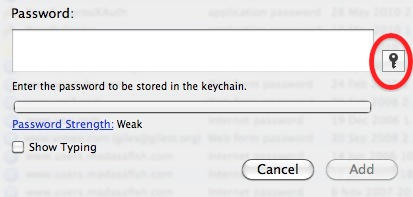
If you click that key, you get this:
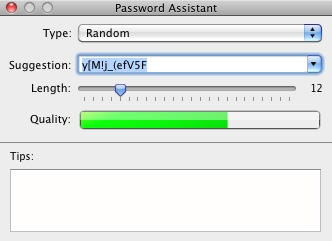
And that’s the Password Generator. It’s capable of creating passwords of varying strength and memorability (click the Type drop-down to see). It’s quite useful to have around, especially when you’re signing up for something new on the web and need a nice strong password to protect it with. (You do use different strong passwords for every site, don’t you? You wouldn’t use the same password everywhere, would you? Cos that would be bad.)
It’s nice that Apple thought to include it, but a pity that it’s so hidden away and hard to find.
Well there is an easier way to reach it: use Code Poetry’s Password Assistant application, which is simply an opener for the built-in product. If you open this Password Assistant, it opens the Password Assistant. So it might be better named Password Assistant Assistant.
Other password generators are available, not least ones that we have already recommended; but this one is free and already exists on your computer. What’s more, Code Poetry’s little opener gadget is free too.
(You’re reading the 40th post in our series, 100 Essential Mac Tips And Tricks For Windows Switchers. These posts explain to OS X beginners some of the most basic and fundamental concepts of using a Mac. Find out more.)

Giles Turnbull is a freelance writer in England. He also writes for the Press Association and The Morning News. You can find out more at his website, and follow him on Twitter @gilest.

