Make Your Own Future Magic With Holo Paint For iPhone

20101004-holopaint.jpg

Remember this video from a week or so ago? It was made by the people at London’s BERG studio for people at advertising agency Dentsu, as part of a wider project called “Making Future Magic”.

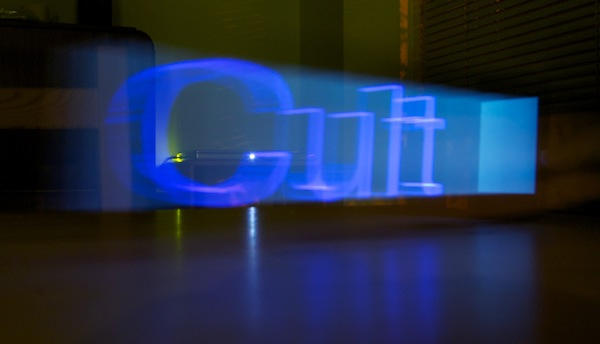
BERG hit on the idea of breaking words and pictures into slices which are displayed on an iPad screen one at a time. If you capture this display with a long exposure on your camera, you get 3D words and images extruded into thin air.

And now the rest of us can join in the fun, with a $1 app for iPhone and iPad, called Holo-Paint.

The app is pretty simple to use. Enter some text, and fiddle with the settings beneath for colour, thickness, depth, font and so on.

Then tap once to start the display, and make sure you hit your camera’s shutter button too.

For best results use long exposures in very dark rooms, and get someone to help out: my initial experiments were fiddly because I was trying to operate both an iPhone and a Nikon D40 simultaneously. You get better results if the person dragging the iPhone or iPad is able to keep a steady pace. It’s worth doing some practice runs first.

Keeping playing around with exposure times and app settings until you capture something magical of your own. Happy light painting!

DON'T MISS
London Designers Make Light Paintings With iPad

Apps you might like

  • john

    this is possibly the worst app i have ever owned
    it does not work

  • Nathan

    I wish I would have read John’s comment before I bought it. Why are you posting stories on crap apps that are impossible to work or just don’t plain work.

  • http://rb-b.blogspot.com/ Rory Parker

    the app works you stupid slurries, you’re obviously retarded.

  • http://gilest.org Giles Turnbull

    The app does work. I used it to make the photo at the top of the page.

    I suggest the people complaining about it ensure they’ve properly read the instructions before posting comments.

    Meanwhile, they’ve given me some ideas for other words to light-paint using this app.

  • Keemps

    Works really really well with mine. Tried it with Canon 7D at bulb setting.

  • sean

    downloaded this, but having problems…the directions are very bad for the app considering its a fairly technical photography issue. My main problem is what angle should I point the ipad at the camera and drag backwards…also I seem to be spelling everything backwards ;)
    this is an app in desperate need of a tutorial video

  • http://gilest.org Giles Turnbull

    sean: I agree, a tutorial would be helpful. The best thing to do is keep experimenting. Drag the iPad from left to right, just as if you are writing words in mid-air. As for the photography aspect: make sure your camera is in manual mode, and set it for a long exposure in a dark place. The photo above was about five seconds, for example.

  • sean

    giles, so you dragged straight across? not at an angle?
    and did you set the angle in the app?

  • http://gilest.org Giles Turnbull

    oh yes, sorry, forgot to address that point.

    I dragged with the screen slightly tilted towards the camera. I tried different experiments at different angles to see the effects.

    In the app, I left the angle setting at zero – I’ll play with that another time.

  • Slick

    I’ve spent about 30 minutes, and i can not get even come close to making anything

    Any tutorials or anything anywhere?

    I don’t even know where to start with camera settings, any suggestions?? It’s actually quite frustrating for me.

  • http://iPhoneDev.com.au iPhoneDevAus
  • http://phone-central.com/ StenvenBe

    this apps is free download in my blogs. but it’s trial for iphone

About the author

gilest

Giles Turnbull is a freelance writer in England. He writes for the Press Association and The Morning News. He has a website you can ignore and a Twitter account you needn't follow.

(sorry, you need Javascript to see this e-mail address)| Read more posts by .

Posted in iPad, iPad apps, iPhone, iPhone Apps, News, Photography, Reviews, Software, Top stories |

