50 Mac Essentials #14: Secrets

20100927-secrets.jpg

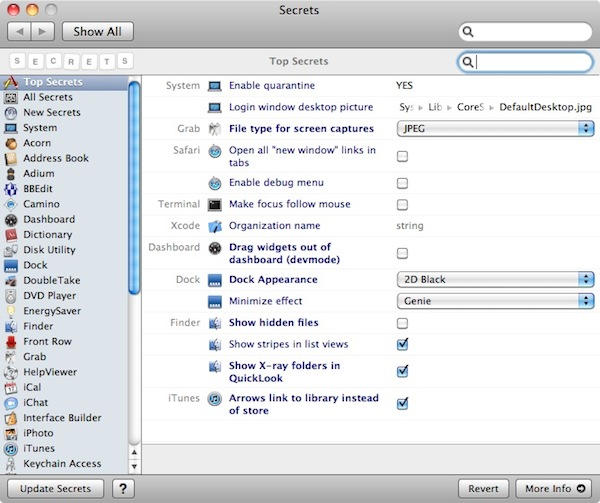
Secrets is a preference pane rather than an app, so once you’ve installed it, you’ll find it inside System Preferences, not in your Applications folder.

What is it? Think of it as “System Preferences Plus”. Secrets gives you point-and-click access to hundreds of hidden preferences in OS X and many applications. Without Secrets, the only way of changing these settings is by using a Terminal window and typing stuff like “defaults write com.apple.iTunes hide-ping-dropdown -bool TRUE” (which is the secret setting for hiding the Ping drop-down menu in iTunes.)

So if you’d rather avoid having to mess around with geekery like that, Secrets is your friend. You can browse through all the hidden preferences on your system, or filter them by application. So if you want Mail to always display messages in plain text, or if you want Safari’s tab bar to stay in view even when there’s only one tab open, or if you want to change how often Time Machine does its backups – well, you can change all of those, and loads more, inside Secrets.

It’s free to download, and frequently updated with new items as and when Apple and third party developers push out updates to software packages.

DON'T MISS
Change Hidden Mac Preferences with Defaults Write [MacRx]

Apps you might like

  • miguel_a

    Seems great, I’m gonna try it. Just one question, if you uninstall it, it will revert to your previous preferences?

  • http://gilest.org Giles Turnbull

    @miguel_a Good question, and the answer is: if you uninstall Secrets, all the settings you’ve changed will remain as they are. If you altered anything with Secrets, it will stay altered until you alter it again – either using Secrets, or via a Terminal command.

    The hidden preferences are already there on your system; Secrets just provides an easy way of getting to them.

  • miguel__a

    Thank You.

  • Sander

    Sweet! This seems like it could be really useful for me; I’ll definitely try this one out. Thanks!

  • http://www.paythegame.net somian

    where can I download it? the site is a list of things I can manually change. I thought there’s a pref pane for that?

  • http://www.paythegame.net somian
  • MacBeth

    Cool!

  • Dave

    Interesting – seems like the Mac equivalent of TuneXP and other such programs. As a new Mac user, I’m definitely going to check this out.

  • Summerbubs

    :o

About the author

gilest

Giles Turnbull is a freelance writer in England. He writes for the Press Association and The Morning News. He has a website you can ignore and a Twitter account you needn't follow.

(sorry, you need Javascript to see this e-mail address)| Read more posts by .

Posted in 50 Mac Essentials, OS X, Reviews, Software |

