Field Test Returns in iOS 4.1

Field Test Returns in iOS .jpg

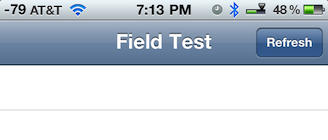
Apple has re-introduced field test mode in iOS 4.1, which will allow you to quickly check the quality of your cellular signal by simply dialing: *3001#12345#* and pressing Call on your iPhone.

The signal bars on your iPhone will be replaced by a number. The higher the numeric portion of the negative number gets the worse your signal is. For example, -100 is worse than -79.  If you tap on the displayed number the display toggles between displaying the number and the normal signal bars.

The original field test mode had a more robust set of features being reported, but signal strength is all you get in this version.

Try the test for yourself and during the test hold your iPhone 4, the wrong way, by connecting the two metal bands on the lower left corner with your finger or hand over the black plastic strip. You’ll see the phone’s signal quality drop rather drastically due to the iPhone 4 death grip. According to AnandTech they were able to make calls and remain on that call with a signal strength as low as -113 on their iPhone 4.

If you are done testing simply press the Home button to return to your iPhone Home screen.

DON'T MISS
Access The Hidden Field Test App For iPhone [iOS Tips]

This is an interesting development considering the fact that Field Test Mode vanished in iOS 4.0 when it was released along with the iPhone 4 and the subsequent Antennagate scandal that rocked the Internet.

[via Gizmodo]

About the author

dwmartin

David W. Martin has more than 20 years of experience in the industry as a programmer, systems and business analyst, author, and consultant. David has written for CNET's iPhoneatlas.com and MacLife.com he currently writes for CultofMac.com and BYTE.com. He comes to Cult of Mac's website with deep knowledge and passion for the all things Apple. Follow David on Twitter @david_w_martin.

(sorry, you need Javascript to see this e-mail address)| Read more posts by .

Posted in News |

  • Jared

    So what number means no signal at all? I got mine all the way down to -113..

  • Shane

    Thanks for the tip, I got mine to range from -73 down to -103 with the death grip in downtown OKC.

  • Jan

    Not wanting to be pedantic, but:

    *The higher the negative number gets the worse your signal is.*

    -79 is clearly higher than -100 – it’s the lager number.

    This depends on your definition of “higher” of course…

  • Humanoid

    I did that on my iphone 3GS. I got -101. Today after the update i am having call issues. The person right next to me called me and it went to my voicemail while it showed 3 bars.
    I tried the test again and its saying “error performing request Unknown error” and before it came my signal were nil and it was “searching” for signals. Never happened before.

    Is this ok?

  • Glenn

    A far better way to do this is to use an app called Signal. Available in the Cydia store on jailbroken iPhones, it gives a very cool graphical map of what cellphone towers your phone is talking to and where they are in relation to where you are. I got this app and it lets me know just exactly how horrible my AT&T service is here in Oklahoma, as my phone is trying to talk to the only AT&T tower in the county, which is 13 miles away!

  • Debby

    Didn’t work for me. Got a message “error performing request unknown error”

  • Shane

    -81, -104 with death grip applied for me.

  • http://mackeeper.zeobit.com/ MacKeeper_Fan_Modua

    Anyway, now that we finally have this diagnosis test, anyone care to tell us what their signal is like normally and then after they bridge the antennas with their left hand?

    Specifically the following states. Flat on table, in your hand, hand bridging antenna.

  • http://www.twitter.com/bbalz Brent Balzer

    I did it today, with the case on and ‘death grip’ applied I went from 54 down to 58.

    Without the case I went from 58 to 58.

    Not dramatic changes but I’m in city coverage.

    Now that I dialed the number I can’t get the field mode to leave for my signal. I constantly keep tapping the corner and it switches over and over.

    Any ideas how to shut it off entirely? I did a power cycle of the phone already.

