Turn iTunes 10 Back Into iTunes 9… Aesthetically

Turn iTunes 10 Back Into iTunes 9… Aesthetically

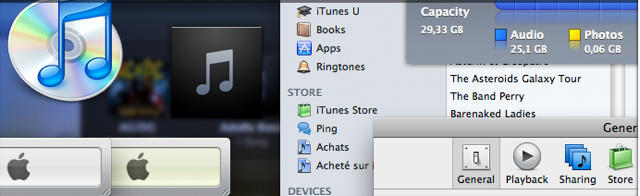
Loathe — absolutely loathe — the new iTunes 10 look? The grayscale sidebar icons? The hypocritically wonky horizontal windows controls? That ghastly new CD-less icon? *Damien Erambert has put together a handy new package which allows you to roll back iTunes 10”s more egregious changes back to a more palatable iTunes-9-style aesthetic bliss. Not that that looked all that great either, you understand.

* – Okay, this download won’t change the icon… but it’s easy enough to do.

DON'T MISS
Replace Your Boring iTunes Icon With Currently Playing Song’s Album Art [How-To]

About the author

John BrownleeJohn Brownlee is news editor here at Cult of Mac, and has also written about a lot of things for a lot of different places, including Wired, Playboy, Boing Boing, Popular Mechanics, Gizmodo, Kotaku, Lifehacker, AMC, Geek and the Consumerist. He lives in Cambridge with his charming inamorata and a tiny budgerigar punningly christened after Nabokov's most famous pervert. You can follow him here on Twitter.

(sorry, you need Javascript to see this e-mail address)| Read more posts by .

Posted in News, Software | Tagged: , , , , , |

  • Joseph

    People really are creatures of habit. The greyscale sidebar icons put more focus on the content. The vertical (not horizontal) window controls are a more efficient use of space as they allow for the other controls to be pushed further to the top edge of the window. Personally I’m hoping Apple pushes out these design improvements consistently across the OS.

  • http://www.alwaysonmessage.com/ app developer

    I guess there will always be people who don’t want anything to change but it always surprises me that those people are using computers!

  • Me

    “Loathe — absolutely loathe — the new iTunes 10 look? The grayscale sidebar icons? The hypocritically wonky horizontal windows controls? That ghastly new CD-less icon?”

    You guys, should really get a life. You have to have no problems to bother yourselves with such an absurd. I’m beginning to really dislike Apple fanboys and understand why people laugh at them…although i love and use their products.

  • porkchop1234

    +1 at me’s above comment

  • Chris

    mhm… tried to install it but i don’t see any change, not even after restart… any suggestions?

  • Mark

    Don’t give a rip about the icon but the color in the sidebar actually adds information in visual clues in the different type lists.

  • Alfred

    The user “Me” said: “You have to have no problems to bother yourselves with such an absurd. I’m beginning to really dislike Apple fanboys and understand why people laugh at them…”

    Ok ok ok …. so people who *support* everything Apple does without question are “fanboys”, and now people who *complain* that they *don’t like* the tiniest things Apple does are, er, also “fanboys”.

    Wow, so if you like the new look, you’re a fanboy. If you hate it, you’re a fanboy too.

    Awesome.

    I think we’ve all learned a lot today.

  • Chris

    Fanboy or not… i just want some color back into my music :p

  • GrimWit

    The only thing I hate, aside from Ping, is the stupid “traffic light” layout of the close/minimize/maximize buttons.

  • http://twitter.com/matrocksteady matrocksteady

    It’s the grayscale that really kills me. Hypercritical or not, it really makes the program feel like the doldrums. I just want the colors back. It gives life to the program. There is nothing aesthetically pleasing about a bunch of gray.

  • http://www.spark-creative.co.uk Mark Astle

    Don’t have a massive issue with the icons. Hate, really hate the traffic light layout, simply because it’s inconsistent. If they change it right across the OS, then so be it. But for now, it should fit with everything else.

    I’ve also patched my system so I can still use “Apple N” to make a new folder.
    Stuck in my ways? Me?

  • Maxx Wyler

    I don’t mind the horizontal controls, but the greyscale is driving me nuts. Put a little color back in my life.

  • http://www.paulgrantdesigns.com Paul

    If you’re on a Mac and wish to roll back to iTunes 9, here’s how.

    First thing’s first. You’ll need to track down a Mac version of 9.2.1. Apple has (from what I could tell) stripped it from the site, and many searches just turned up links to Apple’s site. While this is sill available, get it here – http://tinyurl.com/33pnveb

    Now, trash the cursed icon from your dock, and then delete the program itself from ‘Applications’. No worries, nothing important is saved in the app.

    If you have the space, you’re going to want to do a backup of your music files before anything else. Go into ‘(your hard drive)/Users/Music/’ and you’ll see an ‘iTunes’ folder. This has everything important in it. Go ahead and duplicate it either to a CD backup, or just duplicate it somewhere else on your hard drive. In the event something goes wrong, You can always put the duplicate back in place and re-download iTunes 10.

    Now, go into the iTunes folder (the original, not your backup!) and trash these 3 files-

    - iTunes Library
    - iTunes Library Extensions
    - iTunes Library Genius

    Leave everything as-is.

    Now, install iTunes 9. When finished, put a copy of the icon back on your dock and click it. After clearing the legal agreement, you’ll be greeted with what appears to be a blank slate — no tunes, no video. This is NORMAL. The files we trashed are the glue of what ties the application to your files — files that were updated to only work with 10. What we need to do now is to rebuild those files back into the iTunes folder.

    But before we do anything with the folder, we need to make some quick adjustments in iTunes 9 to ensure everything goes smoothly. This is KEY. Pull down ‘Preferences/ Advanced’ and turn OFF the following-

    - Keep iTunes media folder organized
    - Copy files to iTunes media folder when adding to library

    Click OK.

    Take the iTunes folder that we tracked down before, and drag the whole thing directly into the open white window area of iTunes. Immediately it will start processing your music, linked artwork, iPhone/Touch apps, etc. If at ANY time it asks if you want to replace item X with a new item X, click NO. It may ask you this a few dozen times. Just always click NO.

    And there you go. After 5 to 10 minutes, your iTunes will be fully restored to 9.2.1. Enjoy!

    Future tip – Watch out for Apple updates from now on, or you may inadvertently upgrade to 10 one day and have to repeat the process of rollback.

  • jordan

    itunes 10 blows. they are tampering with it too much. very annoying.

  • francesca

    thanks paul!!!!!!! you saved my dayyyyyy!!!! back to itunes 9.2.1! yeaaaaa

  • Gary

    Thank you Paul, now I’m back to iTunes 9. The new version 10 wasn’t working for so many different reasons it’s even too long to describe here :-)

  • M@

    Is it possible to actually revert back to 9.0 or 9.02?

