On Tuesday this week an Apple spokesperson made claims that the upcoming release of iOS 4.1 will not fix the proximity sensor problems that are being blamed on software bugs, relocation of the proximity sensor due to the addition of the front facing camera, or greasy ear canals. This problem has been widely reported and there are numerous claims from iPhone 4 users that the problem exists. I’ve encountered the problem myself on my original iPhone 4 and its replacement.
On Wednesday this week at an Apple Special Event Steve Jobs told us that the release of iOS 4.1 will resolve the proximity sensor issue, but now one iPhone 4 user, Ryan Bell, is also claiming that iOS 4.1 does not resolve the issue. He presents two YouTube videos that demonstrate why he thinks that the problem isn’t resolved.
iPhone 4 Proximity Sensor, Fixed?
https://www.youtube.com/watch?v=tebrRAceL9U
More iPhone 4 Proximity Sensor Data
https://www.youtube.com/watch?v=oHMrhqwQJjM
Recreate the Second Test Yourself
If you want to recreate the test in the second video then download and install Apple’s iPhone Configuration Utility.
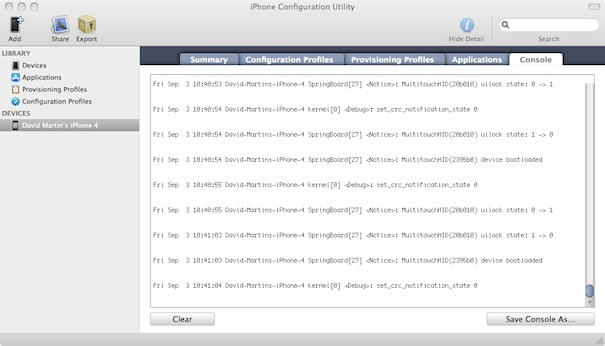
Once the utility is installed simply launch it and connect your iPhone 4 to your computer with the supplied USB cable. If you do not see your iPhone 4 listed under devices then add it if necessary using the icon in the applications toolbar. Once your iPhone is added click its entry under Devices and then click the Console tab for it.
You can now start using your iPhone 4 and you should see a copy of the phones console log displayed in the utility. You will see a variety of messages scroll past and a few of these will be easily recognized for what they mean while others will not. Regardless, it is interesting to see what’s going on inside your iPhone.
The following two entries from my iPhone 4 console log represent the proximity sensor turning the screen off and then on again.
Fri Sep 3 11:41:37 David-Martins-iPhone-4 SpringBoard[27] : MultitouchHID(20b010) uilock state: 0 -> 1
Fri Sep 3 11:41:43 David-Martins-iPhone-4 SpringBoard[27] : MultitouchHID(20b010) uilock state: 1 -> 0
Conclusion
We now have two claims that go against what Steve Jobs stated and one comes with visual evidence that you can recreate yourself with Apple’s iPhone Configuration Utility — so what’s the real story?
The answer to that question will present itself next week after Apple releases iOS 4.1 to millions of iPhone 4 users around the world. We suspect this will be on or around September 7th. I plan on spending plenty of time with my iPhone 4 screwed to my ear to give the proximity sensor a good workout and I’m hoping that the problem is resolved.
Are you using iOS 4.1 already? Tell us all about your experience with it by leaving a comment.

David W. Martin has more than 20 years of experience in the industry as a programmer, systems and business analyst, author, and consultant. David has written for CNET’s iPhoneatlas.com, MacLife.com, CultofMac.com, BYTE.com and recently for aNewDoman.net. He comes to Cult of Mac’s website with deep knowledge and passion for the all things Apple. Follow David on Twitter @david_w_martin or see what he’s up to now at davidwmartin.com.

