iTunes Ping And Facebook: What’s Going On?

It seems the situation is more confused than I thought; some people have been able to connect Facebook with Ping, and other haven’t. See end of post for a number of updates.
OK, I give up. I’m confused. I have no idea what’s going on with Ping and Facebook.
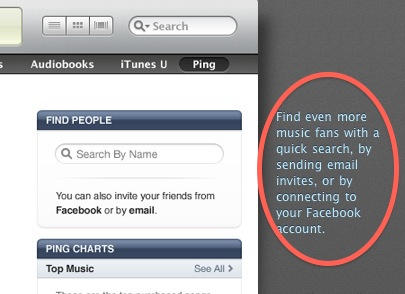
On the one hand, we have the above screenshot, taken from Apple’s own Ping web page just this morning.
It clearly says you can connect Ping to Facebook. But. You can’t.
At least, I can’t. I’ve hunted through every single corner of the Ping pages inside iTunes. I’ve looked in the Account settings, I’ve edited my profile, and there’s nothing. There’s no way I can find of connecting Ping and Facebook. I’m not alone, either. There are plenty of people saying the same thing on Twitter.
On the other hand, we have this report from Kara Swisher, which confirms the lack of Facebook integration inside Ping, and quotes Steve Jobs saying that Facebook’s terms were “too onerous”.
So why does Apple’s own web page still say “Find even more music fans with a quick search, by sending email invites, or by connecting to your Facebook account.”?
My conclusion: I think Facebook’s terms only became onerous at the last minute. And the Ping web page is going to be edited very soon.
UPDATE: Well, this is weird. It seems that some people have been able to link up iTunes and Facebook, and others haven’t. See the comments for details. But if the two services are linked up, why did Steve Jobs tell Kara Swisher that Facebook’s terms were too onerous? Strange.
UPDATE 2: Dan Frommer has noted the same issue.
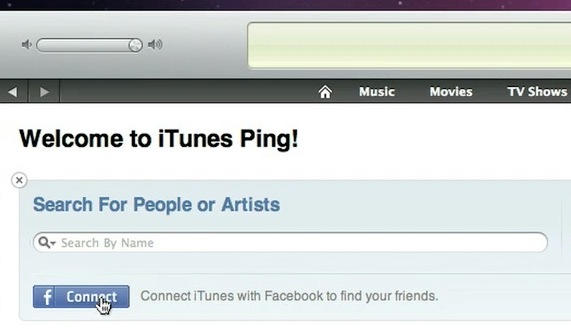
UPDATE 3: Thanks to Markus Ramstedt on Twitter for pointing out this moment in this official Ping how-to video:

More from Cult of Mac
- Facebook Executive Says He’s “Very Confident” They Can Work With Apple on Ping
- Apple and Facebook CEOs Meet For Dinner To Iron Out Ping
- Apple’s Lonely Ping Friends Twitter
- September iPod Event: Meet iTunes’ New Social Network, Ping
- Apple Put Twitter in iOS 5 Because Steve Jobs Thinks Facebook’s Mark Zuckerberg Is A “F**king A**hole” [Report]

![Read "How The iPad Is Revolutionizing Branding [Exclusive Book Excerpt]" Read "How The iPad Is Revolutionizing Branding [Exclusive Book Excerpt]"](http://cultofmac.cultofmaccom.netdna-cdn.com/wp-content/uploads/2012/02/marcolina-250x150.jpg)


![Read "EA Sports Gearing Up For The Super Bowl, Discounts MADDEN NFL 12 To $0.99 [Deal Alert]" Read "EA Sports Gearing Up For The Super Bowl, Discounts MADDEN NFL 12 To $0.99 [Deal Alert]"](http://cultofmac.cultofmaccom.netdna-cdn.com/wp-content/uploads/2012/02/maddennfl12-640x313-250x150.jpg)

![Read "ZAGGFolio Keyboard Case Is Tough, Stylish And A Delight To Use [Review]" Read "ZAGGFolio Keyboard Case Is Tough, Stylish And A Delight To Use [Review]"](http://cultofmac.cultofmaccom.netdna-cdn.com/wp-content/uploads/2012/02/P1020394-250x150.jpg)
![Read "If iBooks Author Is Overkill For Your Simple eBook Project, Try Book Creator For iOS Instead [Review]" Read "If iBooks Author Is Overkill For Your Simple eBook Project, Try Book Creator For iOS Instead [Review]"](http://cultofmac.cultofmaccom.netdna-cdn.com/wp-content/uploads/2012/02/bookcreator-250x150.jpg)
![Read "Stuck On Earth, Perhaps, But Not Stuck For Lovely Photos To Look At [Review]" Read "Stuck On Earth, Perhaps, But Not Stuck For Lovely Photos To Look At [Review]"](http://cultofmac.cultofmaccom.netdna-cdn.com/wp-content/uploads/2012/02/stuckonearth-250x150.jpg)
![Read "How To Type Like A Hacker On Your iPad [Review]" Read "How To Type Like A Hacker On Your iPad [Review]"](http://cultofmac.cultofmaccom.netdna-cdn.com/wp-content/uploads/2012/02/hackertyper-250x150.jpg)

![Read "Use A Screensaver As Your Desktop Wallpaper [Video How-To]" Read "Use A Screensaver As Your Desktop Wallpaper [Video How-To]"](http://cultofmac.cultofmaccom.netdna-cdn.com/wp-content/uploads/2012/01/033-250x150.jpg)
![Read "I Can’t Reinstall Snow Leopard After Installing Lion [Ask MacRx]" Read "I Can’t Reinstall Snow Leopard After Installing Lion [Ask MacRx]"](http://cultofmac.cultofmaccom.netdna-cdn.com/wp-content/uploads/2012/01/mac_os_x_lion_install-250x150.jpg)
![Read "Customize Notification Center To Fit Your Every Need [Video How-To]" Read "Customize Notification Center To Fit Your Every Need [Video How-To]"](http://cultofmac.cultofmaccom.netdna-cdn.com/wp-content/uploads/2012/01/Notification-250x150.jpg)

