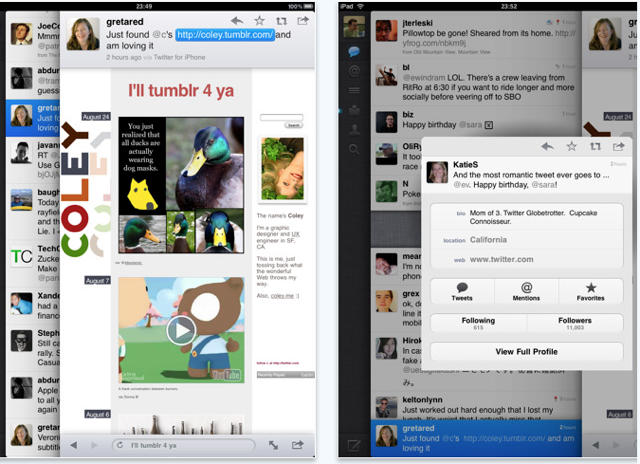
The lack of an official, native version of the Twitter client for the iPad has been a puzzling omission, but now the big blue bird has set things right, having pushed their native iPad app to iTunes.
I haven’t had a chance to play with it, but it seems that a big part of the native client’s delay was because Twitter had big ideas for the app, grafting a truly unique (and, perhaps, a bit quirky) interface on top.
Gizmodo’s Matt Buchanan explains the new interface:
The interface starts out straightforward, like a simple cross between the Tweetie for Mac and the iPhone app. But Twitter for iPad is actually a bit more complicated than it lets on—it’s the most complex of the three. Rather than sticking with the iPad’s standard split-pane views, like in Mail, Twitter is kind of like its own desktop environment, with overlapping, stacked panes that move from left to right. So, on the far left, you’ve got the main control panel, like Tweetie for Mac, which is the bottom pane. To the right of that, and on top of it, you’ve got the tweet list—either the main feed, mentions or direct messages. Whenever you touch on a tweet, a third pane opens to the right, on top of the other two. If there’s a link in the tweet, it’ll open the browser. If not, it’ll open that person’s somebody’s profile. (And if you type a direct message, that’s layered on top of everything else via a popover, for four total layers.) You can switch back to the main tweet list or control pane by touching it, and it’ll load browser pages in the background while you browse through other tweets. It can get cluttered quickly if you’re opening sub-menus and other things—at the same time, it gives you a lot of flexibility.
Buchanan ultimately finds the new interface bold, but quirky, but Techcrunch’s MC Siegler declares it a triumph, announcing that it completely and totally obviates not only any other Twitter app out there, but Twitter’s own website. Then again, I thought pretty much any Twitter client had killed the need to visit Twitter.com over a year ago.
Twitter for iPad is a free download, and it’s available now on iTunes

John Brownlee is a writer for Fast Company, and a contributing writer here at CoM. He has also written for Wired, Playboy, Boing Boing, Popular Mechanics, VentureBeat, and Gizmodo. He lives in Boston with his wife and two parakeets. You can follow him here on Twitter.

