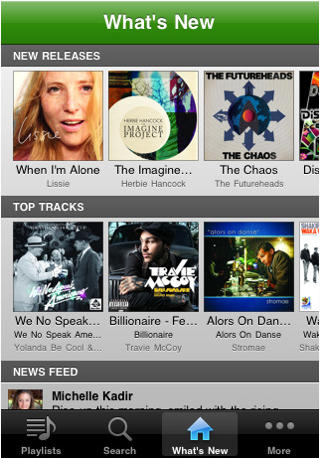
Get Spotify’s iPhone App Working In USA [How To]

Get Spotify’s iPhone App Working In USA [How To]

Although Spotify is “the best desktop music player ever,” the revolutionary music service is only available for people located in Finland, France, Norway, Netherlands, Spain, Sweden and the United Kingdom. You can’t get it in the U.S.

This is enforced by Spotify by checking your IP Address and making sure that you are in one of those countries. As such, anyone in the U.S. that goes to https://www.spotify.com/int/get-spotify/overview/ will get a message that Spotify is “Not available in your country yet.”

Don’t worry though, because with this walkthrough I’m going to show you how you can get this great music service on your computer and on your iPhone/iPod Touch.

Step 1: Downloading Spotify desktop software to your Mac/PC

1) Go to https://www.spotify.com/int/download/
2) Select Windows or Mac OS X
3) Download the file and install
4) Leave the software alone for now (you can’t use it yet anyway but we’ll get it working in a bit)

Get Spotify’s iPhone App Working In USA [How To]

Step 2: Downloading and Installing the Spotify iOS App

This is (in my opinion) the number one reason that you’re going to want Spotify. Any music. Anywhere. Unfortunately it’s not as easy as logging into the App Store, searching “spotify” and downloading the app, because the app isn’t available in the US App Store. So we’re going to have to set up a U.K. iTunes account without a credit card.
1) Open up iTunes
2) Go to the iTunes Store
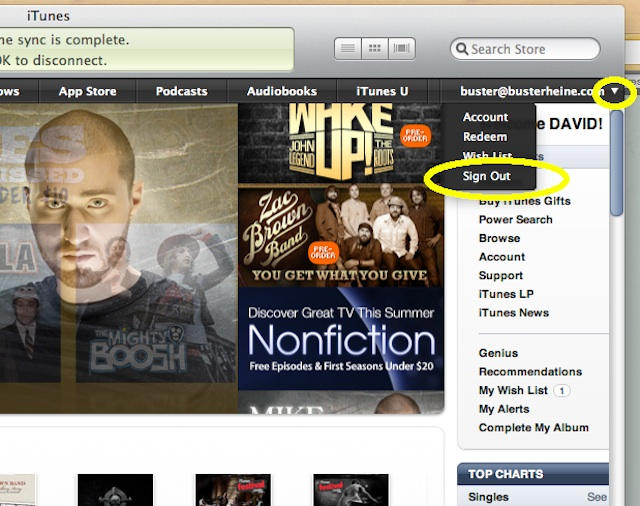
3) Sign out of your current iTunes account. In the upper right hand corner should be your account name. Click on it, and then click on “sign out”
Get Spotify’s iPhone App Working In USA [How To]

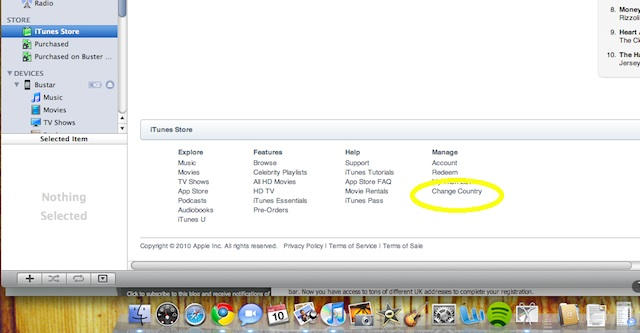
4) Scroll down to the bottom of the page in the iTunes Store and clink on the link “Change Country”
Get Spotify’s iPhone App Working In USA [How To]

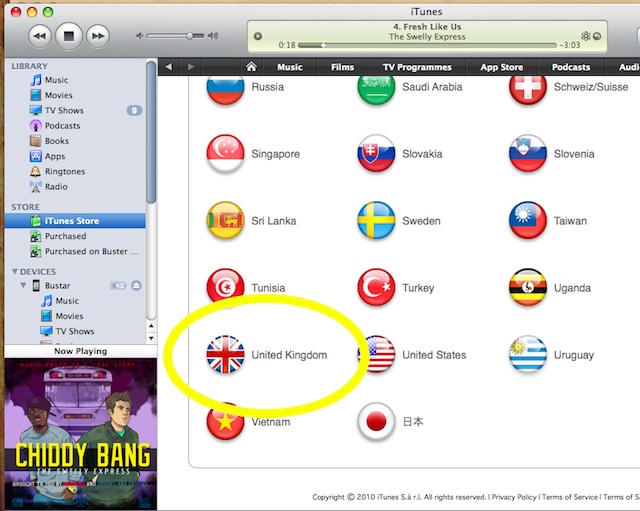
5) A new page with a list of countries will come up. Scroll down and click on “United Kingdom”
Get Spotify’s iPhone App Working In USA [How To]

6) Search for “Spotify”

7) Click the download button.
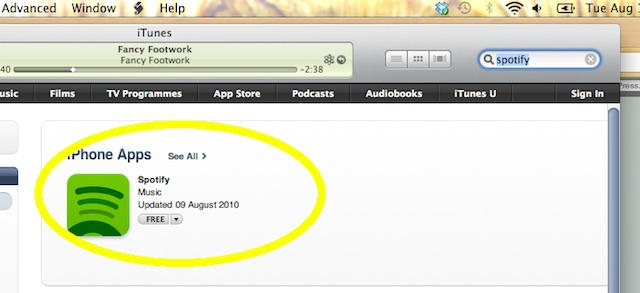
Get Spotify’s iPhone App Working In USA [How To]

8 ) You’ll now be prompted to login to your existing account or CREATE A NEW ACCOUNT. Click on Create a New Account.
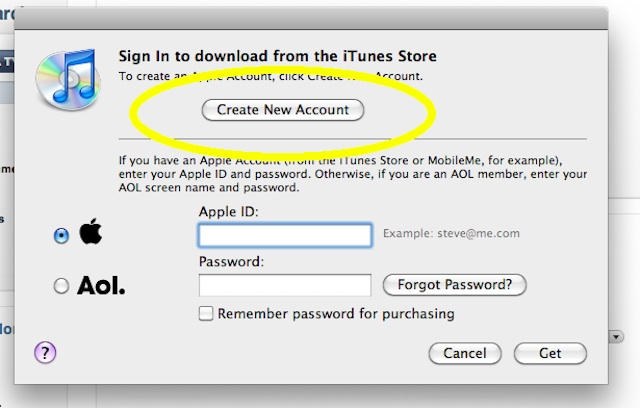
Get Spotify’s iPhone App Working In USA [How To]

9) Using a secondary email address other than the one you use for your US iTunes Account, create you Apple ID and password.

Get Spotify’s iPhone App Working In USA [How To]

10) This screen is going to ask for your credit card information. Fear not, you don’t have to put in a credit card number because you chose to download a free app (this is the only time Apple lets you create an account without a credit card). Choose “NONE” from the list of Payment Methods.
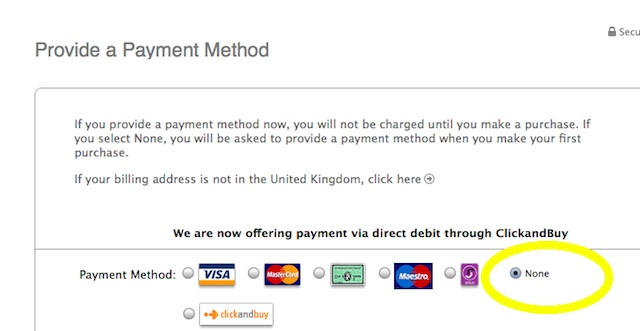
Get Spotify’s iPhone App Working In USA [How To]

11) Using a UK address, complete the registration. You can quickly find a random UK address by going to google.com/maps, type in UK and it will bring up a map of the United Kingdom. Now type in a random store name like “Pizza Hut” in the search bar and it will bring up a list of addresses of Pizza Huts in the UK. Now use that to complete the registration.

Get Spotify’s iPhone App Working In USA [How To]

12) Fill out all the forms and complete the registration. Apple will then send you an email to confirm your account. YOU HAVE TO CONFIRM YOUR ACCOUNT BEFORE YOU CAN DOWNLOAD THE SPOTIFY APP. So go check your email and click the link to activate your new UK iTunes account.
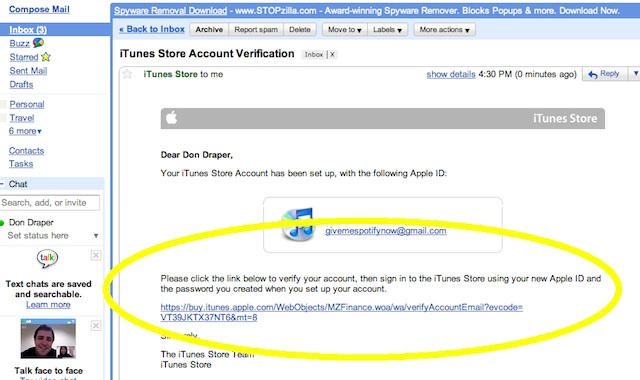
Get Spotify’s iPhone App Working In USA [How To]

13) You’re in! Now you can download any of the free UK Apps (like Spotify) and sync them to your phone. Search for Spotify again, download it, and sync it to your iPhone/iPod Touch. (reminder: sign out of your UK iTunes account when you’re done and login to your real iTunes account.

Step 3: Getting a Spotify Account

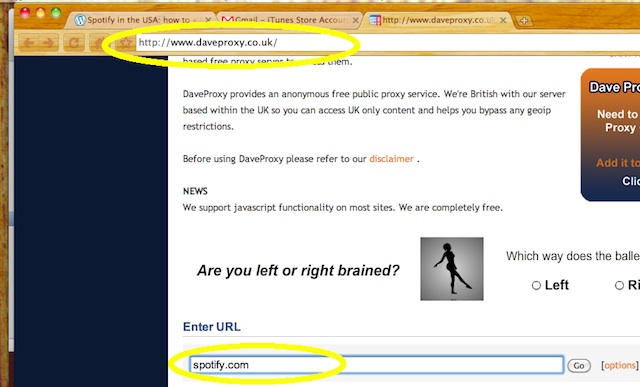
1). Open up a web browser and type http://www.daveproxy.co.uk1). Open up a web browser and type http://www.daveproxy.co.uk

2). Once the proxy site opens up type in spotify.com under the “Enter URL” section at the bottom of the page (it may take a few minutes for the page to resolve. Be patient)
Get Spotify’s iPhone App Working In USA [How To]

3). Now Spotify.com thinks that we’re in the U.K. and they’re going to let us make an account (remember that “not available in your country yet” message we got earlier? you won’t be seeing that anymore :)

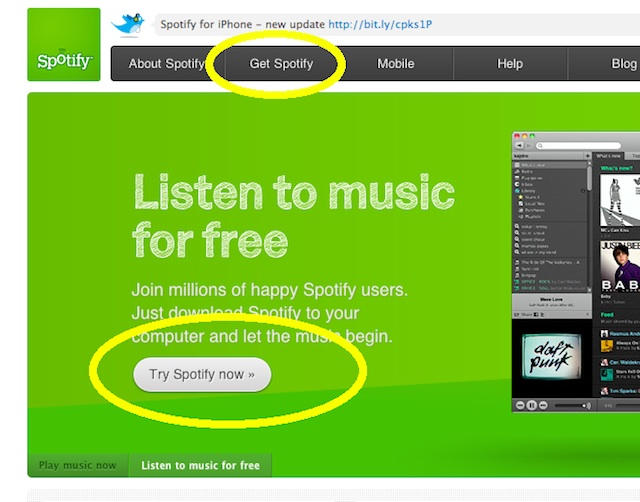
4) From the Spotify.com site, click on “Get Spotify” towards the top of the page.
Get Spotify’s iPhone App Working In USA [How To]

5) You’re going to have the option to choose between Premium, Unlimited, and Open. You’re not going to be able to get Premium or Unlimited yet (unless you have a U.K. Credit Card or PayPal account). Choose the “Get Open” option. It’s the free one.

Get Spotify’s iPhone App Working In USA [How To]

DON'T MISS
Get a U.S. iTunes Account Anywhere In the World [How To]

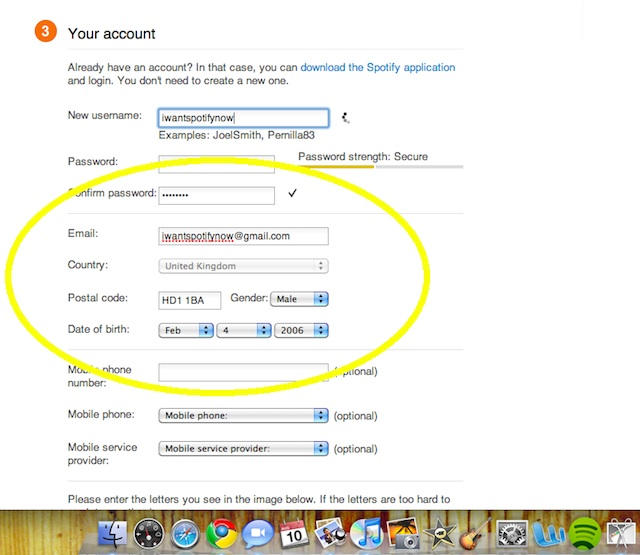
6) Create your account using your email address and a UK Postal code.
Get Spotify’s iPhone App Working In USA [How To]

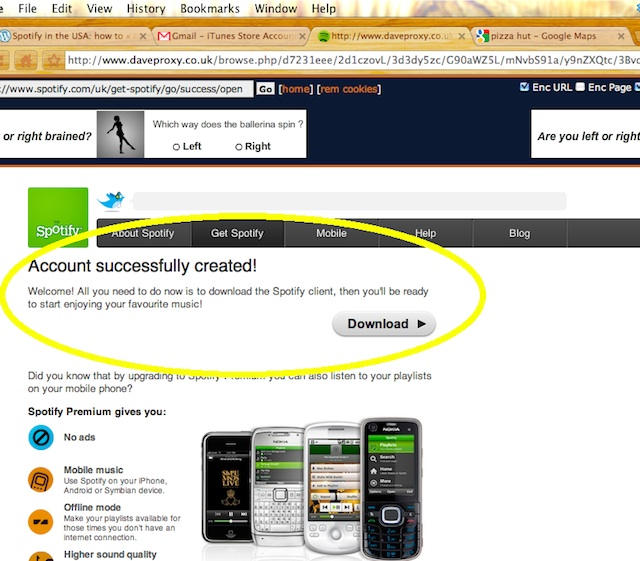
7) You now have a free Spotify Account!
Get Spotify’s iPhone App Working In USA [How To]

8) Open up the Spotify software you downloaded to your computer, login and start exploring the magic of Spotify!
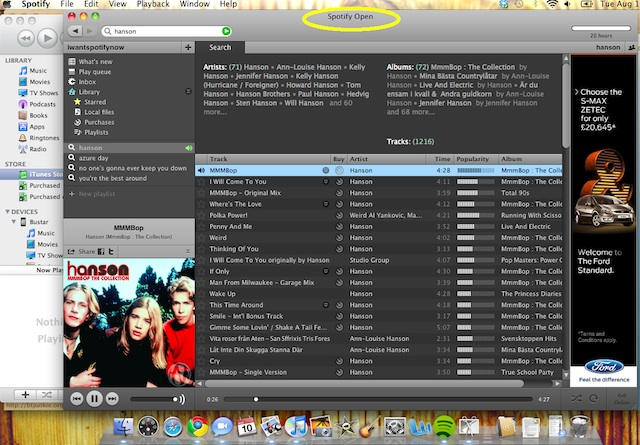
Get Spotify’s iPhone App Working In USA [How To]

You can now use the Spotify software on your computer for 2 weeks (can’t use the iPhone app without upgrading to Premium service). Every two weeks Spotify will re-check your IP address. When they do this they will see that you don’t live in the U.K. and shut down your access to the service. HOWEVER, if you have a Premium account, they don’t check your IP address anymore. (Access to the iPhone app is only available for Premium account holders).

Step 5: Upgrading to a Premium Spotify account (so that the iOS app will work)

The last step to enjoying Spotify for as long as you want on both your iPhone and Computer is to upgrade your “Open” account to a Premium account. I wish it were as easy as clicking “upgrade” and giving them your credit card info, but it’s not. Spotify only accepts payments from bank accounts in the U.K. (or other countries where they offer service). Unless you have a credit card or PayPal account from the UK they won’t accept your payment and you can’t upgrade.

There are multiple ways around this obstacle, but the quickest and easiest method that I have found to upgrade to a Premium Spotify account, is through purchasing access off eBay.

Get Spotify’s iPhone App Working In USA [How To]

All you need to do is go to eBay.com and search for “Premium Spotify.” There are a couple of people who sell “access” to Spotify. All the seller does is make the payment for the Premium service for you. Once you purchase the access from the eBay seller you give them your username and password and they log into your Spotify account, make the payment for you with their UK PayPal account, and then tell you it’s good to go.

Once you’ve got a Premium user account you can now log into the iOS app and use the Desktop app free of advertisements and enjoy access to over 8 million songs anywhere you go.

I paid $25 for the first month. After 10 days of trying the app on my iPhone I liked it so much that I struck up a deal with a seller on eBay $110 for 6 months.<

Hope you found this walkthrough to be useful.

This post was originally published on Bust3r.

About the author

busterheineBuster Heine heads Cult of Mac's Social Media presence as well as contributes posts as often as he gets around to it. Website: noolo.gy; Twitter: twitter.com/bst3r.

(sorry, you need Javascript to see this e-mail address)| Read more posts by .

Posted in How-To, Music, News, Top stories |

  • Colin Merrill

    Buster! very clever….Spotify sounds great-i had never heard of it before. how does it compare with Grooveshark??

    • http://bust3r.com Buster Heine

      I prefer Spotify mostly because of the iPhone app. GrooveShark is a cool service, but I believe they might be having some legal issues. As far as I know they don’t have licenses for the music like Spotify does. GrooveShark Mobile was pulled from the App store after only being up for 5 days because Apple received complaints from Univeral that they were violating their Intellectual Property.

  • MacGoo

    Ummmm…HANSON? My dear Buster, those Okies are infamous in the states, as is the song you’ve selected. If this is your best use of Spotify, I can give you a way better deal – my kid sister has ALL their albums and she hasn’t listened to them in years. I’ll sell you the lot and you can load them into iTunes for the grand total of $30. ;) I jest…in part. Thanks for the tips!

    • http://bust3r.com Buster Heine

      @MacGoo haha. it takes a special man to appreciate Hanson…You know you loved “MMMBop” (I was jesting too with Hanson on Spotify…in part).

  • JDS

    Nice. But too much trouble (I think) sooner or later it will show up here. Until then get your music at the local public library – your taxes finally at work for you.

  • Joey

    I’m going through the process but the option to select ‘none’ no longer exists for me.

    • http://bust3r.com Buster Heine

      @joey I just checked again to make sure they haven’t changed anything, and it still works for me. As long as the first app you try to download is a free app then they give you the option to not put in a credit card. Make sure you follow the steps exactly as written.

      @JDS they’ve been saying that “spotify is about to launch in the US!” for about a year and a half now, but it’s still M.I.A. I get impatient.

  • roy

    On other spotify registration walkthroughs I’ve seen people said that after about 2 weeks spotify checks your IP address again and shuts down access when it finds out you’re in the US. Is that still a problem? Its not as if you’re running everything through a proxy all the time…

    • http://bust3r.com Buster Heine

      @roy once you become a Spotify Premium member they don’t check your IP address anymore. But if you’re only using Spotify Open then you’re right, they check your IP you’d be denied access after using the service for two weeks. Hence the reason to upgrade to Premium.

      @ianhwk I’m not sure what alternative you’re looking for. Are you wanting an alternative from Google, or an alternative from davesproxy.co.uk? You can’t use a US proxy because you want your IP address to show up as originating from the UK. Dave’s Proxy is pretty reputable but there are alternative sites. If you’re worried about security you could always pay for a VPN, but that seems overkill when you’re just using it to access a website for 2 minutes to create an account. (you’re never putting in personal information while you’re going through the proxy server.

      If you want an alternative from Google…well there’s always Bing I suppose.

  • IanHwk

    Any chance of a “safe” U.S proxy server site Buster? As they can be dodgy to use I would appreciate a recommendation rather than a Google search.

  • DANdroids

    Buster,
    Good find. Been using Spotify since February, and got my account in a similar fashion. Spotify has blocked proxies in the past, so I wouldn’t be surprised if they block Daveproxy.

    That said, you really shouldn’t be pointing people to purchase a membership from eBay. There’s got to be a better option. ;)

    • http://bust3r.com Buster Heine

      There’s lot of different proxies out there other than Dave’s. It’d be a pain for Spotify to block ALL of them. And there’s definitely other ways to pay for the Premium service, I was just going with the quick and easy way.

  • Josh

    Apple has removed the “none” in payment list. Is this the case for everyone, it’s just not there in my UK sign up process

    • http://bust3r.com Buster Heine

      Apple hasn’t removed the “none” option in the payment list, you just have to go through the right steps. Make sure you’re following the steps exactly. If you click on a paid app it won’t show the “none” option.

  • dbkenn

    The only thing I need is a UK credit/debit account and I set. My UK paypal needs it. I don’t even need to charge it ever. Sucks.

  • IanHwk

    Hi Buster – sorry to not make myself clear. I am actually a UK resident but would like to use a proxy server to access the ABC app in the same kind of way you propose with Spotify.

    The only thing putting me off is knowing a “safe” proxy server that won’t (hopefully) skim any info from me.

    I just kinda hoped you could point us non-US people in the right direction so we can reverse what you are doing here.

    Ta.

    • http://bust3r.com Buster Heine

      a good US Proxy to use is NinjaProxy.com.

      hope that helps

  • Ron

    Hey ,

    Nice Article,

    You can also get your premium membership from the following website :

    http://spotifypremium.bigcartel.com/

    Its faster and cheaper than ebay , especially the 3 months or more bundles.

  • Hugh

    I love Spotify (desktop version), but even with your 6 month deal, that’s nearly $20/mo. Grooveshark is only $3/mo and Rdio is $10. While GS has issues, I’m prepared to deal with them to pay 85% less than what you’re paying for Spotify Premium. Even Rdio would be 50% less and I’ve heard good things about its mobile client.

    Guess we’ll have to wait for Spotify’s US vaporware release. The Eks guy hasn’t managed the release well here and should get someone else to handle negotiations for him.

  • Stuart

    Hi All

    I just followed your process and I love Spotify! it’s definately the best! The Spotify App is just magic! I bought premium from eBay. All the sellers on ebay look legit but I bought from “sturry68″ seemed most experienced. Def worth it, much recomended. Also ask them for discount if you’re buying 3 or 6 months. I got $135 which seemed a good enough deal to me. the seller told me that he couldn’t lower it cus of fees and exchange rates…

    S

  • Joshua

    Hi Everyone ,

    Same experience than Stuart here , followed your guide and worked perfectly and spotify app is way better than anything else out there.
    However I got mine from the seller ”esther_art1303” and paid $120 for 6 months.
    Thanks again for that article , that’s really gonna be a help during the whole uni year!

    Joshua

    • http://bust3r.com Buster Heine

      glad to hear people are having success with it.

      @Hugh I guess it’s not for everyone. If you’re a fan of music and like being able to easily discover new music and stream it anywhere then it’s a great app, but the price may seem too costly for some.

  • Stuart

    Hi josh you got a good deal there. Did you pay outside of ebay? because I can’t see a 6 month purchase from your seller’s “sold” list?

    I thought about arranging to buy outside of ebay fro a little bit more discount but I decided it was worth paying a little bit more to get protected.

  • Joshua

    Stuart ,

    I got 2* 6 months actually , present for my sister.
    I inquired for six month then got the $120 price offer , and decided to get one for my sister too.

    Overall she’s thrilled too , we’ve been creating and checking out playlists all day.
    Will try to sync my library via the offline feature this evening :)

    Seller said that if I wanted to renew I could email him directly to get the price without the ebay fees.

  • Stuart

    ah that’s probably why, i guess the more you buy the cheaper prices you can get!

  • Sten

    Hey, thanks for the guide – works well not just from US but from any country not currently supported by them yet. I did not know that you can successfully sync apps installed from different stores on the same device.

    And to Josh’s concern above – the “none” option under payments is not visible indeed when you just try to create an account from scratch. I suffered the same issue for a while. I then realized that you need to initiate account creation through the flow of starting to install the free Spotify app – and voila, “none” option appears on the “purchase” of free item.

  • Johanna

    Wonderful, thank you!

  • T

    quick tip: jailbreak your iphone (spiritJB etc. – only has to “break” it open not open it for carrier change etc.) and search for “groveshark” in cydia…
    5 bucks a month and its the same thing.

  • John doe

    Don’t know about you but I prefer to listen to the radio for free, gone are the good old days, but hey if you want to pay just to listen to music go right ahead :)

  • mmarx82

    This method no longer works as you can no longer choose NONE for payment option when creating a new account.

    • Nicolas

      It does work, but only if you create the account by downloading a free app, not by separately clicking on “Create account”.

  • lolarennt
  • Nicolas

    Everything worked perfectly, except the Spotify app closes after about 2 seconds on the iPhone.
    Has this hapenned to anyone else?

  • Birdeballer

    Why dont you just open a UK paypal account??

  • Birdeballer

    Why dont you just open a UK paypal account??

    • Lucas Barcellos

      Creating a UK Paypal account worked for me. You just have to add the real billing address to the credit card being used.
