
Facebook has introduced a new feature called Places and like everything Facebook seems to do lately it leaves us all feeling a little more paranoid and less secure than we did before. The thought of your friends checking you in at your therapist may not be something you want everyone to know. You might like going to the therapist, but you may not want anyone knowing how often you spend your time there talking about your iPhone addiction. So, if you’re anxious to find out how to turn off Facebook Places, read on.
Step 1
Log in to your Facebook account. Click on the Account menu at the top right hand side of the page and choose Privacy Settings from the drop-down list. You will see a table showing your current privacy settings.
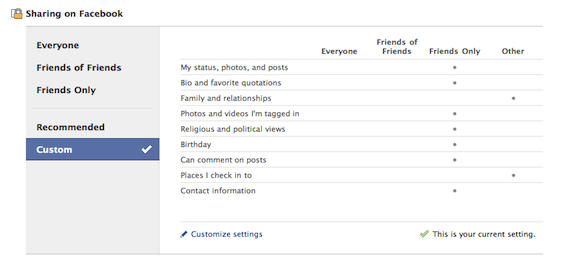
On the left hand side of the table locate and choose Custom. You should now see “Customize Settings” with a small pencil on its left at the bottom of the table. Click it.
Step 2

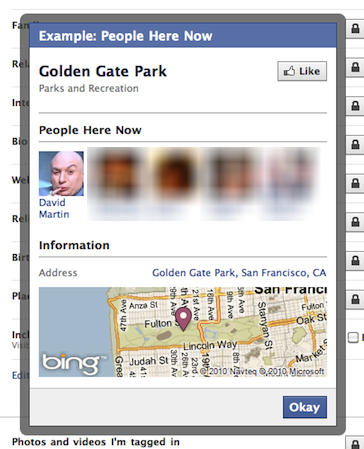
You must also make sure that you uncheck the box next to “Include me in ‘People Here Now’ after I check in.” This will prevent your profile picture from appearing on a list of people at a particular location.
Step 3
Now go to the next section on this page, Things others share. Look for “Friends can check me in to Places” and change it to say “Disabled. ”

Now that you have made these changes to your settings your friends cannot check you into places on your behalf. Now the only person who can check you in somewhere is you, and once you do that the fact that you’re there is only visible to you and no one else on Facebook.

David W. Martin has more than 20 years of experience in the industry as a programmer, systems and business analyst, author, and consultant. David has written for CNET’s iPhoneatlas.com, MacLife.com, CultofMac.com, BYTE.com and recently for aNewDoman.net. He comes to Cult of Mac’s website with deep knowledge and passion for the all things Apple. Follow David on Twitter @david_w_martin or see what he’s up to now at davidwmartin.com.

