Designing a Snap-On QWERTY Keyboard for the iPhone

Designing a Snap-On QWERTY Keyboard for the iPhone

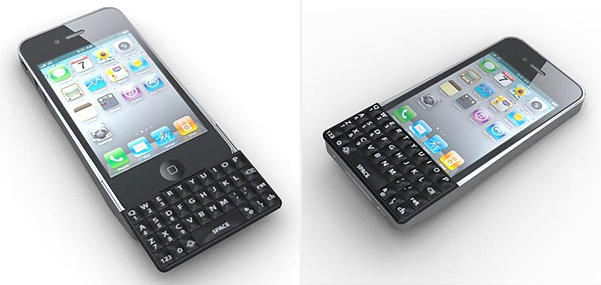
iPhone 4 with sliding QWERTY keyboard (all images: Altamash Jiwani)

Desperate for a real keyboard on your iPhone?  Indian industrial designer Altamash Jiwani was too, and created a prototype of a snap-on sliding QWERTY keyboard for the iPhone 4:

[The] keyboard offers a QWERTY slider tactile keyboard and a stylish impact case to protect your Iphone from bumps and bruises along with access to all the switches and jacks on your Iphone. Just fit your Iphone in the case while connecting the QWERTY keyboard’s port to the dock connector of your Iphone.

Design also incorporates a finger rest at the lower end bottom of the case to get a comfortable hold while typing. If you don’t open the slider, you still have access to whole Iphone screen and the QWERTY keyboard for quickly typing something.

Jiwani put significant thought into choosing among three possible form factors: a flip keyboard, an elongated iPhone frame, or a sliding keyboard.  He documented the design process on his blog.
Designing a Snap-On QWERTY Keyboard for the iPhone

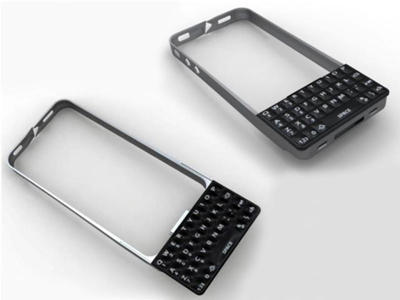
The keyboards are held in place by a “bumper” frame that goes around the iPhone, constructed out of Polycarbonate, ABS and Carbon Steel.  The different concepts are sketched and detailed and the pros and cons of each are considered:

Designing a Snap-On QWERTY Keyboard for the iPhone

Jiwani Concept 1 | Flap keyboard

This isn’t a bad concept, familiar and popular.  It allows full use of the phone, and if it included a microphone at the bottom of the keyboard that could improve voice quality.  I wouldn’t be surprised to see something like this eventually, but ultimately it was rejected for being too dated.
Designing a Snap-On QWERTY Keyboard for the iPhone

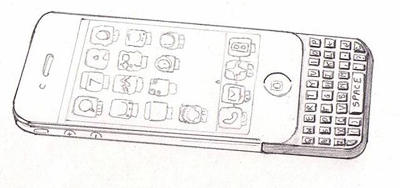
Jiwani Concept 2 | Elongated keyboard

This is my personal favorite; it allows for viewing and using the whole phone without having to move anything out of the way, and there are no hinges to break.  Crafted correctly I think it could work, but this was rejected by Jiwani for being too bulky.
Designing a Snap-On QWERTY Keyboard for the iPhone

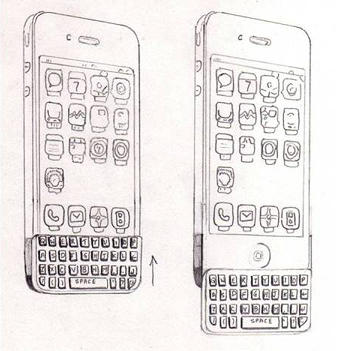
Jiwani Concept 3 | Slider keyboard (finalized)

The slider style is Jiwani’s choice for the best compromise.  He goes on to make a foam mockup, then the actual prototype.  A fascinating insight into how to conceptualize and implement industrial design.  Read the full posts on Jiwani’s blog for more details and larger photos:

DON'T MISS
The Bubble Slider Case Saved My iPhone (And Looks Good) [CultofMac Favorite]

Iphone QWERTY Keyboard | Industrial Design
Iphone QWERTY keyboard (The making) | Industrial Design

Thanks to iPhoneSavior for the tip.

About the author

oakbogAdam Rosen is an IT consultant specializing in Apple Macintosh systems new and old. He lives in Boston with two cats and too many possessions. In addition to membership in the Cult of Mac, Adam has written for Low End Mac and is curator of the Vintage Mac Museum. He also enjoys a good glass of Pinot Noir.

(sorry, you need Javascript to see this e-mail address)| Read more posts by .

Posted in iOS, News | Tagged: , , , |

  • Poppa

    I don’t like it, never had a problem typing on iphone or ipod touch touch screens which are a lot better than some other phones.

  • mike

    That’s just goofy.

  • Pauly

    It’s not something that I’m personally interested in, however that doesn’t mean someone else might like it. As always I think having more options is better than having less.

  • http://blog.purplearth.net Obbie Z

    What’s the point? This keyboard is no bigger than the on-screen keyboard, so it does little or nothing to make typing easier, so it’s big accomplishment would be to get in the way.

    The only point with a separate keyboard is to make typing easier, so it needs something closer to full-size keys arranged more traditionally. What we need is something like the folding keyboard that Palm made back in the day.

  • Sean Peters

    This keyboard is no bigger than the on-screen keyboard, so it does little or nothing to make typing easier, so it’s big accomplishment would be to get in the way.

    Not so. For many of us, being able to feel the keys makes it way easier to type than on the tactile-feedback-free iPhone keyboard. And even if this weren’t the case, it’s not like the keyboard is useless – it frees up a bunch of screen area that is normally used by the soft keyboard (when present).

  • http://theiloop.com Zaib Ali

    That looks like a shit

  • Emily Martin

    Is it real or fake? If it’s real will it ever be sold and when?

  • ozzy

    u suck that app and hardware sucks jajajaj u suck
