Apple Brings Three-Finger Dragging, Inertial Scrolling to Some MacBooks

Apple Brings Three-Finger Dragging, Inertial Scrolling to Some MacBooks

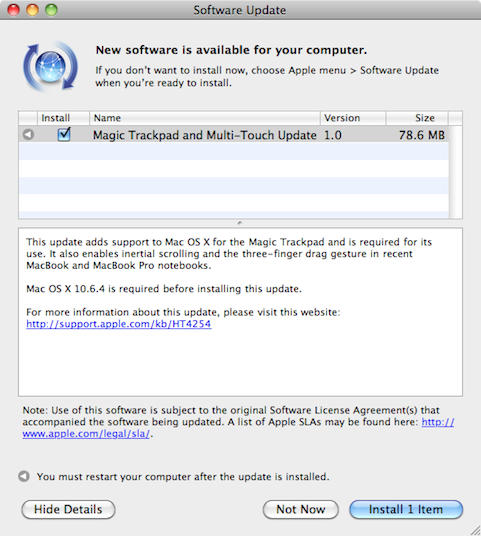
Amid all the new product news on Tuesday Apple quietly shipped a driver update titled: Magic Trackpad and Multi-Touch Update 1.0. I discovered the 78.6MB update last night via Software Update on my Macbook Pro and promptly installed it.

I highly recommend this update for most recent Macbook and Macbook Pro notebooks since it adds support of the new $69 Multi-Touch Trackpad as well as adding gestures for inertial scrolling and three-finger dragging. The three-fingered gesture is my favorite since it allows me to quickly drag windows around.

A complete list of notebooks that support the new gestures can be found in this Apple support document http://support.apple.com/kb/ht4254.

DON'T MISS

Also Tuesday, Apple released updates for Windows that add support for the Magic Trackpad hardware. A 6.62MB update is available for 32-bit versions of Windows and another for the 64-bit versions of Windows is 3.98MB. It works with Windows XP, Windows Vista, and Windows 7 as well as Macs running the operating system via Boot Camp.

About the author

dwmartin

David W. Martin has more than 20 years of experience in the industry as a programmer, systems and business analyst, author, and consultant. David has written for CNET's iPhoneatlas.com and MacLife.com he currently writes for CultofMac.com and BYTE.com. He comes to Cult of Mac's website with deep knowledge and passion for the all things Apple. Follow David on Twitter @david_w_martin.

(sorry, you need Javascript to see this e-mail address)| Read more posts by .

Posted in Apple, Hardware, Mac, News, OS X, Software, Windows on Mac | Tagged: , , , , , , , , |

  • http://www.diarmy.net diarmy

    I like the inertial scrolling more than the moving windows around. Possibly more useful on a low-res MacBook

  • .: taya :.

    Just a tip for those who still use a Mighty Mouse. Smart Scroll (v3.4.7) still supports inertial scroll for use the trackball, while Apple’s implementation has forgotten that aspect altogether…

  • Greg

    Why won’t it work? Is there some special thing that you have to do? I have a white macbook early 2009.

  • .: taya :.

    Not sure. All I know is that you can only activate the inertial scrolling in the System Preferences > Trackpad. When you do flicking the trackball on the Mighty Mouse doesn’t do anything. What I mentioned has nothing to do with the inertial scrolling for White MacBook as long as you have a glass trackpad, but rather the older Mighty Mouse. Newer Magic Mouse is touch and it seems the new firmware was designed around its capabilities.

    Looked all over the Mouse Preferences with a Mighty Mouse connected via Bluetooth and didn’t seen any way to activate the inertial scrolling for the trackball. Maybe I’m missing something but that’s what I see.

    Regardless I like Smart Scroll better because it allows more customization of how fast pages scroll and how long the pages take to coast to a stop. That among some other options.

  • Greg

